How Find Similar Features Using Embeddings works
 Available with Advanced license.
The Find Similar Features Using Embeddings tool performs large-scale similarity search on location and image data by comparing their embedding representations. The tool is optimized for processing large embedding datasets using parallel processing. This tool is recommended for long-running analyses after preliminary exploration using Find Similar.
Unlike interactive similarity search, this tool runs as a geoprocessing operation and does not block the map view while running, making it suitable for large-scale and computationally intensive similarity searches.
Conceptual workflow
Conceptually, the tool works as follows:
Input embeddings (search space)
The input embedding features define the search space for similarity analysis. Each feature contains an embedding representation derived from either imagery or geographic location.
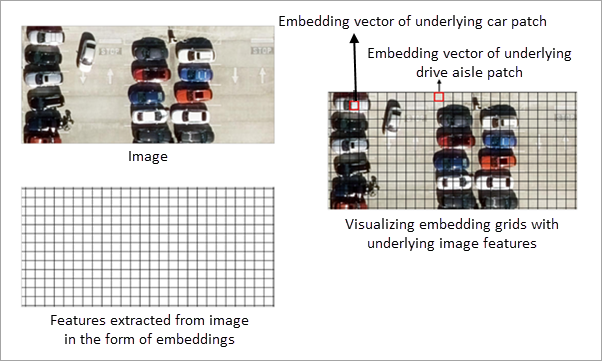
For image embeddings, embedding grid cells represent features extracted from the underlying imagery. All similarity computations are performed on these embedding grid cells. The imagery is displayed for visual reference only and is not directly used in similarity calculations.
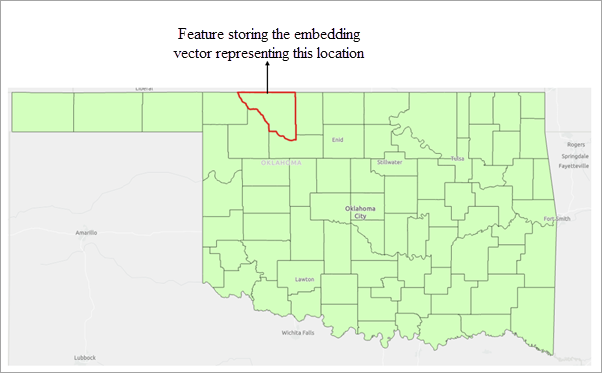
For location embeddings, each feature is represented by an embedding derived from its geographic location. Similarity is computed by comparing these location-based embeddings.
Similarly, for text embeddings, each feature is represented by an embedding derived from its associated text attribute. Similarity is computed by comparing these text-based embeddings, capturing semantic relationships between features.
Query features
Query features define the objects of interest for similarity search. One or more polygon features can be used as queries.
All embedding grid cells or features in the search space that overlap with the query polygons are identified, and the mean of their embedding vectors is computed to derive a single query embedding.
The resulting query embedding is then compared with all embeddings in the search space (input embedding features) using cosine similarity to identify similar features.
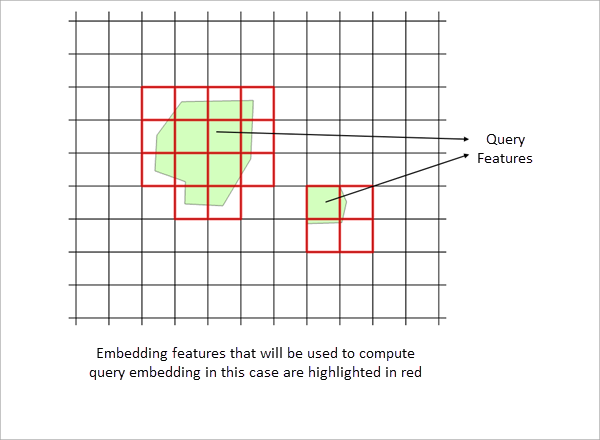
Provide query polygons
By drawing query polygons interactively, or by specifying an existing feature layer containing query polygons.
Similarity evaluation and result filtering
The derived query embedding is compared with the embeddings in the search space, and a similarity score is computed for each candidate embedding in the search space.
The threshold parameter is applied to filter results. Only features whose similarity score meets or exceeds the specified minimum threshold are included in the output.
The tool detects all embedding features that satisfy the similarity criteria across the specified extent of the input features.
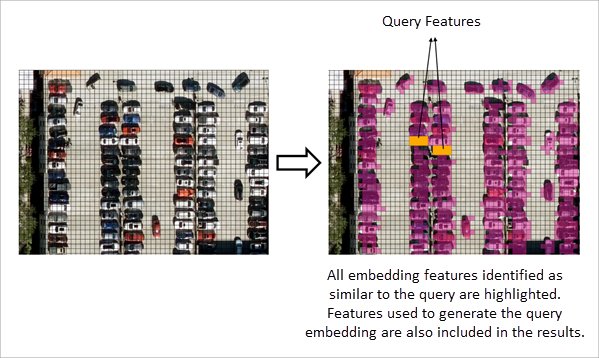
The results of the similarity search are written to an output feature class, which stores the matched features with all the available attributes.
Interpret embedding-based similarity
Similarity search is performed entirely on embedding representations. The definition of similarity depends on the type of embeddings used and the model that generated them.
Location embeddings
When location embeddings are used, each feature is represented by an embedding derived from its geographic location and area. Similarity between features is computed by comparing these embedding representations.
The spatial characteristics encoded in the embeddings depend on the embedding model used. Consequently, features considered similar are based on the patterns learnt by the model that generated the embeddings.
Image embeddings
When image embeddings are used, embedding grid cells represent features extracted from the underlying imagery. Similarity search is performed on these embedding grid cells, and not on the image pixels themselves.
The imagery displayed in the map is provided for visual reference only and is not directly used in similarity computations. All comparisons are performed using the embedding representations derived from the imagery.
Text embeddings
When text embeddings are used, each feature is represented by an embedding derived from its associated text attribute. Similarity between features is computed by comparing these embedding representations.
In all cases, similarity is determined by comparing embedding representations, and results may vary depending on the embedding model used.
Best practices for defining query features
For optimal results, reuse query features that have already produced meaningful outcomes in an interactive similarity search workflow. You can export the query features used in interactive similarity search and supply those exported features as the query feature layer for this tool. This approach helps ensure consistent and reliable similarity results when scaling the analysis to larger datasets.