How Generate Embeddings Using AI Models works
 Available with Image Analyst license.
Available with Advanced license.
Generating embeddings is the process of converting raw spatial or related data into numerical vector representations that capture semantic meaning. These vector representations, known as embeddings, enable imagery, geographic locations, attributes, and text descriptions to be compared based on similarity within a shared embedding space. Generating image embeddings requires the Image Analyst extension, while generating location or text embeddings requires the Advanced license in ArcGIS Pro.
The Generate Embeddings Using AI Models tool uses pretrained models to generate embeddings for spatial data. Depending on the selected model, the tool can generate the following:
Vision embeddings from imagery
Location embeddings from geographic features
Text embeddings from text fields
Vision-language or multimodal embeddings that combine imagery or spatial context, and text
The generated embeddings are written to a binary large object (BLOB) field named Embedding in the output feature class and can be used for several downstream workflows in ArcGIS.
Potential Applications
Embedding-based workflows extend beyond image similarity and support many spatial analysis scenarios, including the following:
Semantic similarity search—Identify spatial features, imagery regions, or locations that are semantically similar to a given input.
Change analysis—Compare embeddings generated from imagery captured at different time periods.
Natural-language semantic search—Use descriptive text queries, for example, large parking lot with dense vehicles or coastal residential area, to retrieve relevant imagery or locations.
Location similarity—Identify places with similar geographic, environmental, or spatial context.
Clustering and exploratory analysis—Group spatial features based on embedding similarity without predefined labels.
Use embeddings as high-level semantic features for regression, classification, or predictive modeling tasks in ArcGIS Pro. Embeddings often improve model performance by capturing complex spatial and contextual relationships that traditional handcrafted features may miss.
Embedding generation models create compact, learned, fixed-length numerical representations of raw inputs. These models can include large-scale foundation models trained on massive datasets, as well as specialized embedding models such as vision encoders or language models—for example, transformer-based text encoders similar to BERT architectures. The tool supports pretrained embedding models that are appropriate for the selected input modality.

For image-based inputs such as satellite or aerial imagery, the model processes pixel data to learn visual patterns, spatial structure, and contextual relationships, producing embeddings that represent the semantic content of an image or region rather than raw pixel values. When vision-language or multimodal models are used, images and text are projected into a shared embedding space, enabling natural-language image search and cross-modal similarity comparisons.
For location-based inputs, the model converts geographic information such as feature geometry into embeddings that capture spatial characteristics like land-use patterns, density, terrain, and proximity relationships. Locations with similar geographic context are positioned closer together in embedding space, enabling similarity analysis based on spatial semantics rather than attribute matching alone.
For text-based inputs, textual fields such as descriptions or metadata are transformed into embeddings that capture semantic meaning. This supports natural-language querying, semantic comparison of feature descriptions, and integration of textual information into spatial analysis workflows.
Across all modalities, embeddings preserve semantic similarity: inputs with similar visual, spatial, or textual meaning produce vectors that are closer together in embedding space. This enables similarity search, clustering, retrieval, feature ranking, and predictive modeling within ArcGIS Pro, providing a unified foundation for semantically driven spatial analysis.
Generate Embeddings Using AI Models
You can use the Generate Embeddings Using AI Models tool to generate embeddings for spatial data using pretrained embedding or foundation models. This tool does not require model training or labeled data. Instead, it applies pretrained models to transform raw spatial or textual inputs into fixed-length embedding vectors that capture semantic meaning.
These embeddings can then be used in downstream embedding-based workflows, including the following:
Similarity search
Spatial clustering
Regression and classification models
Location-based pattern analysis
Text based spatial analysis
By using embeddings as high-level semantic features, subsequent analytical tasks often benefit from improved generalization and reduced need for manual feature engineering.
How the tool works
The tool takes spatial input data, such as raster imagery, geographic features, or text attributes. A selected embedding model processes the input and generates semantic embeddings. And then, the embeddings are written to an output feature class for reuse.
Raster inputs
For raster imagery, embeddings are generated over a regular spatial grid. Each grid cell represents a defined ground area and produces a single embedding summarizing the semantic content within that region.
Feature inputs (location)
For geographic feature inputs, the tool does the following:
Embeddings can be generated directly per feature.
The
SHAPEfield (geometry) is used to derive spatial context.Each feature receives a single embedding representing its spatial semantics.
Text field inputs
When a text field is specified, the tool does the following:
The selected text attribute is processed using a pretrained text embedding model.
Each record produces a semantic embedding derived from its textual content.
Text embeddings can be used independently or combined with spatial embeddings in multimodal workflows.
Output embeddings feature class
The resulting embeddings are written to an output feature class that includes the following:
The original non-embedding attributes.
A dedicated
Embeddingfield stored as esriFieldTypeBlob.
Because embeddings are stored as reusable vector representations, they can be efficiently used in downstream embedding-based analysis tools without regenerating them.
Embedding storage format
Embeddings are represented as a fixed-precision Float32 vector and persisted in a binary large object (BLOB) field named Embedding. The canonical on-disk representation is a raw byte sequence containing the embedding values encoded as little-endian IEEE-754 32-bit floats (<f4), stored contiguously in element order (index 0, 1, …, D-1). This format is compact, fast to read and write, and language-agnostic; any runtime can reconstruct the vector by interpreting the BLOB bytes as little-endian float32 values.
The embedding dimension D is fixed per model; therefore, the expected payload size is D * 4 bytes. When embeddings must transit through text-only channels, for example, JSON or ArcGIS Feature Service REST APIs, the same binary payload is transported as a Base64 string. No platform-specific struct layouts or language-specific serialization are assumed beyond the explicit little-endian float32 convention.
Best practices
The following are considered best practices when using the tool.
Selecting an embedding grid size for imagery
When generating embeddings from raster imagery, the grid size parameter controls the ground area summarized by each embedding. Because similarity search operates on these embeddings, grid size influences how precisely objects are represented and matched.
If the grid size is too large relative to the target objects, multiple features and surrounding background may be combined within a single embedding. This can produce broader similarity responses and reduce boundary precision. If the grid size is too small, objects may be fragmented across many embedding cells, which can emphasize local texture over overall structure.
In general, effective results are obtained when the object of interest spans multiple embedding cells rather than being contained within only one. This helps balance structural detail and contextual completeness.
Interpreting grid size effects
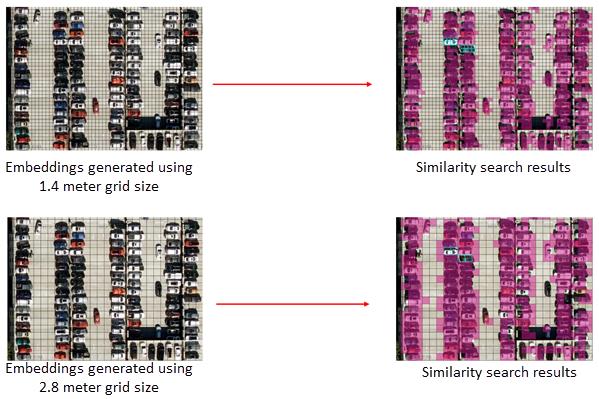
In the example above, embeddings generated using a 1.4 m grid size preserve vehicle structure across several cells, producing tightly localized similarity matches. With a 2.8 meter grid size, each embedding summarizes a larger area, increasing contextual mixing and resulting in broader similarity patterns.
Because object sizes, imagery resolution, and analysis goals vary, there is no single optimal grid size. You should select a grid size that aligns with the scale and structural complexity of the features you want to identify. Testing multiple grid sizes and comparing similarity patterns can help determine the most appropriate configuration for your workflow.