How Merge Embeddings works
The Merge Embeddings tool allows you to aggregate high-dimensional vector data (embeddings) from a source layer into a target polygon layer. This process is essential for summarizing complex information, and it bridges the gap between raw, localized embeddings and larger, meaningful geographic units such as administrative boundaries, watersheds, or custom analytical grids.
Understanding embeddings in ArcGIS
In modern AI workflows, an embedding is a dense, high-dimensional representation of a feature that captures the semantic meaning of that feature.
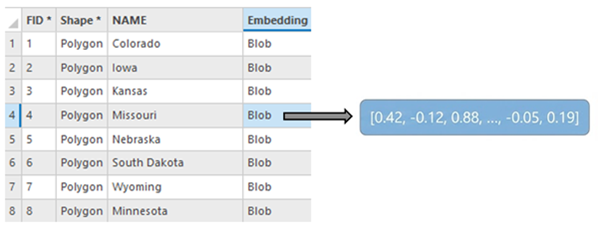
In ArcGIS Pro, embeddings are stored in a BLOB (Binary Large Object) field as described in Embeddings as BLOB fields.
To ensure performance and cross-compatibility with Python, C++ and JavaScript, the tool expects these BLOBs to be serialized as 32-bit floating-point (float32) binary arrays. When the tool runs, it reads these binary buffers directly into memory as numerical arrays, performs mathematical aggregation, and re-serializes them for storage in the output feature class.
When you generate embeddings, for example using deep learning models, the resulting vector captures the semantics of a location. The Merge Embeddings tool provides a way to move these vectors across different scales of geography while preserving their mathematical integrity.
How the tool processes data
The tool follows a four-stage workflow to ensure spatial and mathematical accuracy:
Spatial overlay
The tool initiates by determining the precise spatial overlap between the Embedding Features parameter value (source) and the Target Features parameter value (destination). This ensures that only the portions of embeddings that physically fall within a target polygon contribute to its final vector. By utilizing a pairwise intersect logic, the tool handles massive datasets with high topological complexity more efficiently than standard overlay methods.
For points, the tool identifies which points are physically contained within each target polygon. For polygons, the tool calculates the intersection area—the exact footprint where a source embedding polygon overlaps a target polygon.
Aggregation logic
The core of the tool is its ability to merge multiple high-dimensional vectors into a single representative vector for the target area. The method of calculation shifts based on the input geometry.
Point to polygon (simple mean)
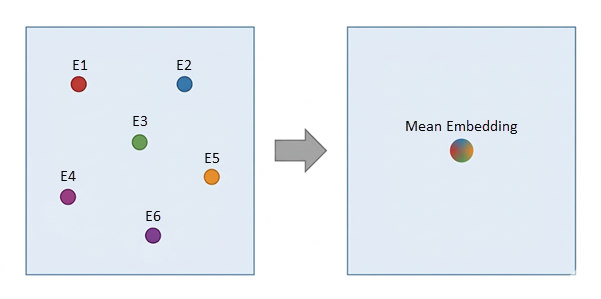
When aggregating points into a polygon, the tool assumes each point represents a discrete, equal-weighted observation. The final vector \(E_{\text{target}}\) is the arithmetic mean of all vectors \((E_i)\) found within the boundary. This is ideal for aggregating geo-tagged social media embeddings or localized sensor data.
Note:
If a target polygon contains no points, the Embedding field in the output will remain null.
Polygon to polygon (area-weighted average)
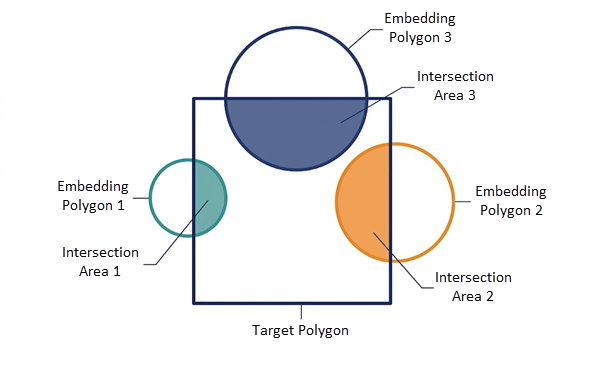
When the source embeddings are polygons (such as patches from a satellite image or county boundaries), the tool uses area-weighted interpolation. This logic recognizes that an embedding covering 90% of a target polygon should have a significantly higher influence on the result than one covering only 10%.
The tool calculates the weight (Wi) for each overlapping embedding by dividing the Intersection Area (\(Area_i\)) by the Total Overlapping Area within that specific target.
Vector calculation
Using the NumPy library, the tool reconstructs the binary BLOBs into arrays, performs the weighted math, and then re-serializes the results back into a binary format for storage.
Output generation
The final results are written into a new feature class. A new BLOB field—defaulting to the name Embedding—is created. This output is optimized for subsequent GeoAI tools, such as Similarity Search.
Usage
This section provides practical tips and constraints for ensuring the tool runs successfully.
Data preparation
The tool specifically looks for a field named Embedding. Ensure your source features have this exact field name and that the data type is set to BLOB.
All embeddings in the input must have the same length (e.g., all must be 128-dimensional or 512-dimensional). If the tool encounters embeddings of mismatched lengths, it will skip those records and issue a warning.
Workspace constraints
Because shapefiles and GeoPackages have technical limitations regarding the storage and retrieval of large BLOB data, the Output Embedding Features parameter value must be stored in a file, mobile, or Enterprise geodatabase.
Using memory or in_memory workspaces is not recommended for this tool due to the potentially high RAM consumption of large embedding datasets.
Environment settings
For area-weighted average calculations, it is highly recommended to use a Projected Coordinate System for the Output Coordinate System environment. Using a Geographic Coordinate System (WGS84) may lead to slower performance and less accurate area ratios in certain regions.
Troubleshooting
If a target polygon in your output has a null Embedding field, it means no source features spatially intersected that polygon, or the intersecting features contained empty BLOB data.