Find Similar pane
The Find Similar pane enables interactive similarity search on location and image data by comparing their embedding representations. It is designed for real-time exploration, supporting the discovery similar features dynamically through direct interaction with the map and selected records.
The Find Similar pane operates on features within the current map view extent, making it optimized for focused, context-aware exploration. As you pan or zoom the map, similarity search is performed against the visible subset of data, ensuring responsive performance and meaningful spatial context.
Unlike the Find Similar Features Using Embeddings geoprocessing tool, which is optimized for large-scale batch analysis, the Find Similar pane is experience-driven and responsive. Results are generated immediately based on selection and are visualized directly in the map view, supporting iterative exploration, rapid comparison, and interactive refinement of similarity criteria.
This process also serves as a preparatory step for large-scale analysis. By interactively testing different query features and evaluating their similarity results within the map extent, you can identify the most appropriate query features before running the geoprocessing tool for full-dataset similarity search.
The Find Similar pane is intended for exploratory analysis, rapid validation, and informed decision-making prior to performing computationally intensive similarity operations.
Conceptual workflow
Conceptually, the Find Similar pane works as follows:
Input embeddings (search space)
The input embedding features define the search space for similarity analysis. Each feature contains an embedding representation derived from either imagery or geographic location.
For image embeddings, embedding grid cells represent features extracted from the underlying imagery. All similarity computations are performed on these embedding grid cells. The imagery is displayed for visual reference only and is not directly used in similarity calculations.
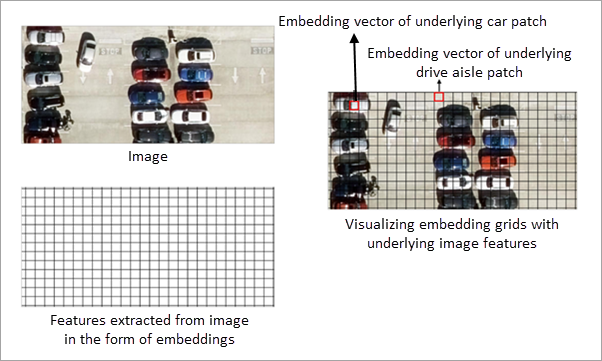
For location embeddings, each feature is represented by an embedding derived from its geographic location. Similarity is computed by comparing these location-based embeddings.
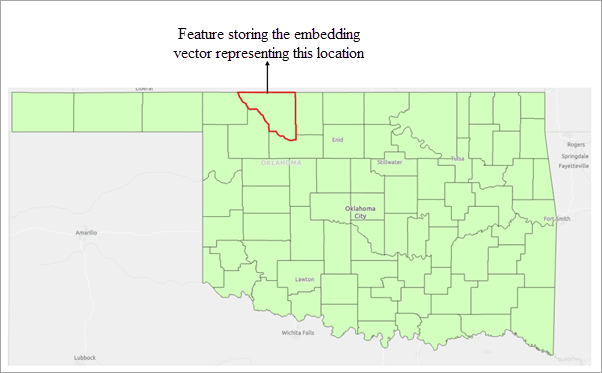
Similarly, for text embeddings, each feature is represented by an embedding derived from its associated text attribute. Similarity is computed by comparing these text-based embeddings, capturing semantic relationships between features.
Query features
Query features define the objects of interest for similarity search. One or more polygon features can be used as queries. These are selected polygon features from the input embedding features. In other words, you interactively highlight one or more existing embedding features to define the area or objects of interest.
The embedding vectors of the selected features are aggregated by computing their mean, producing a single representative query embedding vector. This aggregated vector captures the overall semantic characteristics of the selected features.
The resulting query embedding is then compared with all embeddings in the current map view extent using cosine similarity to identify similar features.
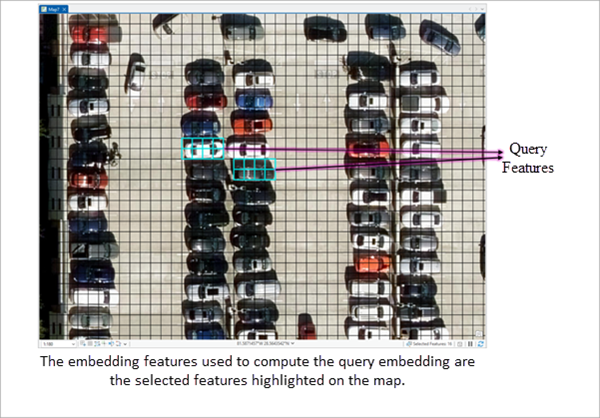
Similarity evaluation and result filtering
The derived query embedding is compared with the embeddings in the search space, and a similarity score is computed for each candidate embedding in the search space.
The threshold parameter is applied to filter results. Only features whose similarity score meets or exceeds the specified minimum threshold are included in the output.
The workflow detects all embedding features that satisfy the similarity criteria within the current map view extent.
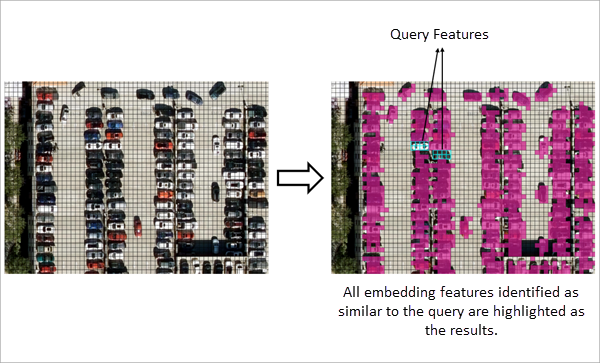
Exporting the search results
The results of the similarity search can be exported to an output feature class using the Export Result button in the Find Similar pane. The exported feature class stores the matched features along with all available attributes.
Note:
Exporting features to a folder as a shapefile does not preserve embeddings. Embeddings can only be exported to supported geodatabase formats—file geodatabases, enterprise geodatabases (registered feature classes), or mobile geodatabases.
Interpreting embedding-based similarity
Similarity search is performed entirely on embedding representations. The definition of similarity depends on the type of embeddings used and the model that generated them.
Location embeddings
When location embeddings are used, each feature is represented by an embedding derived from its geographic location and area. Similarity between features is computed by comparing these embedding representations.
The spatial characteristics encoded in the embeddings depend on the embedding model used. Consequently, features considered similar are based on the patterns learnt by the model that generated the embeddings.
Image embeddings
When image embeddings are used, embedding grid cells represent features extracted from the underlying imagery. Similarity search is performed on these embedding grid cells, and not on the image pixels themselves.
The imagery displayed in the map is provided for visual reference only and is not directly used in similarity computations. All comparisons are performed using the embedding representations derived from the imagery.
Text embeddings
When text embeddings are used, each feature is represented by an embedding derived from its associated text attribute. Similarity between features is computed by comparing these embedding representations.
In all cases, similarity is determined by comparing embedding representations, and results may vary depending on the embedding model used.