Detect Bright Ocean Objects (Image Analyst Tools)
Summary
Detects potential bright human-made objects—such as ships, oil rigs, and windmills—while masking out the synthetic aperture radar (SAR) data outside the region of interest.
The tool clusters pixels and filters the clusters by the minimum and maximum width and length parameters, and outputs the results to a feature class. The output feature class can be specified as a bounding box or a perimeter around the polygon for the detected objects.
Usage
Calibrate the input radar data to gamma nought using the Apply Radiometric Calibration tool. This optimizes object detection, especially in large radar scenes.
The input radar data may not align with the output feature class. If the input radar data is not orthorectified, the tool transforms the Output Feature Class parameter value using the DEM Raster parameter. When no DEM is provided, the tool performs a transformation using an ellipsoidal surface. For optimal transformation of the Output Feature Class parameter value, provide an input DEM for the DEM Raster parameter. The input DEM must be in the WGS84 (EPSG:4326) geographic coordinate system.
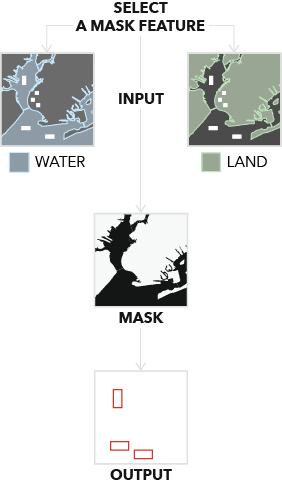
To ensure that only objects in the ocean are detected, provide a value for the Mask Features parameter and use the Feature Type parameter to specify whether the mask is water or land. Alternatively, provide a DEM Raster parameter value, and the tool will use the elevation to determine land and water pixels. Either of these methods can be used to create a land mask.
If both the Mask Features and DEM Raster parameter values are provided, the Mask Features parameter will be used to create the mask.
Parameters
| Label | Explanation | Data type |
|---|---|---|
|
Input Radar Data |
The input radar data. |
Raster Dataset; Raster Layer |
|
Output Feature Class |
The output feature class of detected bright ocean objects. |
Feature Class |
|
Output Type (Optional) |
Specifies the type of boundary that will be used for the output feature class.
|
String |
|
Minimum Object Width (Optional) |
The minimum width of an object to be detected. The width must be a positive value. The default value is 10 meters. |
Linear Unit |
|
Maximum Object Width (Optional) |
The maximum width of an object to be detected. The width must be a positive value. The default value is 100 meters. |
Linear Unit |
|
Minimum Object Length (Optional) |
The minimum length of an object to be detected. The length must be a positive value. The default value is 50 meters. |
Linear Unit |
|
Maximum Object Length (Optional) |
The maximum length of an object to be detected. The length must be a positive value. The default value is 500 meters. |
Linear Unit |
|
Mask Features (Optional) |
A land or water polygon feature. This polygon will be used to create a mask. |
Feature Layer |
|
Feature Type (Optional) |
Specifies the type of polygon the Mask Features parameter value represents. This parameter is required if the Mask Features parameter value is provided.
|
String |
|
DEM Raster (Optional) |
The input DEM. If the input radar data is not orthorectified, this DEM will be used to orthorectify the output result. If a Mask Features parameter value is provided, this DEM will be used to project it in radar coordinates. If no value is provided for the Mask Features parameter, this DEM will also be used to create a land mask. |
Mosaic Layer; Raster Layer |
|
Apply Geoid Correction (Optional) |
Specifies whether the vertical reference system of the input DEM will be transformed to ellipsoidal height. Most elevation datasets are referenced to sea level orthometric height, so a correction is required in these cases to convert to ellipsoidal height.
|
Boolean |
|
Mask Tolerance (Optional) |
The buffer distance surrounding the mask created from either the Mask Features parameter or the DEM Raster parameter. The distance cannot be negative. The default value is 100 meters. |
Linear Unit |
Environments
Compression, Current Workspace, NoData, Output CONFIG Keyword, Parallel Processing Factor, Pyramid, Raster Statistics, Resampling Method, Scratch Workspace, Snap Raster, Tile Size
Licensing information
- Basic: Requires Image Analyst
- Standard: Requires Image Analyst
- Advanced: Requires Image Analyst