Reverse Line Orders (Location Referencing Tools)
Summary
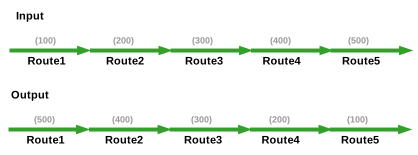
Reverses the line order for all the routes in a line.
Illustration
Usage
Use a line network feature class registered with an LRS Network or a line network feature service as input to the tool.
Select at least one route for the line whose line order values must be reversed before running the tool. The tool reverses the line order for all the routes in the line.
If only a few routes are selected within a given time range, the line order of all routes that overlap with the selected routes time range will be reversed.
After running this tool, route time slices may be created for routes (with different time ranges) where line orders were reversed. Run the Generate Events tool to update the events on the routes that include those line orders.
After running this tool, run the Generate Routes tool to update the derived network based on the reversed line order values.
The tool supports conflict prevention and will attempt to acquire and transfer locks.
Learn more about conflict prevention in ArcGIS Pipeline Referencing or conflict prevention in ArcGIS Roads and Highways.
Parameters
| Label | Explanation | Data type |
|---|---|---|
|
Input Route Features |
The LRS line network for which line order values will be reversed. |
Feature Layer |
Derived output
| Label | Explanation | Data type |
|---|---|---|
|
Updated Route Features |
The updated route features feature layer. |
Feature Layer |
|
Output Details File |
The file that contains the output details. |
Text File |
|
Output Derived Route Features |
The output derived route features. |
Feature Layer |
Environments
Licensing information
- Basic: Requires ArcGIS Location Referencing (ArcGIS Pipeline Referencing or ArcGIS Roads and Highways)
- Standard: Requires ArcGIS Location Referencing (ArcGIS Pipeline Referencing or ArcGIS Roads and Highways)
- Advanced: Requires ArcGIS Location Referencing (ArcGIS Pipeline Referencing or ArcGIS Roads and Highways)