Expand (Spatial Analyst Tools)
Summary
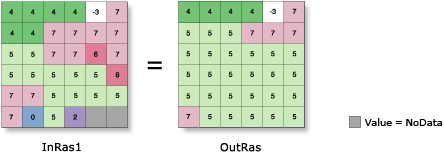
Expands specified zones of a raster by a specified number of cells.
Illustration
Usage
The specified zone values are considered to be foreground zones, while the remaining zone values are considered to be background zones. With this tool the foreground zones are allowed to expand into the background zones.
When two foreground zones compete to expand into the same background zone, the conflict is resolved based on the value of the majority of surrounding cells.
NoData cells are always considered background cells; therefore, neighboring cells of any value can expand into NoData cells. NoData cells will never expand into their neighbors.
See Analysis environments and Spatial Analyst for additional details on the geoprocessing environments that apply to this tool.
Parameters
| Label | Explanation | Data type |
|---|---|---|
|
Input raster |
The input raster for which the identified zones are to be expanded It must be of integer type. |
Raster Layer |
|
Number of cells |
The number of cells to expand each specified zone by. The value must be an integer greater than 1. |
Long |
|
Zone values |
The list of zone values to expand. The zone values must be integers. They can be in any order. |
Long |
|
Expand method (Optional) |
The method used to expand the selected zones. The Distance option supports parallelization, and can be controlled with the Parallel Processing Factor environment setting.
|
String |
Return value
| Label | Explanation | Data type |
|---|---|---|
|
Output raster |
The output generalized raster. The specified zones of the input raster will be expanded by the specified number of cells. The output is always of integer type. |
Raster |
Environments
Auto Commit, Cell Size, Cell Size Projection Method, Compression, Current Workspace, Extent, Geographic Transformations, Mask, Output CONFIG Keyword, Output Coordinate System, Parallel Processing Factor, Scratch Workspace, Snap Raster, Tile Size
Licensing information
- Basic: Requires Spatial Analyst
- Standard: Requires Spatial Analyst
- Advanced: Requires Spatial Analyst