Shrink (Spatial Analyst Tools)
Summary
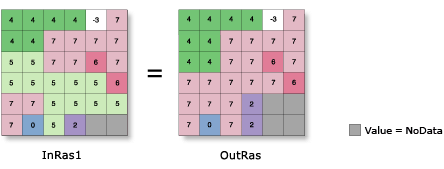
Shrinks the selected zones by a specified number of cells by replacing them with the value of the cell that is most frequent in its neighborhood.
Illustration
Usage
The specified zone values are considered to be foreground zones, while the remaining zone values are considered to be background zones. With this tool, cells in the foreground zones are allowed to be replaced by cells in the background zones.
When two adjacent regions are part of the selected set to shrink, there is no change at the boundary between them.
NoData has the same priority as any valid value to invade areas vacated by shrinking selected values. Therefore, if a selected value is adjacent to NoData, it may become NoData after shrinking.
See Analysis environments and Spatial Analyst for additional details on the geoprocessing environments that apply to this tool.
Parameters
| Label | Explanation | Data type |
|---|---|---|
|
Input raster |
The input raster for which the identified zones are to be shrunk. It must be of integer type. |
Raster Layer |
|
Number of cells |
The number of cells by which to shrink each specified zone. The value must be an integer greater than 0. |
Long |
|
Zone values |
The list of zone values to shrink. The zone values must be integers. They can be in any order. |
Long |
|
Shrink method (Optional) |
The method to use to shrink the selected zones. The Distance option supports parallelization, and can be controlled with the Parallel Processing Factor environment setting.
|
String |
Return value
| Label | Explanation | Data type |
|---|---|---|
|
Output raster |
The output generalized raster. The specified zones of the input raster will be shrunk by the specified number of cells. The output is always of integer type. |
Raster |
Environments
Auto Commit, Cell Size, Cell Size Projection Method, Compression, Current Workspace, Extent, Geographic Transformations, Mask, Output CONFIG Keyword, Output Coordinate System, Parallel Processing Factor, Scratch Workspace, Snap Raster, Tile Size
Licensing information
- Basic: Requires Spatial Analyst
- Standard: Requires Spatial Analyst
- Advanced: Requires Spatial Analyst