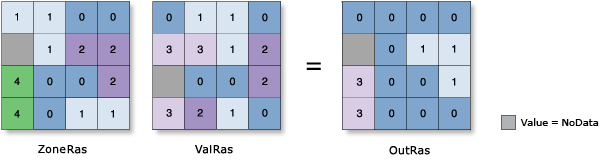
A zone is defined as all areas in the input that have the same value. The areas do not have to be contiguous. Both rasters and features can be used for the zone input.
If the Input Raster or Feature Zone Data parameter value (in_zone_data in Python) is a raster, it must be an integer raster.
If the Input Raster or Feature Zone Data parameter value is a feature, it will be converted to a raster internally using the cell size and cell alignment from the Input Value raster (in_value_raster in Python) parameter.
If the cell size, cell alignment, or spatial reference of the Input Raster or Feature Zone Data and Input Value Raster parameter values is different, the Input Value Raster value will be used as the Cell Size, the Snap Raster, and the Output Coordinate System internally. Any of these cases will cause an internal resampling before the zonal operation is performed.
When the zone and value inputs are both rasters of the same cell size and the cells are aligned, they will be used directly in the tool and will not be resampled internally during tool processing.
If the Input Raster or Feature Zone Data parameter value is a feature, for any of the zone features that do not overlap any cell centers of the value raster, those zones will not be converted to the internal zone raster. As a result, those zones will not be represented in the output. You can manage this by determining an appropriate value for the Cell Size environment that will preserve the desired level of detail of the feature zones, and specify it in the analysis environment.
If the Input Raster or Feature Zone Data value is a point feature, more than one point may be contained in any particular cell of the value input raster. For such cells, the zone value is determined by the point with the lowest ObjectID field (for example, OID or FID).
If the Input Raster or Feature Zone Data value has overlapping polygons, the zonal analysis will not be performed for each individual polygon. Since the feature input is converted to a raster, each location can have only one value.
An alternative method is to process the zonal operation iteratively for each of the polygon zones and collate the results.
When specifying the Input Raster or Feature Zone Data parameter value, the default zone field will be the first available integer or text field. If no other valid fields exist, the ObjectID field (for example, OID or FID) will be the default.
The supported statistics type depends on the data type of the Input Value Raster value, and the statistics calculation type specified by the Calculate Circular Statistics parameter.
If the data type is integer, the arithmetic statistics calculation supports the Mean, Majority, Majority count, Majority percentage, Maximum, Median, Minimum, Minority, Minority count, Minority percentage, Percentile, Range, Standard deviation, Sum, and Variety options. The circular statistics calculation supports the Mean, Majority, Minority, Standard deviation, and Variety options.
If the data type is float, the arithmetic statistics calculation supports the Mean, Maximum, Median, Minimum, Percentile, Range, Standard deviation, and Sum options. The circular statistics calculation supports the Mean and Standard deviation options.
For majority and minority calculations, when there is a tie, the output will be the lowest of the tied values.
To calculate circular statistics, check the Calculate Circular Statistics parameter (circular_calculation = "CIRCULAR" in Python), and specify a value for the Circular Wrap Value parameter (circular_wrap_value in Python).
Supported multidimensional raster dataset types include multidimensional raster layer, mosaic, image service, and Esri CRF.
The data type (integer or float) of the output is dependent on the zonal calculation being performed and the input value raster type. See How the zonal statistics tools work for the specific behavior of a statistic.
By default, this tool will use up to 80 percent of all multicore processors if available.
For a very large number of zones, use fewer number of cores for processing. To use a different number of cores, use the Parallel Processing Factor environment setting.
When the output raster format is .crf, this tool supports the Pyramid raster storage environment. Pyramids will be created in the output by default. For any other output format, this environment is not supported, and pyramids will not be created.
See Analysis environments and Spatial Analyst for additional details on the geoprocessing environments that apply to this tool.
|
Label
|
Explanation
|
Data type
|
|
Input Raster or Feature Zone Data
|
The dataset that defines the zones.
The zones can be defined by an integer raster or a feature layer.
|
Raster Layer; Feature Layer
|
|
Zone Field
|
The field that contains the values that define each zone.
It can be an integer or a string field of the zone dataset.
|
Field
|
|
Input Value Raster
|
The raster that contains the values for which a statistic will be calculated.
|
Raster Layer
|
|
Statistics Type
(Optional)
|
Specifies the statistic type to be calculated.
Mean—The average of all cells in the value raster that belong to the same zone as the output cell will be calculated.This is the default.
Majority—The value that occurs most often for all cells in the value raster that belong to the same zone as the output cell will be calculated.
Majority count—The frequency of all cells that contain the majority value in the value raster that belong to the same zone as the output cell will be calculated.
Majority percentage—The percentage of cells that contain the majority value in the value raster that belong to the same zone as the output cell will be calculated.
Maximum—The largest value of all cells in the value raster that belong to the same zone as the output cell will be calculated.
Median—The median value of all cells in the value raster that belong to the same zone as the output cell will be calculated.
Minimum—The smallest value of all cells in the value raster that belong to the same zone as the output cell will be calculated.
Minority—The value that occurs least often for all cells in the value raster that belong to the same zone as the output cell will be calculated.
Minority count—The frequency of all cells that contain the minority value in the value raster that belong to the same zone as the output cell will be calculated.
Minority percentage—The percentage of cells that contain the minority value in the value raster that belong to the same zone as the output cell will be calculated.
Percentile—The percentile of all cells in the value raster that belong to the same zone as the output cell will be calculated. The 90th percentile is calculated by default. You can specify other values (from 0 to 100) using the Percentile Value parameter.
Range—The difference between the largest and smallest value of all cells in the value raster that belong to the same zone as the output cell will be calculated.
Standard deviation—The standard deviation of all cells in the value raster that belong to the same zone as the output cell will be calculated.
Sum—The total value of all cells in the value raster that belong to the same zone as the output cell will be calculated.
Variety—The number of unique values for all cells in the value raster that belong to the same zone as the output cell will be calculated.
|
String
|
|
Ignore NoData in Calculations
(Optional)
|
Specifies whether NoData values in the value input will be ignored in the results of the zone that they fall within.
Checked—Within any particular zone, only cells that have a value in the input value raster will be used in determining the output value for that zone. NoData cells in the value raster will be ignored in the statistic calculation. This is the default.
Unchecked—Within any particular zone, if NoData cells exist in the value raster, they will not be ignored and their existence indicates that there is insufficient information to perform statistical calculations for all the cells in that zone. Consequently, the entire zone will receive the NoData value.
|
Boolean
|
|
Process as Multidimensional
(Optional)
|
Specifies how the input rasters will be calculated if they are multidimensional.
Checked—Statistics will be calculated for all dimensions of the input multidimensional dataset.
Unchecked—Statistics will be calculated from the current slice of the input multidimensional dataset. This is the default.
|
Boolean
|
|
Percentile Value
(Optional)
|
The percentile that will be calculated. The default is 90, indicating the 90th percentile.
The values can range from 0 to 100. The 0th percentile is essentially equivalent to the minimum statistic, and the 100th percentile is equivalent to maximum. A value of 50 will produce essentially the same result as the median statistic.
This parameter is only available if the Statistics type parameter is set to Percentile.
|
Double
|
|
Percentile Interpolation Type
(Optional)
|
Specifies the method of interpolation that will be used when the percentile value falls between two cell values from the input value raster.
Auto-detect—If the input value raster is of integer pixel type, the Nearest method will be used. If the input value raster is of floating point pixel type, the Linear method will be used. This is the default.
Nearest—The nearest available value to the desired percentile is used. In this case, the output pixel type is the same as that of the input value raster.
Linear—The weighted average of the two surrounding values from the desired percentile is used. In this case, the output pixel type is floating point.
|
String
|
|
Calculate Circular Statistics
(Optional)
|
Specifies how the input raster will be processed for circular data.
Checked—The statistics for angles or other cyclic quantities, such as compass direction in degrees, daytimes, and fractional parts of real numbers, will be calculated.
Unchecked—Ordinary linear statistics will be calculated. This is the default.
|
Boolean
|
|
Circular Wrap Value
(Optional)
|
The value that will be used to round a linear value to the range of a given circular statistic. It must be a positive integer or a floating-point value. The default value is 360 degrees.
This parameter is only supported if the Calculate Circular Statistics parameter is checked.
|
Double
|
Return value
|
Label
|
Explanation
|
Data type
|
|
Output Raster
|
The output zonal statistics raster.
|
Raster
|
ZonalStatistics(in_zone_data, zone_field, in_value_raster, {statistics_type}, {ignore_nodata}, {process_as_multidimensional}, {percentile_value}, {percentile_interpolation_type}, {circular_calculation}, {circular_wrap_value})
|
Name
|
Explanation
|
Data type
|
|
in_zone_data
|
The dataset that defines the zones.
The zones can be defined by an integer raster or a feature layer.
|
Raster Layer; Feature Layer
|
|
zone_field
|
The field that contains the values that define each zone.
It can be an integer or a string field of the zone dataset.
|
Field
|
|
in_value_raster
|
The raster that contains the values for which a statistic will be calculated.
|
Raster Layer
|
|
statistics_type
(Optional)
|
Specifies the statistic type to be calculated.
MEAN—The average of all cells in the value raster that belong to the same zone as the output cell will be calculated.This is the default.
MAJORITY—The value that occurs most often for all cells in the value raster that belong to the same zone as the output cell will be calculated.
MAJORITY_COUNT—The frequency of all cells that contain the majority value in the value raster that belong to the same zone as the output cell will be calculated.
MAJORITY_PERCENT—The percentage of cells that contain the majority value in the value raster that belong to the same zone as the output cell will be calculated.
MAXIMUM—The largest value of all cells in the value raster that belong to the same zone as the output cell will be calculated.
MEDIAN—The median value of all cells in the value raster that belong to the same zone as the output cell will be calculated.
MINIMUM—The smallest value of all cells in the value raster that belong to the same zone as the output cell will be calculated.
MINORITY—The value that occurs least often for all cells in the value raster that belong to the same zone as the output cell will be calculated.
MINORITY_COUNT—The frequency of all cells that contain the minority value in the value raster that belong to the same zone as the output cell will be calculated.
MINORITY_PERCENT—The percentage of cells that contain the minority value in the value raster that belong to the same zone as the output cell will be calculated.
PERCENTILE—The percentile of all cells in the value raster that belong to the same zone as the output cell will be calculated. The 90th percentile is calculated by default. You can specify other values (from 0 to 100) using the percentile_value parameter.
RANGE—The difference between the largest and smallest value of all cells in the value raster that belong to the same zone as the output cell will be calculated.
STD—The standard deviation of all cells in the value raster that belong to the same zone as the output cell will be calculated.
SUM—The total value of all cells in the value raster that belong to the same zone as the output cell will be calculated.
VARIETY—The number of unique values for all cells in the value raster that belong to the same zone as the output cell will be calculated.
|
String
|
|
ignore_nodata
(Optional)
|
Specifies whether NoData values in the value input will be ignored in the results of the zone that they fall within.
DATA—Within any particular zone, only cells that have a value in the input value raster will be used in determining the output value for that zone. NoData cells in the value raster will be ignored in the statistic calculation. This is the default.
NODATA—Within any particular zone, if NoData cells exist in the value raster, they will not be ignored and their existence indicates that there is insufficient information to perform statistical calculations for all the cells in that zone. Consequently, the entire zone will receive the NoData value.
|
Boolean
|
|
process_as_multidimensional
(Optional)
|
Specifies how the input rasters will be calculated if they are multidimensional.
ALL_SLICES—Statistics will be calculated for all dimensions of the input multidimensional dataset.
CURRENT_SLICE—Statistics will be calculated from the current slice of the input multidimensional dataset. This is the default.
|
Boolean
|
|
percentile_value
(Optional)
|
The percentile that will be calculated. The default is 90, indicating the 90th percentile.
The values can range from 0 to 100. The 0th percentile is essentially equivalent to the minimum statistic, and the 100th percentile is equivalent to maximum. A value of 50 will produce essentially the same result as the median statistic.
This parameter is only supported if the statistics_type parameter is set to PERCENTILE.
|
Double
|
|
percentile_interpolation_type
(Optional)
|
Specifies the method of interpolation that will be used when the percentile value falls between two cell values from the input value raster.
AUTO_DETECT—If the input value raster is of integer pixel type, the NEAREST method will be used. If the input value raster is of floating point pixel type, the LINEAR method will be used. This is the default.
NEAREST—The nearest available value to the desired percentile is used. In this case, the output pixel type is the same as that of the input value raster.
LINEAR—The weighted average of the two surrounding values from the desired percentile is used. In this case, the output pixel type is floating point.
|
String
|
|
circular_calculation
(Optional)
|
Specifies how the input raster will be processed for circular data.
CIRCULAR—The statistics for angles or other cyclic quantities, such as compass direction in degrees, daytimes, and fractional parts of real numbers, will be calculated.
ARITHMETIC—Ordinary linear statistics will be calculated. This is the default.
|
Boolean
|
|
circular_wrap_value
(Optional)
|
The value that will be used to round a linear value to the range of a given circular statistic. It must be a positive integer or a floating-point value. The default value is 360 degrees.
This parameter is only supported if the circular_calculation parameter is set to CIRCULAR.
|
Double
|
Return value
|
Name
|
Explanation
|
Data type
|
|
out_raster
|
The output zonal statistics raster.
|
Raster
|
Code sample
ZonalStatistics example 1 (Python window)
This example determines for each zone the range of cell values in the Value input raster.
import arcpy
from arcpy import env
from arcpy.sa import *
env.workspace = "C:/sapyexamples/data"
outZonalStats = ZonalStatistics("zone", "value", "valueraster", "RANGE",
                                "NODATA")
outZonalStats.save("C:/sapyexamples/output/zonestatout")
ZonalStatistics example 2 (stand-alone script)
This example creates a multidimensional zonal output by calculating the maximum value from the input multidimensional Value raster for each zone.
# Name: ZonalStatistics_Ex_standalone.py
# Description: Summarizes values of a multidimensional raster within the zones
#              of another dataset.
# Requirements: Spatial Analyst extension

# Import system modules
import arcpy
from arcpy.sa import *

# Set the analysis environments
arcpy.env.workspace = "C:/sapyexamples/data"

# Set the local variables
inZoneData = "zones.shp"
zoneField = "sampleID"
inValueRaster = "multidimensional_valueraster.crf"

# Run ZonalStatistics
outZonalStatistics = ZonalStatistics(inZoneData, zoneField, inValueRaster,
                                     "MAXIMUM", "NODATA", "ALL_SLICES")

# Save the output
outZonalStatistics.save("C:/sapyexamples/output/zonestatout2.crf")