Assess Sensitivity to Attribute Uncertainty (Spatial Statistics Tools)
Summary
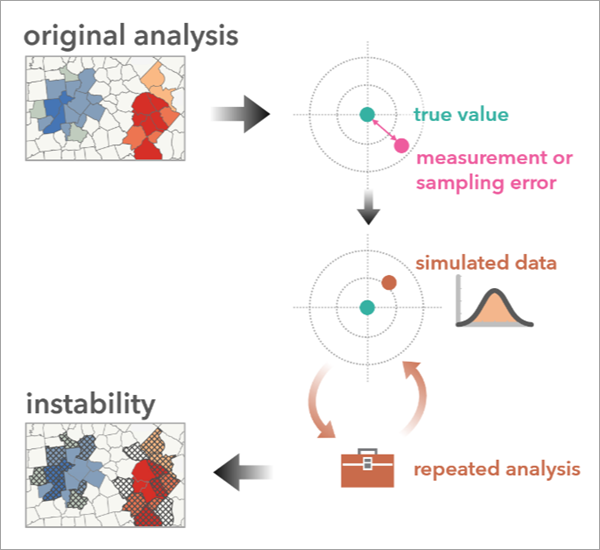
Measures the stability of an analysis result by comparing the original analysis output to the results from multiple tool runs using simulated data. The simulated data accounts for uncertainty in one or more analysis variables. Three types of attribute uncertainty are supported: margin of error, confidence bounds, and a percentage of the original attribute value.
Learn more about how Assess Sensitivity to Attribute Uncertainty Works
Illustration
Usage
The Analysis Result Features parameter requires analysis results from one of the following tools in the Spatial Statistics toolbox:
The tool produces an output group layer with layers, charts, and pop-ups that compare how the original analysis differs across simulated runs.
The outputs of the tool depend on the type of analysis that is being assessed as follows:
For Hot Spot Analysis, Optimized Hot Spot Analysis, Cluster and Outlier Analysis, and Optimized Outlier Analysis, the tool provides a copy of the original analysis outputs and a layer that highlights the locations that produced a different result from the original analysis for at least 80 percent of the simulated runs.
For Generalized Linear Regression, the tool provides a copy of the original analysis outputs and a table containing the results of each simulation. The table includes charts to visualize the regression results (distribution of R-squared, Jarque-Bera, and coefficients) across simulated runs.
For Spatial Autocorrelation (Global Moran's I), the tool provides a copy of the analysis input features and a table containing the results of each simulation. The table includes charts to visualize the z-score and Global Moran's I results across simulated runs.
For Calculate Composite Index, the tool provides a group layer for each postprocessing result, with corresponding layers to represent features that are deemed unstable.
Learn more about the definitions of instability for index results.
The simulations that the tool will run are configured using the following parameters:
Uncertainty Type—Specifies how the uncertainty of the attributes will be measured and the range of possible uncertainty for the simulated data. For example, a margin of error field can be used to denote the uncertainty in the analysis variable values.
Simulation Method—Specifies the way that the simulated data will be generated using different statistical distributions. For example, the Normal option for the Simulation Method parameter will generate simulated values using a normal distribution. The original attribute value will be the mean and the Uncertainty Type parameter (the margin of error) determines the standard deviation.
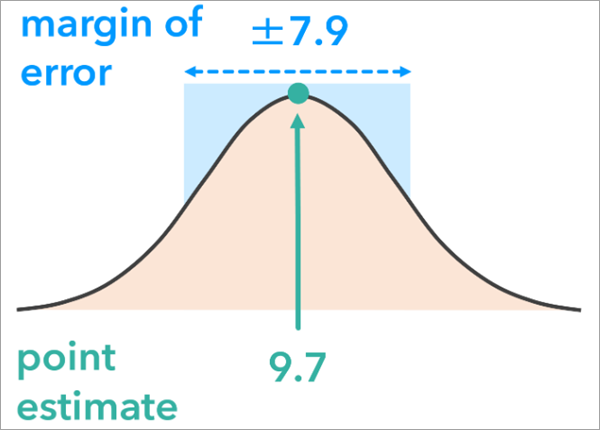
The normal simulation method generates simulated values using a normal distribution. If Uncertainty Type is Margin of Error, the mean of the distribution is the original attribute value and the standard deviation is the margin of error. The Simulation Data Limits parameter allows you to further configure the simulations. Use this parameter to prevent the simulations from generating data that would not make sense in the analysis, for example negative values when the analysis variable is the percentage of the population below the poverty line.
The tool reads the metadata of the Analysis Result Features parameter
o identify the analysis tool that produced the layer. If multiple tools were run on the layer, the most recent tool will be used.
Parameters
| Label | Explanation | Data type |
|---|---|---|
|
Analysis Result Features |
A feature class containing the output analysis result from a spatial statistics tool. Only certain tools are supported. This is the analysis result that will be evaluated for stability. |
Feature Layer |
|
Output Features |
The output features that will contain a copy of the original analysis results and fields summarizing the stability of the analysis for each feature. |
Feature Class |
|
Output Simulation Table |
The output table that will contain fields summarizing the stability of the analysis. |
Table |
|
Analysis Input Features (Optional) |
The input features that were used in the analysis that produced the analysis result features. |
Feature Layer |
|
Uncertainty Type (Optional) |
Specifies how attribute uncertainty will be measured.
|
String |
|
Margin of Error Field (Optional) |
The field containing the margin of error (MOE) of the analysis variable. The MOE is used to construct a symmetric distribution from which the simulated values will be generated. Value table columns:
|
Value Table |
|
Lower and Upper Bounds Field (Optional) |
The fields containing the lower and upper bounds for the analysis variable. Values will be generated between the lower and upper confidence bounds. Value table columns:
|
Value Table |
|
Percentage Below and Above Values (Optional) |
The percentage of the original attribute value that will be subtracted and added to the original value of the analysis variable to create a range of values for the simulations. Value table columns:
|
Value Table |
|
Number of Simulations (Optional) |
The number of simulations that will be performed. |
Long |
|
Simulation Method (Optional) |
Specifies the probability distribution that will be used to simulate data.
|
String |
|
Workspace for Simulation Results (Optional) |
An existing workspace where the analysis results from each simulation will be stored. The workspace can be a folder or a geodatabase. |
Workspace |
|
Simulation Data Limits (Optional) |
The lower and upper limits for the simulated values. All simulated values will be within these limits. For example, for counts or percentages, use a lower limit of zero to ensure that there are no negative counts or percentages. Value table columns:
|
Value Table |
|
Margin of Error Confidence Level (Optional) |
The confidence level of the margins of error. For example, if the margins of error were created from 95 percent confidence intervals, provide a value of 95. |
Long |
Derived output
| Label | Explanation | Data type |
|---|---|---|
|
Output Group Layer |
A group layer of the outputs. |
Group Layer |
|
Workspace for Simulation Results |
A workspace where the analysis results from each simulation are stored. The workspace can be a folder or a geodatabase. |
Workspace |
Environments
Output Coordinate System, Random number generator
Licensing information
- Basic: Yes
- Standard: Yes
- Advanced: Yes
Related topics
- An Overview of the Assessing Sensitivity toolset
- Find a geoprocessing tool
- How Hot Spot Analysis (Getis-Ord Gi*) works
- How Cluster and Outlier Analysis (Anselin Local Moran's I) works
- How Optimized Hot Spot Analysis works
- How Optimized Outlier Analysis works
- How Generalized Linear Regression (GLR) works
- How Spatial Autocorrelation (Global Moran's I) works
- Calculate Composite Index