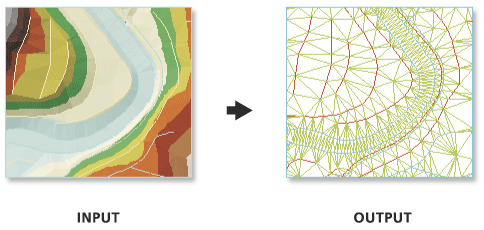
arcpy.3d.TinEdge(in_tin, out_feature_class, {edge_type})
|
名前
|
説明
|
データ タイプ
|
|
in_tin
|
処理対象の TIN データセット。
|
TIN Layer
|
|
out_feature_class
|
生成されるフィーチャクラス。
|
Feature Class
|
|
edge_type
(オプション)
|
エクスポートされる三角形エッジ。
DATA—Edges representing the interpolation zone. This is the default.
SOFT—Edges representing gradual breaks in slope.
HARD—Edges representing distinct breaks in slope.
ENFORCED—Edges that were not introduced by the TIN's triangulation.
REGULAR—Edges that were created by the TIN's triangulation.
OUTSIDE—Edges that are excluded from the interpolation zone.
ALL—All edges, included those that were excluded from the interpolation zone.
|
String
|
コードのサンプル
TinEdge の例 1 (Python ウィンドウ)
次のサンプルは、Python ウィンドウでこのツールを使用する方法を示しています:
arcpy.env.workspace = 'C:/data'
arcpy.ddd.TinEdge('tin', 'tin_edge.shp', edge_type='ENFORCED')
TinEdge の例 2 (スタンドアロン スクリプト)
次のサンプルは、スタンドアロン Python スクリプトでこのツールを使用する方法を示しています:
"""****************************************************************************
Name: Create Terrain from TIN
Description: This script demonstrates how to create a terrain dataset using
             features extracted from a TIN. It is particularly useful in
             situations where the source data used in the TIN is not available,
             and the amount of data stored in the TIN proves to be too large
             for the TIN. The terrain's scalability will allow improved
             display performance and faster analysis. The script is designed
             to work as a script tool with 5 input arguments.
****************************************************************************"""
# Import system modules
import arcpy

# Set local variables
tin = arcpy.GetParameterAsText(0) # TIN used to create terrain
gdbLocation = arcpy.GetParameterAsText(1) # Folder that will store terran GDB
gdbName = arcpy.GetParameterAsText(2) # Name of terrain GDB
fdName = arcpy.GetParameterAsText(3) # Name of feature dataset
terrainName = arcpy.GetParameterAsText(4) # Name of terrain

try:
    # Create the file gdb that will store the feature dataset
    arcpy.management.CreateFileGDB(gdbLocation, gdbName)
    gdb = '{0}/{1}'.format(gdbLocation, gdbName)
    # Obtain spatial reference from TIN
    SR = arcpy.Describe(tin).spatialReference
    # Create the feature dataset that will store the terrain
    arcpy.management.CreateFeatureDataset(gdb, fdName, SR)
    fd = '{0}/{1}'.format(gdb, fdName)
    # Export TIN elements to feature classes for terrain
    arcpy.AddMessage("Exporting TIN footprint to define terrain boundary...")
    boundary = "{0}/boundary".format(fd)
    # Run TinDomain
    arcpy.ddd.TinDomain(tin, tinDomain, 'POLYGON')
    arcpy.AddMessage("Exporting TIN breaklines...")
    breaklines = "{0}/breaklines".format(fd)
    # Run TinLine
    arcpy.ddd.TinLine(tin, breaklines, "Code")
    arcpy.AddMessage("Exporting TIN nodes...")
    masspoints = "{0}/masspoints".format(fd)
    # Run TinNode
    arcpy.ddd.TinNode(sourceTIN, TIN_nodes)
    arcpy.AddMessage("Creating terrain dataset...")
    terrain = "terrain_from_tin"
    # Run CreateTerrain
    arcpy.ddd.CreateTerrain(fd, terrainName, 10, 50000, "",
                            "WINDOWSIZE", "ZMEAN", "NONE", 1)
    arcpy.AddMessage("Adding terrain pyramid levels...")
    terrain = "{0}/{1}".format(fd, terrainName)
    pyramids = ["20 5000", "25 10000", "35 25000", "50 50000"]
    # Run AddTerrainPyramidLevel
    arcpy.ddd.AddTerrainPyramidLevel(terrain, "", pyramids)
    arcpy.AddMessage("Adding features to terrain...")
    inFeatures = "{0} Shape softclip 1 0 10 true false boundary_embed <None> "\
             "false; {1} Shape masspoints 1 0 50 true false points_embed "\
             "<None> false; {2} Shape softline 1 0 25 false false lines_embed "\
             "<None> false".format(boundary, masspoints, breaklines)
    # Run AddFeatureClassToTerrain
    arcpy.ddd.AddFeatureClassToTerrain(terrain, inFeatures)
    arcpy.AddMessage("Building terrain...")
    # Run BuildTerrain
    arcpy.ddd.BuildTerrain(terrain, "NO_UPDATE_EXTENT")
    arcpy.GetMessages()

except arcpy.ExecuteError:
    print(arcpy.GetMessages())
except Exception as err:
    print(err)