Generate Desire Lines (Business Analyst Tools)
Краткая информация
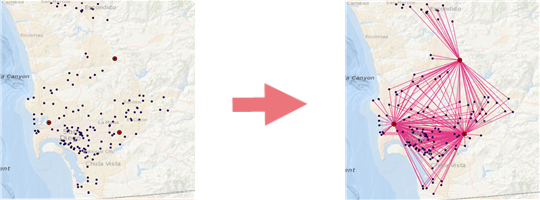
Generates a series of lines from each customer to an associated store location. These lines are often called spider diagrams. The tool can also generate an optional Wind Rose report from the output.
Примечание:
This tool is similar to the Generate Origin-Destination Links tool in the Analysis toolbox Proximity toolset.
Иллюстрация
Использование
The store layer and customer layer must each be a point feature class.
Generating desire lines with drive time and drive distance will take longer than using the straight-line (Euclidean) distance method.
The output shows the spatial distribution between the Store Layer and the Customer Layer parameter values and calculates the distance values between each store and customer.
Checking the optional Create Report parameter creates a Wind Rose report, which visualizes the distributions of customers around each store.
The Interpret Wind Rose report is a PDF document you can use to understand the various sections and elements of the Wind Rose report.
Параметры
| Подпись | Объяснение | Тип данных |
|---|---|---|
|
Store Layer |
The input point layer representing store or facility locations. |
Feature Layer |
|
Customer Layer |
The input point layer representing customers or patrons. |
Feature Layer |
|
Output Feature Class |
The resultant feature class that will be added to the Contents pane. |
Feature Class |
|
Store ID Field |
A unique ID field representing a store or facility location. |
Field |
|
Associated Store ID Field |
An ID field used to assign individual customers to stores. |
Field |
|
Distance Type (Дополнительный) |
The method of travel that will be used for distance calculation. Straight Line is the default value. When using Portal for ArcGIS or local data sources, travel mode options are dynamically populated. |
String |
|
Measure Units (Дополнительный) |
The type of distance- or time-measuring units that will be used when calculating minimal distance. |
String |
|
Cutoff (Дополнительный) |
The distance beyond which customers will be considered outliers and excluded from consideration during desire line generation. |
Double |
|
Travel Direction (Дополнительный) |
Specifies the direction of travel that will be used between stores and demand points.
|
String |
|
Time of Day (Дополнительный) |
The time at which travel begins. |
Date |
|
Time Zone (Дополнительный) |
Specifies the time zone that will be used for the Time of Day parameter.
|
String |
|
Create Report (Дополнительный) |
Specifies whether a Wind Rose report will be created.
|
Boolean |
|
Report Title (Дополнительный) |
The title of the Wind Rose report. |
String |
|
Output Report Folder (Дополнительный) |
The output directory that will contain the Wind Rose report. |
Folder |
|
Report Format (Дополнительный) |
One or more output report formats. The default value is PDF. Additional available formats are XLSX, HTML, CSV, and PAGX. |
String |
Производные выходные данные
| Подпись | Объяснение | Тип данных |
|---|---|---|
|
Output Report |
The output report file. |
File |
Параметры среды
Current Workspace, Data Source, Network Source
Информация о лицензировании
- Basic: Requires Business Analyst and Network Analyst
- Standard: Requires Business Analyst and Network Analyst
- Advanced: Requires Business Analyst and Network Analyst