NbrRectangle
Summary
Defines a rectangle neighborhood which is created by specifying the height and the width in either map units or number of cells.
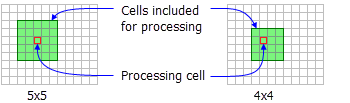
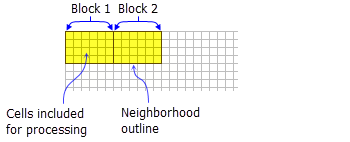
Discussion
Tools that use neighborhood rectangle object: Block Statistics, Focal Statistics, Point Statistics, Point Density, Top Hat Transform, and Topographic Position Index.
License:
This class is also available if you have an Image Analyst extension license, but only for the Focal Statistics tool.
The rectangle neighborhood is specified by providing a width and a height in either cells or map units.
When rectangle is used in a focal tool the x, y position of the processing cell within the neighborhood is determined, with respect to the upper-left corner of the neighborhood, by the following equations:
If the input number of cells is even, the x,y coordinates are computed using truncation.
Only the cells whose centers fall within the defined object are processed as part of the rectangle neighborhood.
Syntax
NbrRectangle({width}, {height}, {units})
| Name | Explanation | Data type |
|---|---|---|
|
width (Optional) |
The width of the rectangle neighborhood. If only the The default value is 3. |
Double |
|
height (Optional) |
The height of the rectangle neighborhood. If only the The default value is 3. |
Double |
|
units (Optional) |
Defines the units of the neighborhood.
The default value is CELL. |
String |
Properties
| Name | Explanation | Data type |
|---|---|---|
|
width (Read and Write) |
The width of the rectangle neighborhood. If only the |
Double |
|
height (Read and Write) |
The height of the rectangle neighborhood. If only the |
Double |
|
units (Read and Write) |
Defines the units of the neighborhood.
|
String |
Code sample
Demonstrates how to create a NbrRectangle class and use it in the BlockStatistics tool within the Python window.
import arcpy
from arcpy import env
from arcpy.sa import *
env.workspace = "C:/sapyexamples/data"
outNbrRec = BlockStatistics("block", NbrRectangle(4, 5, "MAP"))
outNbrRec.save("C:/sapyexamples/output/blstatsnbrr2")
Implements the BlockStatistics tool using the NbrRectangle class.
# Name: NbrRectangle_Ex_02.py
# Description: Uses the NbrRectangle object to run BlockStatistics tool.
# Requirements: Spatial Analyst extension

# Import system modules
import arcpy
from arcpy import env
from arcpy.sa import *

# Set environment settings
env.workspace = "C:/sapyexamples/data"

# Set local variables
inRaster = "block"

# Create the Neighborhood Object
width = 5
height = 6
myNbrRec = NbrRectangle(width, height, "MAP")

# Run BlockStatistics
outBlkStat =  BlockStatistics(inRaster, myNbrRec, "MINIMUM", "DATA")

# Save the output
outBlkStat.save("C:/sapyexamples/output/blstat_rec3")