NbrWedge
Summary
Defines a wedge neighborhood which is created by specifying a radius and two angles in either map units or number of cells.
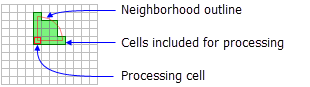
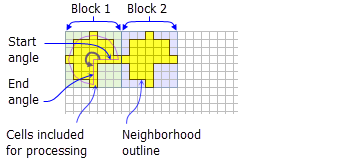
Discussion
Tools that use neighborhood wedge object: Block Statistics, Focal Statistics, Point Statistics, Point Density, and Topographic Position Index.
License:
This class is also available if you have an Image Analyst extension license, but only for the Focal Statistics tool.
A wedge is specified by a radius, a startAngle, an endAngle, and the units. The wedge extends counterclockwise from the starting angle to the ending angle. Angles are specified in arithmetic degrees (counterclockwise from the positive x-axis). Negative angles may be used.
The radius is identified in cells or map units, measured perpendicular to the x- or y-axis. When the radius is specified in map units, it is converted to a radius in cell units. The resulting radius in cell units produces an area that most closely represents the area calculated by using the original radius in map units. Any cell center encompassed by the wedge will be included in the processing of the neighborhood.
Syntax
NbrWedge({radius}, {startAngle}, {endAngle}, {units})
| Name | Explanation | Data type |
|---|---|---|
|
radius (Optional) |
The radius is the distance from the corner of the wedge to the outer limit of the wedge. The radius is an integer or floating-point value. The default value is 3. |
Double |
|
startAngle (Optional) |
The The start angle is measured counterclockwise from the positive x-axis (3:00 on a clock) to the closest edge of the wedge. The default value is 0. |
Double |
|
endAngle (Optional) |
The The end angle is measured counterclockwise from the positive x-axis (3:00 on a clock) to the outer edge of the wedge. The default value is 90. |
Double |
|
units (Optional) |
Defines the units of the neighborhood.
The default value is CELL. |
String |
Properties
| Name | Explanation | Data type |
|---|---|---|
|
radius (Read and Write) |
The |
Double |
|
startAngle (Read and Write) |
The The start angle is measured counterclockwise from the positive x-axis (3:00 on a clock) to the closest edge of the wedge. |
Double |
|
endAngle (Read and Write) |
The The |
Double |
|
units (Read and Write) |
Defines the units of the neighborhood.
|
String |
Code sample
Demonstrates how to create a NbrWedge class and use it in the BlockStatistics tool within the Python window.
import arcpy
from arcpy import env
from arcpy.sa import *
env.workspace = "C:/sapyexamples/data"
outNbrWedge = BlockStatistics("block", NbrWedge(5, 10.5, 40, "MAP"))
outNbrWedge.save("C:/sapyexamples/output/blstatsnbrw2")
Implements the BlockStatistics tool using the NbrWedge class.
# Name: NbrWedge_Ex_02.py
# Description: Uses the NbrWedge object to run BlockStatistics tool
# Requirements: Spatial Analyst extension

# Import system modules
import arcpy
from arcpy import env
from arcpy.sa import *

# Set environment settings
env.workspace = "C:/sapyexamples/data"

# Set local variables
inRaster = "block"

# Create the Neighborhood Object
radius = 5
startAngle = 5
endAngle = 10

myNbrWedge = NbrWedge(radius, startAngle, endAngle, "")

# Run BlockStatistics
outBlkStats =  BlockStatistics(inRaster, myNbrWedge, "MINIMUM", "DATA")

# Save the output
outBlkStats.save("C:/sapyexamples/output/blkst_wedge4")