Add a color set
Color sets serve as the standardized color library, or palette, used to create color schemes in your network. A color set defines the available colors that may be used for particular types of features and assigns a name, label, and hex code, or codes, to each which define the color. Distinct color sets can be created for different types of features such as fibers, connectors, or patch cables. These sets are referenced when creating color schemes to ensure a standard is maintained across all color schemes.
The Add Color Set tool allows you to create color sets which define the color palette available for use by your color schemes.
Requirements
To add a color set, the following requirements must be met:
The Input Utility Network parameter must reference a utility network version 8 or later.
The Domain Network parameter must reference a telecom domain network.
The Color Set Name parameter value must be unique in the domain network and may not exceed 256 characters.
The Color Codes parameter's Name and Label property values may not exceed 256 characters.
The Color Codes parameter's HexCode property value must contain a 6-digit hex triplet. Multiple hex codes can be provided using a comma delimited list.
When working with an enterprise geodatabase, ensure the following:
The Input Utility Network parameter value must be from a database connection established as the database utility network owner.
The active ArcGIS Enterprise portal account must be the portal utility network owner.
License:
The active portal account must be licensed with the ArcGIS Advanced Editing user type extension to create, publish, and edit a utility network in an enterprise geodatabase.
Example
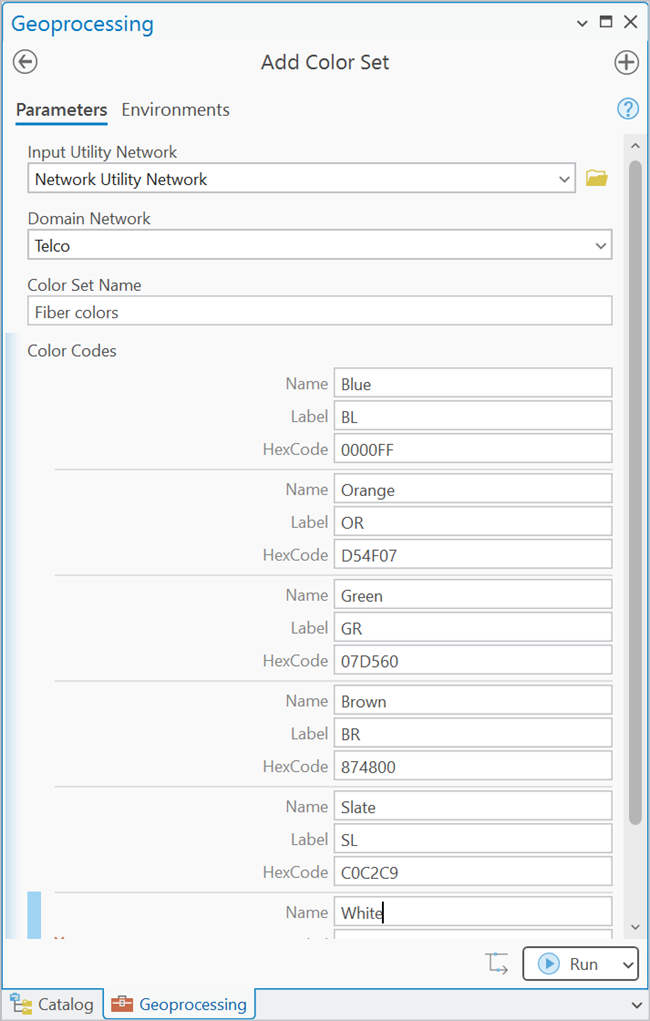
A new color set is created with the Color Set Name of Fiber colors to establish the color palette available to fibers in the Telco domain network. For the Color Codes parameter, each color available in the set is defined with a name, label, and hex code.
Add a color set to a utility network
To add a color set to a utility network, complete the following steps:
On the Analysis tab, in the Geoprocessing group, click Tools
 to open the Geoprocessing pane.
In the Geoprocessing pane, search for and select Add Color Set.
For the Input Utility Network parameter, specify a utility network.
For the Domain Network parameter, specify a telecom domain network.
For the Color Set Name parameter, provide a name for the color set.
This name is used to identify the color set when it is consumed by a color scheme.
For the the Color Codes parameter, provide values for the Name, Label, and HexCode properties that will be used to define the color in the color set.
Multiple hex codes can be provided using a comma delimited list to represent items such as a multicolor fiber tube jacket. For example, a blue fiber with a black stripe (
0000FF,000000).Repeat step 6 for each color in the color set.
Click Run.
The color set is added to the utility network.
You can now apply the color set to a color scheme using the Add Color Scheme tool.