Points To Line (Data Management Tools)
Summary
Creates line features from points.
Illustration
Usage
Line features are only written to the output if the line will contain two or more vertices.
If a field is specified as the Line Field parameter value, line features will be constructed with only points of the unique value in the field. The field will be included in the output feature class.
If a field is specified as the Sort Field parameter value, points will be sorted in ascending order of the field.
You can create polygons from input points by first checking the Close Line parameter to create closed line features. Then use the output line feature class as input to the Feature To Polygon tool to create polygon features.
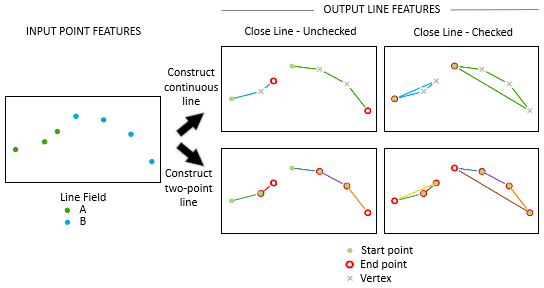
The Line Construction Method parameter specifies how line features will be constructed. Line features can be created by connecting points continuously or by connecting two consecutive points as they are sorted. For example, if the input contains three points that have a Line Field value of A, and four points have a Line Field value of B, the following behaviors are expected from the options:
Construct continuous line—Two output lines, one with two segments and one with three segments, will be created. If the Close Line parameter is checked, an additional segment connecting the last point with the start point of each line feature will be added to form a closed line.
Construct two-point line—Five output lines, each between consecutive points with the same Line Field value, will be created. If the Close Line parameter is checked, additional line features connecting the last point with the start point for each set of input points with the same Line Field value will be added to form a closed shape.
The Attribute Source parameter allows you to specify whether or how the attributes of the input points specified by the Transfer Fields parameter will be transferred to the output lines. The Attribute Source parameter supports the following options:
None—No attributes will be transferred.
From both start and end points—Attributes will be transferred from the start and end points of each line. The output field names and aliases will be prefixed by START_ and END_, for example,
START_FIELD1(START_ALIAS1),END_FIELD1(END_ALIAS1), and so on.From start point—Attributes will be transferred from the start point of each line.
From end point—Attributes will be transferred from the end point of each line.
Use the Transfer Fields parameter to identify the fields that will be transferred from the input. Field values will be transferred according to the Attribute Source parameter value. If a value of None is specified for that parameter, no attributes will be transferred.
Parameters
| Label | Explanation | Data type |
|---|---|---|
|
Input Features |
The point features that will be used to construct lines. |
Feature Layer |
|
Output Feature Class |
The line feature class that will be created from the input points. |
Feature Class |
|
Line Field (Optional) |
The field that will be used to identify unique attribute values so line features can be constructed using points of the same values. If no field is specified, lines will be constructed without using unique attribute values. This is the default. |
Field |
|
Sort Field (Optional) |
The field that will be used to sort the order of the points. If no field is specified, points used to create output line features will be sorted in the order they are found. This is the default. |
Field |
|
Close Line (Optional) |
Specifies whether the output line features will be closed.
|
Boolean |
|
Line Construction Method (Optional) |
Specifies the method that will be used to construct the line features.
|
String |
|
Attribute Source (Optional) |
Specifies how the specified attributes will be transferred.
|
String |
|
Transfer Fields (Optional) |
The fields containing values that will be transferred from the source points to the output lines. If no fields are selected, no attributes will be transferred. If the Attribute Source parameter value is specified as None, this parameter will be inactive. |
Field |
Environments
Current Workspace, Scratch Workspace, XY Resolution, XY Tolerance, Output has M values, M Resolution, M Tolerance, Output has Z values, Default Output Z Value, Z Resolution, Z Tolerance, Maintain fully qualified field names, Output CONFIG Keyword, Auto Commit, Output XY Domain, Output M Domain, Output Z Domain
Licensing information
- Basic: Yes
- Standard: Yes
- Advanced: Yes