Weighted Overlay (Spatial Analyst Tools)
Summary
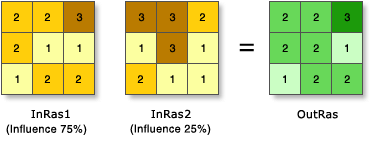
Overlays several rasters using a common measurement scale and weights each according to its importance.
Illustration
Usage
All input rasters must be integer. A floating-point raster must first be converted to an integer raster before it can be used in Weighted Overlay. The Reclassification tools provide an effective way to do the conversion.
Each value class in an input raster is assigned a new value based on an evaluation scale. These new values are reclassifications of the original input raster values. A restricted value is used for areas you want to exclude from the analysis.
Each input raster is weighted according to its importance or its percent influence. The weight is a relative percentage, and the sum of the percent influence weights must equal 100. Influences are specified by integer values only. Decimal values are rounded down to the nearest integer.
Changing the evaluation scales or the percentage influences can change the results of the weighted overlay analysis.
By default, this tool will use multicore processors if available. The maximum number of cores that can be used is four.
To use fewer cores, use the Parallel Processing Factor environment setting.
See Analysis environments and Spatial Analyst for additional details on the geoprocessing environments that apply to this tool.
Parameters
| Label | Explanation | Data type |
|---|---|---|
|
Weighted overlay table |
The weighted overlay table allows the calculation of a multiple-criteria analysis between several rasters. Input Rasters:
Remap Table:
Scale—Evaluation scale for defining the remap values. Select from a list of predefined evaluation scales. You can also define your own evaluation scale controls by typing in the parameter sign hyphens or spaces to separate values. A negative value must be preceded by a space. |
WOTable |
Return value
| Label | Explanation | Data type |
|---|---|---|
|
Output raster |
The output weighted raster. |
Raster |
Environments
Auto Commit, Cell Size, Cell Size Projection Method, Compression, Current Workspace, Extent, Geographic Transformations, Mask, Output CONFIG Keyword, Output Coordinate System, Parallel Processing Factor, Scratch Workspace, Snap Raster, Tile Size
Licensing information
- Basic: Requires Spatial Analyst
- Standard: Requires Spatial Analyst
- Advanced: Requires Spatial Analyst