Generate Spatial Weights Matrix (Spatial Statistics Tools)
Summary
Generates a spatial weights matrix file (.swm) to represent the spatial relationships among features in a dataset.
Illustration
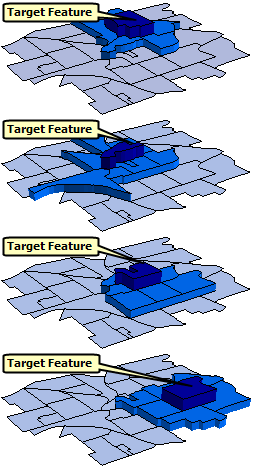
Usage
The output from this tool is a spatial weights matrix file (
.swm). Tools that require you to specify a neighborhood type (sometimes called a conceptualization of spatial relationships), such as the Hot Spot Analysis and Bivariate Spatial Association (Lee's L) tools, will allow defining neighbors and weights using a spatial weights matrix file. Using a file is useful when you plan to run multiple analysis with the same features (such as hospital locations or United States counties) or when you will share results with others.The messages include a report of the spatial weights matrix file that displays the number of features, connectivity, and minimum, maximum, and average number of neighbors.
For space and time analyses, choose the Space time window option for the Neighborhood Type parameter. You define space by specifying a Threshold Distance value; you define time by specifying a Date/Time Field value and both a Date/Time Type (such as hours or days) and a Date/Time Interval Value value. The Date/Time Interval Value parameter value is an integer. For example, if you enter 1000 feet, choose the Hours option, and provide a Date/Time Interval Value value of 3, features within 1,000 feet and occurring within three hours of each other will be considered neighbors.
To improve performance, the file is created in a binary file format. Feature relationships are stored as a sparse matrix, so only nonzero relationships are written to the
.swmfile. For very large numbers of relationships (generally tens or hundreds of millions of neighbor relationships), memory errors may occur. In this case, use different options to reduce the number of neighbors per feature (such as reducing the threshold distance).Coincident points are not used in the calculation of the default threshold distance.
When using data with coordinates that include a z-value, the only options supported by the Neighborhood Type parameter are Inverse distance, Fixed distance, K nearest neighbors, and Space time window.
If the input features contains z-values, the linear units of the vertical coordinate system (VCS) must match the linear units of the horizontal coordinate system. If the input features do not have a VCS, it is assumed that the vertical linear unit is the same as the horizontal linear unit.
When the input features are not projected (that is, when coordinates are in latitude and longitude degrees) or when the output coordinate system is set to a geographic coordinate system, distances are computed using chordal distances. Chordal distances are used because they can be computed quickly and provide good estimates of true geodesic distances, up to approximately 30 degrees. For any two points on a spheroid, the chordal distance between them is the length of a line, passing through the three-dimensional earth, to connect those two points. Chordal distances are reported in meters.
Caution:
Project the data if the study area extends beyond 30 degrees. Chordal distances are not a good estimate of geodesic distances beyond 30 degrees.
When chordal distances are used in the analysis, the threshold distance must be specified in meters.
For line and polygon features, feature centroids are used in distance computations. For multipoints, polylines, or polygons with multiple parts, the centroid is computed using the weighted mean center of all feature parts. The weighting for point features is 1, for line features is length, and for polygon features is area.
The Unique ID Field parameter value is linked to feature relationships derived from running this tool. Consequently, the field values of the unique ID field must be unique for every feature and typically should be in a permanent field that remains with the feature class. If you don't have a unique ID field, you can create one by adding a new integer field (Add Field) to the feature class table and calculating the field values to be equal to the
FIDorOBJECTIDfield (Calculate Field). Because theFIDandOBJECTIDfield values may change when you copy or edit a feature class, it is recommended that you not use these fields as the unique ID field.The Number of Neighbors parameter may override the Threshold Distance parameter for inverse or fixed distance neighborhood types. For example, if you specify a threshold distance of 10 miles and a value of 3 for the Number of Neighbors parameter, all features will receive a minimum of three neighbors, even if the distance threshold must be increased to find them. The threshold distance is only increased in cases in which the minimum number of neighbors is not met.
The Convert table option for the Neighborhood Type parameter can be used to convert an ASCII spatial weights matrix file to a SWM formatted spatial weights matrix file. First, put the ASCII weights into a formatted table (using Microsoft Excel, for example).
For polygon features, it is recommended that you check the Row Standardization parameter. Row standardization mitigates bias when the number of neighbors for each feature is a function of the aggregation scheme or sampling process, rather than reflecting the actual spatial distribution of the variable you are analyzing.
The Modeling Spatial Relationships help topic provides additional information about this tool's parameters.
The tools that can use a spatial weights matrix file project features to the output coordinate system prior to analysis and all mathematical computations are based on the output coordinate system. Consequently, if the output coordinate system setting does not match the input feature class spatial reference, either ensure that, for all analyses using the spatial weights matrix file, the output coordinate system matches the settings used when the spatial weights matrix file was created or project the input feature class so it matches the spatial reference associated with the spatial weights matrix file.
Caution:
When using shapefiles, keep in mind that they cannot store null values. Tools or other procedures that create shapefiles from nonshapefile inputs may store or interpret null values as zero. In some cases, nulls are stored as very large negative values in shapefiles. This can lead to unexpected results. See Geoprocessing considerations for shapefile output for more information.
Parameters
| Label | Explanation | Data type |
|---|---|---|
|
Input Features |
The features for which spatial relationships of features will be created. |
Feature Class |
|
Unique ID Field |
An integer field containing a different value for every feature in the input feature class. If you don't have a Unique ID field, you can create one by adding an integer field to your feature class table and calculating the field values to equal the |
Field |
|
Output Spatial Weights Matrix File |
The full path for the output spatial weights matrix file ( |
File |
|
Neighborhood Type |
Specifies how neighbors of each feature will be determined.
|
String |
|
Distance Method (Optional) |
Specifies how distances will be calculated from each feature to neighboring features.
|
String |
|
Exponent (Optional) |
The value for inverse distance calculation. A typical value is 1 or 2. |
Double |
|
Threshold Distance (Optional) |
The cutoff distance for the Neighborhood Type parameter's Inverse distance and Fixed distance options. Enter this value using the units specified in the environment output coordinate system. This defines the size of the space window for the Space time window option. When this parameter is left blank, a default threshold value is computed based on the output feature class extent and the number of features. For the inverse distance conceptualization of spatial relationships, a value of zero indicates that no threshold distance will be applied and all features will be neighbors of every other feature. |
Double |
|
Number of Neighbors (Optional) |
An integer reflecting either the minimum or the exact number of neighbors. When the Neighborhood Type parameter is set to K nearest neighbors, each feature will have exactly this specified number of neighbors. For the Inverse distance and Fixed distance options, each feature will have at least this many neighbors (the threshold distance will be temporarily extended to ensure this many neighbors if necessary). When the Contiguity edges only or Contiguity edges corners option is chosen, each polygon will be assigned this minimum number of neighbors. For polygons with fewer than this number of contiguous neighbors, additional neighbors will be based on feature centroid proximity. For K nearest neighbors, the default is 8. For all other neighborhood types, the default is 0. This value does not include the focal features, so if they are included, the number of neighbors will be one more than the provided value. |
Long |
|
Row Standardization (Optional) |
Specifies whether spatial weights will be standardized by row. Row standardization is recommended whenever feature distribution is potentially biased due to sampling design or to an imposed aggregation scheme.
|
Boolean |
|
Input Table (Optional) |
A table containing numeric weights between pairs of neighbors when converting a table to a spatial weights matrix. Required fields for the table are the unique ID field name, |
Table |
|
Date/Time Field (Optional) |
A date field with a time stamp for each feature. |
Field |
|
Date/Time Interval Type (Optional) |
Specifies the units that will be used for measuring time.
|
String |
|
Date/Time Interval Value (Optional) |
An integer reflecting the number of time units comprising the time window. For example, if you choose Hours for the Date/Time Interval Type parameter and specify 3 for this parameter, the time window will be three hours. Features within the specified space window and within the specified time window will be neighbors. |
Long |
|
Use Z values (Optional) |
Specifies whether z-coordinates will be used in the construction of the spatial weights matrix if the input features are z-enabled.
|
Boolean |
|
Contiguity Order (Optional) |
The order of polygon contiguity. The order is the number of steps it would take to move from the focal polygon to its neighbors. The default is 1, meaning that only the immediate neighbors of the focal polygon will be neighbors (those that can be reached in a single step). Order two means all polygons that can be reached in two steps or fewer (the first order neighbors and all of their first order neighbors) will be neighbors. The value must be between 1 and 10; however, it is generally recommended to use values between 1 and 3. |
Long |
|
Include Focal Feature |
Specifies whether each feature will be considered a neighbor of itself.
|
Boolean |
|
Weighting Method (Optional) |
Specifies the weighting method that will be used to determine the spatial weights of neighbors around each focal feature.
|
String |
|
Kernel Type (Optional) |
Specifies whether the kernel bandwidth will be a fixed distance that is shared between all features or if each feature will use a different (adaptive) bandwidth. This parameter only applies to the k nearest neighbors neighborhood type.
|
String |
|
Adaptive Kernel Number of Neighbors (Optional) |
For an adaptive kernel bandwidth, specifies the number of neighbors that will be used to determine the adaptive kernel. For example, the value 10 means that the bandwidth for each feature will be equal to the distance to its tenth neighbor. The default is the number of neighbors, plus one. Using one value greater than the number of neighbors ensures that each neighbor receives a nonzero weight by default. |
Long |
|
Kernel Bandwidth (Optional) |
The kernel bandwidth distance. If no value is provided, one will be estimated during processing and included as a geoprocessing message. |
Linear Unit |
|
Weight Field (Optional) |
The field containing weight values for each feature that will be used when weighting by the values of a field. All values must be greater than zero, and row standardization will always be performed on the field values. |
Field |
Environments
Current Workspace, Scratch Workspace, Output Coordinate System, Geographic Transformations
Special cases
- Output Coordinate System
-
Feature geometry is projected to the output coordinate system prior to analysis, so values entered for the Threshold Distance parameter should match those specified in the output coordinate system. All mathematical computations are based on the spatial reference of the output coordinate system. When the output coordinate system is based on degrees, minutes, and seconds, geodesic distances are estimated using chordal distances in meters.
Licensing information
- Basic: Yes
- Standard: Yes
- Advanced: Yes
Related topics
- An Overview of the Modeling Spatial Relationships toolset
- Find a geoprocessing tool
- How Geographically Weighted Regression works
- Spatial Autocorrelation (Global Moran's I)
- High/Low Clustering (Getis-Ord General G)
- Cluster and Outlier Analysis (Anselin Local Moran's I)
- Hot Spot Analysis (Getis-Ord Gi*)
- Grouping Analysis
- Spatial weights
- Modeling spatial relationships
- How Generate Network Spatial Weights works