arcpy.management.FindIdentical(in_dataset, out_dataset, fields, {xy_tolerance}, {z_tolerance}, {output_record_option})
|
名称
|
说明
|
数据类型
|
|
in_dataset
|
可找到相同记录的表或要素类。
|
Table View
|
|
out_dataset
|
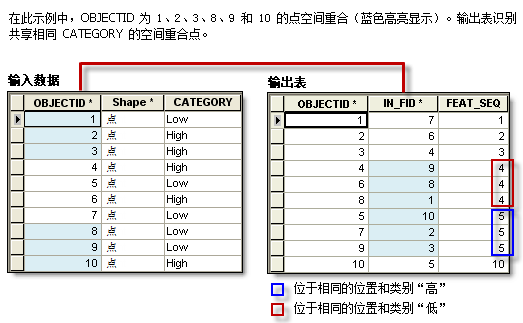
用于报告相同记录的输出表。 在输出表中,相同记录的 FEAT_SEQ 字段具有相同值。
|
Table
|
|
fields
[fields,...]
|
将比较其值以查找相同记录的一个或多个字段。
|
Field
|
|
xy_tolerance
(可选)
|
在评估另一个要素中是否存在相同折点时将应用于每个折点的 x,y 容差。
如果 fields 参数值包含了 Shape 字段,将启用此参数。
|
Linear Unit
|
|
z_tolerance
(可选)
|
在评估另一个要素中是否存在相同折点时将应用于每个折点的 z 容差。
如果 fields 参数值包含了 Shape 字段,将启用此参数。
|
Double
|
|
output_record_option
(可选)
|
指定输出表中是否只包含重复记录。
|
Boolean
|
代码示例
FindIdentical 示例 1(Python 窗口)
以下 Python 窗口脚本演示了如何在即时模式下使用 FindIdentical 函数。
import arcpy

# Find identical records based on a text field and a numeric field.
arcpy.management.FindIdentical("C:/data/fireincidents.shp", "C:/output/duplicate_incidents.dbf", ["ZONE", "INTENSITY"])
以下独立脚本演示了如何使用 FindIdentical 函数识别表或要素类的重复记录。
# Name: FindIdentical_Example2.py
# Description: Finds duplicate features in a dataset based on location (Shape field) and fire intensity

import arcpy

arcpy.env.overwriteOutput = True

# Set workspace environment
arcpy.env.workspace = "C:/data/findidentical.gdb"

# Set input feature class
in_dataset = "fireincidents"

# Set the fields upon which the matches are found
fields = ["Shape", "INTENSITY"]

# Set xy tolerance
xy_tol = ".02 Meters"

out_table = "duplicate_incidents"

# Run Find Identical
arcpy.management.FindIdentical(in_dataset, out_table, fields, xy_tol)
print(arcpy.GetMessages())
FindIdentical 示例 3:(独立脚本)
下面的独立脚本演示了如何使用可选 output_record_option 参数。 如果参数值为 ONLY_DUPLICATES,则删除所有唯一记录,只保留重复记录作为输出。
# Name: FindIdentical_Example3.py
# Description: Demonstrates the use of the optional parameter Output only duplicated records.

import arcpy

arcpy.env.overwriteOutput = True

# Set workspace environment
arcpy.env.workspace = "C:/data/redlands.gdb"

in_data = "crime"
out_data = "crime_dups"

# Note that XY Tolerance and Z Tolerance parameters are not used
# In that case, any optional parameter after them must assign
# the value with the name of that parameter
arcpy.management.FindIdentical(in_data, out_data, ["Shape"], output_record_option="ONLY_DUPLICATES")

print(arcpy.GetMessages())
FindIdentical 示例 4:(独立脚本)
下面的独立脚本会读取 FindIdentical 函数的输出,并根据 FEAT_SEQ 字段值对相同记录进行分组。
import arcpy

from itertools import groupby
from operator import itemgetter

# Set workspace environment
arcpy.env.workspace = r"C:\data\redlands.gdb"

# Run Find Identical on feature geometry only.
result = arcpy.management.FindIdentical("parcels", "parcels_dups", ["Shape"])

# List of all output records as IN_FID and FEAT_SEQ pair - a list of lists
out_records = []
for row in arcpy.SearchCursor(result.getOutput(0), fields="IN_FID; FEAT_SEQ"):
    out_records.append([row.IN_FID, row.FEAT_SEQ])

# Sort the output records by FEAT_SEQ values
# Example of out_records = [[3, 1], [5, 3], [1, 1], [4, 3], [2, 2]]
out_records.sort(key = itemgetter(1))

# records after sorted by FEAT_SEQ: [[3, 1], [1, 1], [2, 2], [5, 3], [4, 3]]
# records with same FEAT_SEQ value will be in the same group (i.e., identical)
identicals_iter = groupby(out_records, itemgetter(1))

# now, make a list of identical groups - each group in a list.
# example identical groups: [[3, 1], [2], [5, 4]]
# i.e., IN_FID 3, 1 are identical, and 5, 4 are identical.
identical_groups = [[item[0] for item in data] for (key, data) in identicals_iter]

print(identical_groups)