Downgrade attachments
The purpose of this tool is to downgrade attachments on an enabled and upgraded attachments feature class or table. This allows you to restore access to the attachment table and delete features or records.
Reasons to downgrade attachments include the following:
A feature class or table was temporarily upgraded to share as a web layer and needs to be downgraded to its previous schema.
An upgraded attachments feature class or table is no longer needed.
ArcGIS Pro 2.6 and earlier versions cannot access an attachment table that has been upgraded to include EXIF fields (
KEYWORDS,EXIFINFO).ArcGIS Pro 3.6 and earlier versions cannot access an attachment table that has been upgraded to include both EXIF fields and Alt Text fields (
KEYWORDS,EXIFINFO,ATT_TITLE,ATT_ALT_TEXT,ATT_CAPTION,ATT_CREDIT).
Downgrade an attachment
To downgrade an attachment or restore compatibility with an earlier ArcGIS Pro version, complete the following steps:
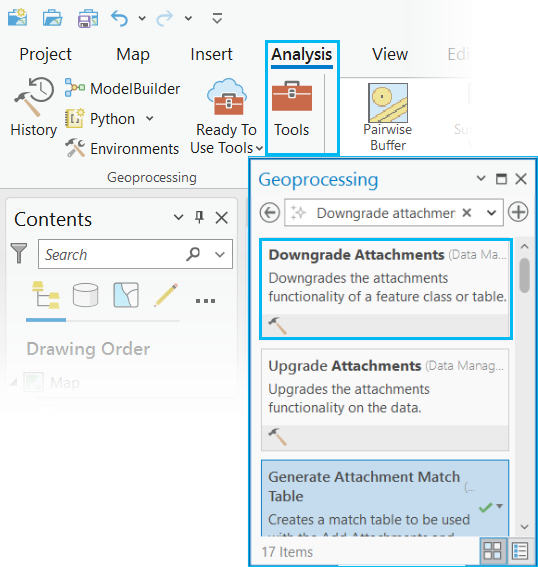
On the Analysis tab in the Geoprocessing group, click Tools.
Search for or browse to the Downgrade Attachments tool in the Data Management Tools toolset, and click the Downgrade Attachments search result to open the tool.
The Downgrade Attachments dialog box appears with a parameter to populate the input dataset and a parameter to choose a downgrade option.
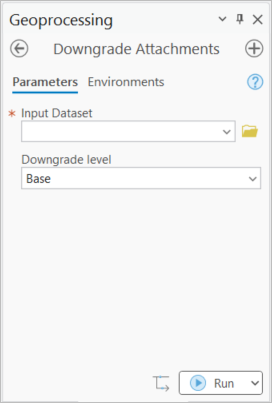
For Input Dataset, use the browse button
 to select a feature class or table, or click the down arrow to choose a dataset from the active map.
For Downgrade level, choose one of the following from the drop-down menu:
Base - Removes the
KEYWORDS,EXIFINFO,ATT_TITLE,ATT_ALT_TEXT,ATT_CAPTIONandATT_CREDITfields from the __attach table. This is the default.Exif Only - Removes the
ATT_TITLE,ATT_ALT_TEXT,ATT_CAPTIONandATT_CREDITfields from the __attach table. TheKEYWORDSandEXIFINFOfields remain. The minimum client version for the attachment table will change from 3.7 to 2.6.
Click Run to downgrade the dataset.
Caution:
Downgrading attachments on a dataset deletes the associated metadata fields and its values. The Downgrade level chosen determines which metadata fields will be removed.