Upgrade attachments
Upgrade a geodatabase dataset enabled for attachments to create metadata fields to add EXIF information or add alternative text when adding new attachments. Upgrading attachments also meet the need to use a geodatabase with an ArcGIS Survey 123 form. The Upgrade Attachments geoprocessing tool has an option to add two or six editable metadata fields to the existing ATTACH table.
EXIF Fields option add a
KEYWORDSandEXIFINFOcolumn.Exif Fields and Alt Text Fields add an additional four alternative text columns.
Note:
This geoprocessing tool only supports geodatabase feature classes and tables enabled for attachments.
Caution:
If the attachments are upgraded, the minimum client version of the attachment table is set to ArcGIS Pro 2.6 ( KEYWORDS and EXIFINFO columns) and set to ArcGIS Pro 3.7 (All six metadata fields). This means that the following limitations apply when working with the data in earlier versions of ArcGIS Pro:
The attachment table cannot be opened.
You can add features or records to the dataset with attachments enabled, but you cannot delete features or records.
Upgrade an attachment
To upgrade attachments using the Upgrade Attachments tool, complete the following steps:
On the Analysis tab in the Geoprocessing group, click Tools, and search for or browse to the Upgrade Attachments tool in the Data Management Tools toolset.
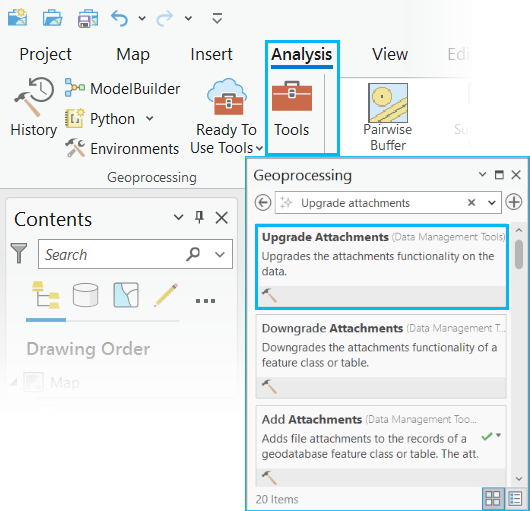
Click the Upgrade Attachments result to open the tool.
The Upgrade Attachments tool dialog box appears with parameters to enter an input dataset and upgrade option.
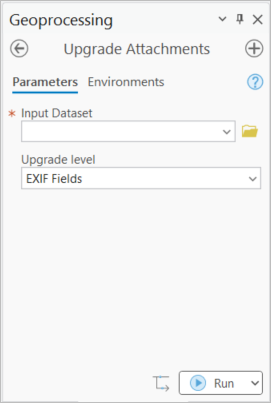
For Input Dataset, use the browse button
 to select a feature class or table, or click the down arrow to choose a dataset from the active map.
For Upgrade level, choose one of the following from the drop-down menu:
EXIF Fields - Adds the
KEYWORDSandEXIFINFOcolumns to the attach table.EXIF and Alt Text Fields - Adds the
KEYWORDS,EXIFINFO,ATT_TITLE,ATT_ALT_TEXT,ATT_CAPTIONandATT_CREDITcolumns to the attach table.
Click Run to upgrade the dataset.
New fields are added to the ATTACH table after the tool has completed successfully in ArcGIS Pro. After upgrading attachments, adding attachments may populate the EXIF fields or alternative text fields if applicable metadata exists.
For example: Adding a new image file with metadata may populate the new fields when loaded.

Note:
Not all media files added as attachments will have metadata. Attachments without metadata will add null values to row cells in the new metadata columns.
All fields are editable, allowing metadata updates manually.
Add metadata updates directly to cells in the ATTACH table
Add metadata updates using the Attributes pane Attachments Properties dialog window.
Learn more about how to work with attachments in the Attributes pane
Learn more about how the new fields are used with an existing feature layer in Survey123