Merge to adjacent route method
 Available with the Linear Referencing license.
When you reassign a route, events are impacted in the edit section and upstream and downstream of the reassignment, depending on the configured event behavior for the event layer.
Note:
Events are not updated until you run the Apply Event Behaviors tool after route edits. If conflict prevention is enabled, you are prompted to run the Apply Event Behaviors tool before posting to the default version.
When you check the Recalibrate route downstream option during route editing, the tool applies the event behavior for route calibration to downstream sections. You can review configured event behaviors by viewing the LRS event properties.
The following sections describe the Merge to adjacent route method and the corresponding event behaviors.
Merge to adjacent route method
In the Merge to adjacent route method, a portion of a route, the entire route, or multiple routes can be reassigned and merged with the adjacent route.
Upstream and downstream sections
Route editing impacts upstream and downstream sections differently.
The following diagram shows the upstream and downstream section for the route reassignment scenario:

The following table details how the route reassignment editing activity impacts upstream and downstream events according to the configured event behavior:
| Behavior | Events upstream reassignment | Events intersecting reassignment | Events downstream reassignment |
|---|---|---|---|
| Stay Put | No action | Retire event. Line events crossing the edit section are split and the original event is retired. | If route calibration is changed, the calibrate event behavior is applied; otherwise, no action is taken. |
| Move | Shape regenerated, if needed, to new location of route measures | Shape regenerated to the new location of route measures. | If route calibration is changed, the calibrate event behavior is applied; otherwise, no action is taken. |
| Retire | No action | Retire event. Line events crossing the reassignment region do not split. | If route calibration is changed, the calibrate event behavior is applied; otherwise, no action is taken. |
| Snap | No action | Geographic location (x,y) is maintained. The event is migrated to the reassigned route. Line events crossing the edit section are split. | If route calibration is changed, the calibrate event behavior is applied; otherwise, no action is taken. |
Note:
The network can contain events that span routes in a line network. The behaviors are still applied in the same manner.
Because the linear referencing system (LRS) is time aware, routes and events are time sliced with edit activities, such as reassigning a route.
Merge to adjacent route results
In this example, the routes are active from 1/1/2000. The reassignment occurs on 1/1/2005, merging the second half of Route 1 into Route 2. The following graphics and tables demonstrate the route information before and after the reassignment.
Routes before reassignment
The following diagram shows the routes before reassignment:
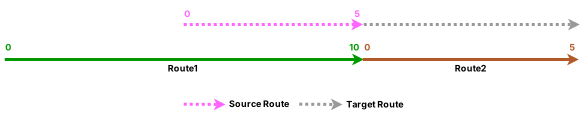
The following table provides details about the routes before reassignment:
| Route Name | From Date | To Date | From Measure | To Measure |
|---|---|---|---|---|
| Route1 | 1/1/2000 | <Null> | 0 | 10 |
| Route2 | 1/1/2000 | <Null> | 0 | 5 |
Routes after reassignment
The following diagram shows the routes after reassignment:

The following table provides details about the routes after reassignment:
| Route Name | From Date | To Date | From Measure | To Measure |
|---|---|---|---|---|
| Route1 | 1/1/2000 | 1/1/2005 | 0 | 10 |
| Route1 | 1/1/2005 | <Null> | 0 | 5 |
| Route2 | 1/1/2000 | 1/1/2005 | 0 | 5 |
| Route2 | 1/1/2005 | <Null> | 0 | 10 |
Events before reassignment
The following diagram shows the routes and events before reassignment:
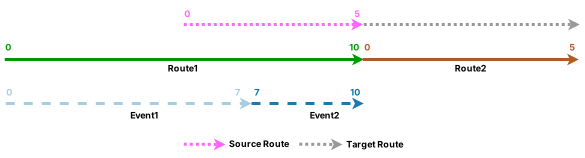
The following table provides details about the events before reassignment:
| Event | Route Name | From Date | To Date | From Measure | To Measure |
|---|---|---|---|---|---|
| Event1 | Route1 | 1/1/2000 | <Null> | 0 | 7 |
| Event2 | Route1 | 1/1/2000 | <Null> | 7 | 10 |
The following sections detail how event behavior rules are enforced after running the Apply Event Behaviors tool under this route reassignment scenario.
Stay Put event behavior
Although the geographic location of the event outside the reassign region is maintained, the measures can change. The event can also split if it crosses the reassign region. Portions in the reassign region are retired.
The reassignment described above has the following effects:
Event 1 was partially in the edit section. It is retired on the date of reassignment, and a new event is created on the nonimpacted portion with the reassignment date as the From Date. The To Measure is changed to accommodate the new ending measure 5 of Route 1.
Event 2 is retired on the date of reassignment because it fell entirely within the edit section.
The following diagram shows the routes and events after reassignment:

Note:
The retired event is not drawn in the previous diagram.
The following table provides details about the events after reassignment when Stay Put is the configured event behavior:
| Event | Route Name | From Date | To Date | From Measure | To Measure | Location Error |
|---|---|---|---|---|---|---|
| Event1 | Route1 | 1/1/2000 | 1/1/2005 | 0 | 7 | No Error |
| Event1 | Route1 | 1/1/2005 | <Null> | 0 | 5 | No Error |
| Event2 | Route1 | 1/1/2000 | 1/1/2005 | 7 | 10 | No Error |
Move event behavior
The measures of the event stay the same, but the geographic location can change.
The reassignment described above has the following effects:
Event 1 was partially in the edit section. It is retired on the date of reassignment, and a new event with the reassignment date as the start date is created on the nonimpacted portion. Because the measures do not change for the Move behavior, there is a location error for the end measure because that measure 7 no longer exists on Route 1.
Event 2 is retired on the date of reassignment since it fell within the edit section. From the date of reassignment, a new event is created. Because the measures remain the same, the newly produced event receives the location error because both its start and end measures cannot be found on Route 1.
The following diagram shows the routes and events after reassignment:

The following table provides details about the events after reassignment when Move is the configured event behavior:
| Event | Route Name | From Date | To Date | From Measure | To Measure | Location Error |
|---|---|---|---|---|---|---|
| Event1 | Route1 | 1/1/2000 | 1/1/2005 | 0 | 7 | No Error |
| Event2 | Route1 | 1/1/2000 | 1/1/2005 | 7 | 10 | No Error |
| Event1 | Route1 | 1/1/2005 | <Null> | 0 | 7 | Partial Match For The To Measure |
| Event2 | Route1 | 1/1/2005 | <Null> | 7 | 10 | Measure Extent Out of Route Measure Range |
Note:
The new Event 2 exists after the Apply Event Behaviors tool is run but has no shape.
Retire event behavior
The Retire event behavior retires events that intersect the reassignment region.
Event 1 was present in the edit section; it is retired on the date of reassignment.
Event 2 was present in the edit section; it is retired on the date of reassignment.
The following diagram shows the routes and events after reassignment:

The following table provides details about the events after reassignment when Retire is the configured event behavior:
| Event | Route Name | From Date | To Date | From Measure | To Measure | Location Error |
|---|---|---|---|---|---|---|
| Event1 | Route1 | 1/1/2000 | 1/1/2005 | 0 | 7 | No Error |
| Event2 | Route1 | 1/1/2000 | 1/1/2005 | 7 | 10 | No Error |
Snap event behavior
Although the event maintains its geographic location by snapping to the route that it was reassigned to, the measures can change. The event can also split if it crosses the reassign region.
The reassignment described above has the following effects:
Event 1 was partially in the edit section. It is retired on the date of reassignment, and a new event with the reassignment date as the From Date is created on the nonimpacted portion of Route 1.
Part of Event 1 that was in the impacted portion is snapped to the new route with the new measures underlying on Route 2. It gets its From Date from the date of reassignment.
Event 2 is retired on the date of reassignment since it fell within the edit section. From the date of reassignment, a new event is created snapped to the route with the new measures underlying on Route 2. It gets its From Date from the date of reassignment.
The following diagram shows the routes and events after reassignment:

The following table provides details about the events after reassignment when Snap is the configured event behavior:
| Event | Route Name | From Date | To Date | From Measure | To Measure | Location Error |
|---|---|---|---|---|---|---|
| Event1 | Route1 | 1/1/2000 | 1/1/2005 | 0 | 7 | No Error |
| Event1 | Route1 | 1/1/2005 | <Null> | 0 | 5 | No Error |
| Event1 | Route2 | 1/1/2005 | <Null> | 0 | 2 | No Error |
| Event2 | Route1 | 1/1/2000 | 1/1/2005 | 7 | 10 | No Error |
| Event2 | Route2 | 1/1/2005 | <Null> | 2 | 5 | No Error |
Detailed behavior results on routes in a line network with events that span routes
In this example, there are four routes on the same line and the routes are active from 1/1/2000. The reassignment occurs on 1/1/2005, merging the entire Route 3 into Route 4. Recalibrate route downstream is checked. The following graphics and tables demonstrate the route information before and after the reassignment.
Routes before reassignment
The following diagram shows the routes before reassignment:
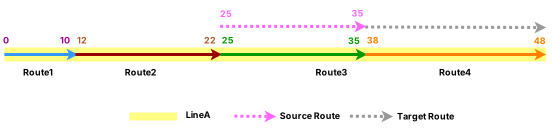
The following table provides details about the routes before reassignment:
| Route Name | Line Name | Line Order | From Date | To Date | From Measure | To Measure |
|---|---|---|---|---|---|---|
| Route1 | LineA | 100 | 1/1/2000 | <Null> | 0 | 10 |
| Route2 | LineA | 200 | 1/1/2000 | <Null> | 12 | 22 |
| Route3 | LineA | 300 | 1/1/2000 | <Null> | 25 | 35 |
| Route4 | LineA | 400 | 1/1/2000 | <Null> | 38 | 48 |
Routes after reassignment
The following diagram shows the routes after reassignment:

The following table provides details about the routes after reassignment:
| Route Name | Line Name | Line Order | From Date | To Date | From Measure | To Measure |
|---|---|---|---|---|---|---|
| Route1 | LineA | 100 | 1/1/2000 | <Null> | 0 | 10 |
| Route2 | LineA | 200 | 1/1/2000 | <Null> | 12 | 22 |
| Route3 | LineA | 300 | 1/1/2000 | 1/1/2005 | 25 | 35 |
| Route4 | LineA | 400 | 1/1/2000 | 1/1/2005 | 38 | 48 |
| Route4 | LineA | 300 | 1/1/2005 | <Null> | 25 | 45 |
Events before reassignment
The following diagram shows the routes and event before reassignment:
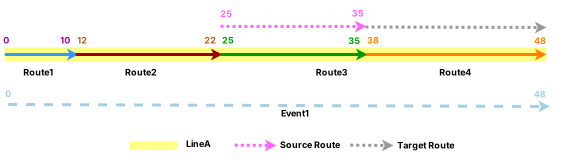
The following table provides details about the event before reassignment:
| Event ID | From Date | To Date | From Route Name | To Route Name | From Measure | To Measure |
|---|---|---|---|---|---|---|
| Event1 | 1/1/2000 | <Null> | Route1 | Route4 | 0 | 48 |
The following sections detail how event behavior rules are enforced when routes on a line in a line network are reassigned.
Stay Put event behavior
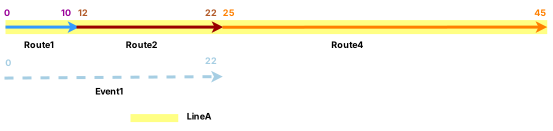
After the reassignment described above, Event 1 falls in the edit section. It is retired on the date of reassignment, and a new event with the reassignment date as the From Date is created. The new event is located only on Route 1 and Route 2 that were not impacted by the edit.
The following diagram shows the routes and events after reassignment:
Note:
The retired event is not drawn in the previous diagram.
The following table provides details about the events after reassignment when Stay Put is the configured event behavior:
| Event | From Route Name | To Route Name | From Date | To Date | From Measure | To Measure | Location Error |
|---|---|---|---|---|---|---|---|
| Event1 | Route1 | Route4 | 1/1/2000 | 1/1/2005 | 0 | 48 | No Error |
| Event1 | Route1 | Route2 | 1/1/2005 | <Null> | 0 | 22 | No Error |
Move event behavior
After the reassignment described above, Event 1 was partially in the edit section. It is retired on the date of reassignment, and a new event with the reassignment date as the From Date is created. The Move behavior does not allow changing the From and To Route IDs or measures of the event. There is a location error for the To Measure because that measure 48 no longer exists on Route 4.
The following diagram shows the routes and events after reassignment:
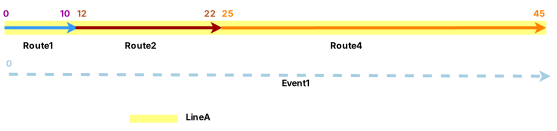
The following table provides details about the events after reassignment when Move is the configured event behavior:
| Event ID | From Route Name | To Route Name | From Date | To Date | From Measure | To Measure | Location Error |
|---|---|---|---|---|---|---|---|
| Event1 | Route1 | Route4 | 1/1/2000 | 1/1/2005 | 0 | 48 | No Error |
| Event1 | Route1 | Route4 | 1/1/2005 | <Null> | 0 | 48 | Partial Match For The To Measure |
Retire event behavior
The Retire event behavior retires events that intersect the reassignment region. Event 1 was present in the edit section; it is retired on the date of reassignment.
The following diagram shows the routes and events after reassignment:
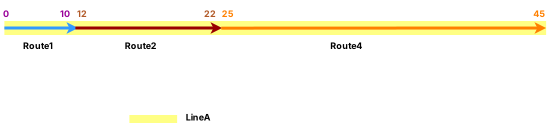
The following table provides details about the events after reassignment when Retire is the configured event behavior:
| Event | From Route Name | To Route Name | From Date | To Date | From Measure | To Measure | Location Error |
|---|---|---|---|---|---|---|---|
| Event1 | Route1 | Route4 | 1/1/2000 | 1/1/2005 | 0 | 48 | No Error |
Snap event behavior
After the reassignment described above, Event 1 was present in the edit section. It is retired on the date of reassignment, and a new event with the reassignment date as the From Date is created on the new routes with the new underlying measures to maintain its geographic location.
The following diagram shows the routes and events after reassignment:
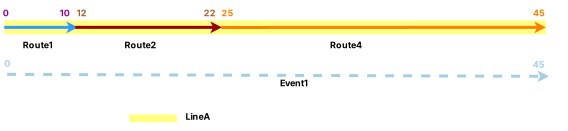
The following table provides details about the events after reassignment when Snap is the configured event behavior:
| Event | From Date | To Date | From Route Name | To Route Name | From Measure | To Measure | Location Error |
|---|---|---|---|---|---|---|---|
| Event1 | 1/1/2000 | 1/1/2005 | Route1 | Route4 | 0 | 48 | No Error |
| Event1 | 1/1/2005 | <Null> | Route1 | Route4 | 0 | 45 | No Error |