Event behavior
 Available with the Linear Referencing license.
Events are located along a route in a linear referencing system (LRS). Route edit activities—such as extension, realignment, reassignment, retirement, reversal, cartographic realignment, and calibration—directly affect how the LRS locates and renders events on a map. A change to an event's measure or geographic location, or both, resulting from a route edit is called event behavior.
ArcGIS Linear Referencing keeps event measures and geographic location (x,y) in alignment with route edits. You can configure event behavior rules for an individual event layer to define how the tool updates event measures and shapes for each type of route edit.
In the following example, a portion of Route 1 is retired. This edit activity affects Event 1 according to the event layer's configured event behavior.

After the route is retired, the event is updated using event behavior rules, which are set at the event layer level.

Types of event behavior rules
After you edit a route, event behavior rules apply to the events. By configuring event behavior rules at the layer level, you can specify how the event responds when the route changes: preserve location, preserve measure, or maintain referent location.
The following event behaviors are supported:
| Event behavior rule | Description |
|---|---|
| Stay Put | Preserves the geographic location of the event; measures can change |
| Move | Preserves the measure or measures of the event; geographic location can change |
| Retire | Preserves both measure and geographic location; event is retired |
| Snap | Preserves the location of an event by snapping the event to a reassigned or abandoned route; measure or measures can change |
| Cover | Changes both measure and geographic location to make the event go across the entire route |
| Honor Route Measure | Preserves the measure of the event or changes the measure proportionally to the route measure change |
| Honor Referent Location | Changes both measure and geographic location to maintain the referent location of the event using a persistent offset value |
To understand how each event behavior rule updates events for a specific route edit type, see the following:
Configuration of event behavior rules
The default event behavior rules are set during the event registration process when running either the Create LRS Event or the Create LRS Event From Existing Dataset tool.
The following event behavior rules are set by default:
| Activity | Rule |
|---|---|
| Calibrate Route | Stay Put |
| Retire Route | Stay Put |
| Extend Route | Stay Put |
| Reassign Route | Stay Put |
| Realign Route | Stay Put |
| Reverse Route | Stay Put |
| Carto Realign Route | Honor Route Measure |
You can review configured event behaviors by viewing the LRS event properties. Use the Modify Event Behavior Rules tool to modify the event behavior rules.
Note:
When you check the Recalibrate route downstream option during route editing, the tool applies the event behavior for route calibration to downstream sections.
Event behavior processing
To apply event behaviors after route edits, run the Apply Event Behaviors tool against the LRS Network. This tool processes event behaviors for all event feature classes registered to the LRS Network.
You do not need to run the Apply Event Behaviors tool after each route edit activity. You can schedule it to run based on your business requirements. It only processes event behaviors for those routes that have been edited but not yet processed.
Event behaviors for events that span routes on a line network
ArcGIS Linear Referencing supports events that span routes when those routes are on the same line in a line network. In cases where an event spans multiple routes on the same line, route editing impacts events on that line. The impact that your edits have on events that span routes depends on the configured event behavior.
For example, in the following diagram, route editing affects both events once event behaviors are applied.
Route 1, Route 2, Route 3, and Route 4 are part of the same line. Event 1 spans Route 1 and ends in Route 3, while Event 2 starts in Route 3 and ends in Route 4. A portion of Route 2 and Route 3 is retired from measures 18 to 32.
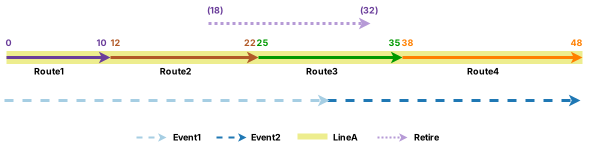
Once event behaviors are updated, the result of the route edit affects both Event 1 and Event 2. In the following example, Stay Put has been applied.
