Event behavior for route realignment
 Available with the Linear Referencing license.
When you realign a route, events are impacted in the edit activity area, as well as upstream and downstream of the realignment, depending on the configured event behavior for each event layer.
Note:
Events are not updated until you run the Apply Event Behaviors tool after route edits. If conflict prevention is enabled, you are prompted to run the Apply Event Behaviors tool before posting to the default version.
When you check the Recalibrate route downstream option during route editing, the tool applies the event behavior for route calibration to downstream sections. You can review configured event behaviors by viewing the LRS event properties.
The following sections describe route realignment and the corresponding event behaviors.
Route realignment scenario
Use the Realign Route tool to realign a single route or several adjoining routes that are part of the same line. For a line network, you can reassign the route segments in the realignment area to abandoned routes.
Refer to the Route realignment with abandonment scenarios in a line network with spanning events section for details.
Refer to the Realign with abandonment scenario in a line network with spanning events with Stay Put event behavior section for details.
Upstream and downstream sections
Route editing impacts upstream and downstream sections differently.
The following diagram illustrates the upstream and downstream sections for the route realignment scenario:

The following table provides more information about how events are impacted by a realignment depending on the configured event behavior:
| Behavior | Events upstream realignment | Events intersecting realignment | Events downstream realignment |
|---|---|---|---|
| Stay Put | No action. | Retire event; line events crossing the edit section are split and the original event is retired. | If route calibration is changed, the calibrate event behavior is applied; otherwise, no action is taken. |
| Move | No action. | Shape is regenerated to a new location of route measures. | If route calibration is changed, the calibrate event behavior is applied; otherwise, no action is taken. |
| Retire | No action. | Retire event. | If route calibration is changed, the calibrate event behavior is applied; otherwise, no action is taken. |
| Cover | No action. | Retire event; line events crossing the edit section are not split and are proportionally moved to new route locations | If route calibration is changed, the calibrate event behavior is applied; otherwise, no action is taken. |
| Snap | No action. | Retire event; the new event is snapped to a concurrent route if one exists. | If route calibration is changed, the calibrate event behavior is applied; otherwise, no action is taken. |
Note:
The network can contain events that span routes in a line network. The behaviors are still applied in the same manner.
Because the LRS is time aware, edit activities, such as realigning a route, cause time slices for routes and events.
Route realignment results
In this example, Route 1 is active from 1/1/2000. The realignment is set to occur on 1/1/2005, where the middle of Route 1 is rerouted to a new location with the Recalibrate route downstream check box unchecked. The diagrams and tables below demonstrate the route information before and after the realignment.
In this example, Route 1 is active from 1/1/2000. The realignment is set to occur on 1/1/2005, where the middle of Route 1 is rerouted to a new location with the Recalibrate route downstream check box checked. The diagrams and tables below demonstrate the route information before and after the realignment.
Note:
In route realignment, you can provide new measures to the realigned portion of a route.
When working with a nonline network with the Recalibrate route downstream check box unchecked, the provided To Measure must be smaller than the measure of the nearest calibration point downstream for the route to remain monotonic. Check the Recalibrate route downstream check box if the end measure of the realignment must exceed the measure of the nearest calibration point downstream.
When working with a line network, the values of provided measures and the Recalibrate route downstream option determine whether new routes will be created on the line of the realigned route.
Refer to the Realign routes and Event behavior for route calibration topics for more information.
Route before realignment
The following diagram shows the route before realignment:

The following table provides details about the route before realignment:
| Route Name | From Date | To Date | From Measure | To Measure |
|---|---|---|---|---|
| Route1 | 1/1/2000 | <Null> | 0 | 20 |
| Route ID | From Date | To Date | From Measure | To Measure |
|---|---|---|---|---|
| Route1 | 1/1/2000 | <Null> | 0 | 20 |
Route after realignment
In this scenario, Route 1 has an updated measure at the end of realignment. The new measure is 18 and is smaller than the measure of the nearest downstream calibration point (20), so Route 1 stays monotonic and is recalibrated between measure 6 to 20 with the Recalibrate route downstream check box unchecked. The end measure of Route 1 has not changed.
The following diagram shows the route after realignment:


The following table provides details about the route after realignment:
| Route Name | From Date | To Date | From Measure | To Measure |
|---|---|---|---|---|
| Route1 | 1/1/2000 | 1/1/2005 | 0 | 20 |
| Route1 | 1/1/2005 | <Null> | 0 | 20 |
| Route ID | From Date | To Date | From Measure | To Measure |
|---|---|---|---|---|
| Route1 | 1/1/2000 | 1/1/2005 | 0 | 20 |
| Route1 | 1/1/2005 | <Null> | 0 | 24 |
Events before route realignment
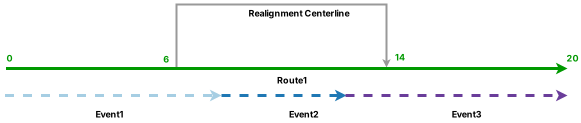
Three events are on Route 1 and all of them have a start date of 1/1/2000. The following diagram shows the route and events before realignment:
The following table provides details about the events before realignment:
| Event | Route Name | From Date | To Date | From Measure | To Measure |
|---|---|---|---|---|---|
| Event1 | Route1 | 1/1/2000 | <Null> | 0 | 8 |
| Event2 | Route1 | 1/1/2000 | <Null> | 8 | 12 |
| Event3 | Route1 | 1/1/2000 | <Null> | 12 | 20 |
| Event | Route ID | From Date | To Date | From Measure | To Measure |
|---|---|---|---|---|---|
| Event1 | Route1 | 1/1/2000 | <Null> | 0 | 8 |
| Event2 | Route1 | 1/1/2000 | <Null> | 8 | 12 |
| Event3 | Route1 | 1/1/2000 | <Null> | 12 | 20 |
The following sections describe how event behavior rules are enforced after running the Apply Event Behaviors tool under this route realignment scenario.
Stay Put event behavior
Although the geographic location of the event is maintained, the measures can change. The event can also split if it crosses the realign region. Portions of events in the realign region are retired.
The following table shows the edit activities involved in the route edit and their corresponding event behaviors:
| Edit activity | Event behavior |
|---|---|
| Realign | Stay Put |
| Calibrate | Stay Put |
Note:
Although the Recalibrate route downstream check box is not checked, the route is recalibrated from the beginning of realignment to the nearest calibration point downstream. The calibrate event behavior is applied to events in the affected route section.
Note:
For any route edit in which the Recalibrate route downstream check box is checked, any portion of the route downstream of the edited section is recalibrated. The calibrate event behavior is applied in these recalibrated sections.
The route realignment described above has the following effects:
Event 1 is retired on the date of realignment because part of it is in the edit section. A new event is created on the postrealignment route with the realignment date as the start date. The start measure changes to 0 and the end measure changes to 6 to accommodate the new measures of Route 1.
Event 2 is retired on the date of realignment because it is completely within the edit section.
Event 3 is retired on the date of realignment because part of it is in the edit section. A new event is created on the postrealignment route with the realignment date as the starting date. The start measure value changes to 18 and the end measure value changes to 20 to accommodate the new measures of Route 1.
Event 3 is retired on the date of realignment because part of it is in the edit section. A new event is created on the postrealignment route with the realignment date as the starting date. The start measure value changes to 18 and the end measure value changes to 24 to accommodate the new measures of Route 1.
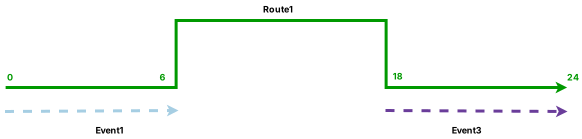
The following diagram shows the route and events after realignment:

Note:
The retired event is not drawn in the diagram above.
The following table provides details about the events after realignment:
| Event | Route Name | From Date | To Date | From Measure | To Measure | Location Error |
|---|---|---|---|---|---|---|
| Event1 | Route1 | 1/1/2000 | 1/1/2005 | 0 | 8 | No Error |
| Event1 | Route1 | 1/1/2005 | <Null> | 0 | 6 | No Error |
| Event2 | Route1 | 1/1/2000 | 1/1/2005 | 8 | 12 | No Error |
| Event3 | Route1 | 1/1/2000 | 1/1/2005 | 12 | 20 | No Error |
| Event3 | Route1 | 1/1/2005 | <Null> | 18 | 20 | No Error |
| Event | Route ID | From Date | To Date | From Measure | To Measure | Location Error |
|---|---|---|---|---|---|---|
| Event1 | Route1 | 1/1/2000 | 1/1/2005 | 0 | 8 | No Error |
| Event1 | Route1 | 1/1/2005 | <Null> | 0 | 6 | No Error |
| Event2 | Route1 | 1/1/2000 | 1/1/2005 | 8 | 12 | No Error |
| Event3 | Route1 | 1/1/2000 | 1/1/2005 | 12 | 20 | No Error |
| Event3 | Route1 | 1/1/2005 | <Null> | 18 | 24 | No Error |
Move event behavior
Although the measures of the event are maintained, the geographic location can change.
The following table shows the edit activities involved in the route edit and their corresponding event behaviors:
| Edit activity | Event behavior |
|---|---|
| Realign | Move |
| Calibrate | Stay Put |
The route realignment described above has the following effects:
Event 1 is retired on the date of realignment because part of it is in the edit section. A new event is created on the postrealignment route with the realignment date as the starting date. Because the measures do not change for the Move behavior, the event moves to the new location of Route 1 to maintain its original start and end measure values of 0 to 8.
Event 2 is retired on the date of realignment because it is completely in the edit section. A new event is created on the postrealignment route with the realignment date as the starting date. Because the measures do not change for the Move behavior, the event moves to the new location of Route 1 to maintain its original start and end measure values of 8 to 12.
Event 3 is retired on the date of realignment because part of it is in the edit section. A new event is created on the postrealignment route with the realignment date as the starting date. Because the measures do not change for the Move behavior, the event moves to the new location of Route 1 to maintain its original start and end measure values of 12 to 20.
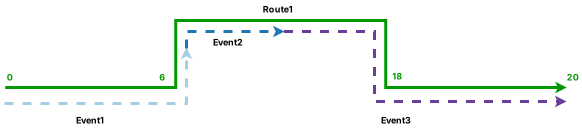
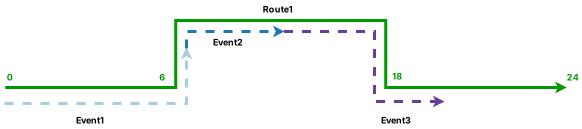
The following diagram shows the route and events after realignment:
The following table provides details about the events after realignment:
| Event | Route Name | From Date | To Date | From Measure | To Measure | Location Error |
|---|---|---|---|---|---|---|
| Event1 | Route1 | 1/1/2000 | 1/1/2005 | 0 | 8 | No Error |
| Event1 | Route1 | 1/1/2005 | <Null> | 0 | 8 | No Error |
| Event2 | Route1 | 1/1/2000 | 1/1/2005 | 8 | 12 | No Error |
| Event2 | Route1 | 1/1/2005 | <Null> | 8 | 12 | No Error |
| Event3 | Route1 | 1/1/2000 | 1/1/2005 | 12 | 20 | No Error |
| Event3 | Route1 | 1/1/2005 | <Null> | 12 | 20 | No Error |
| Event | Route ID | From Date | To Date | From Measure | To Measure | Location Error |
|---|---|---|---|---|---|---|
| Event1 | Route1 | 1/1/2000 | 1/1/2005 | 0 | 8 | No Error |
| Event1 | Route1 | 1/1/2005 | <Null> | 0 | 8 | No Error |
| Event2 | Route1 | 1/1/2000 | 1/1/2005 | 8 | 12 | No Error |
| Event2 | Route1 | 1/1/2005 | <Null> | 8 | 12 | No Error |
| Event3 | Route1 | 1/1/2000 | 1/1/2005 | 12 | 20 | No Error |
| Event3 | Route1 | 1/1/2005 | <Null> | 12 | 20 | No Error |
Retire event behavior
Events intersecting the realignment region are retired. All three events are retired.
The following table shows the edit activities involved in the route edit and their corresponding event behaviors:
| Edit activity | Event behavior |
|---|---|
| Realign | Retire |
| Calibrate | Stay Put |
The route realignment described above has the following effects:
Part of Event 1 was present in the realignment portion; Event 1 is retired on the date of realignment.
Event 2 was completely present in the realignment portion; it is retired on the date of realignment.
Part of Event 3 was present in the realignment portion; Event 3 is retired on the date of realignment.
The following diagram shows the route and events after realignment:


The following table provides details about the events after realignment:
| Event | Route Name | From Date | To Date | From Measure | To Measure | Location Error |
|---|---|---|---|---|---|---|
| Event1 | Route1 | 1/1/2000 | 1/1/2005 | 0 | 8 | No Error |
| Event2 | Route1 | 1/1/2000 | 1/1/2005 | 8 | 12 | No Error |
| Event3 | Route1 | 1/1/2000 | 1/1/2005 | 12 | 20 | No Error |
| Event | Route ID | From Date | To Date | From Measure | To Measure | Location Error |
|---|---|---|---|---|---|---|
| Event1 | Route1 | 1/1/2000 | 1/1/2005 | 0 | 8 | No Error |
| Event2 | Route1 | 1/1/2000 | 1/1/2005 | 8 | 12 | No Error |
| Event3 | Route1 | 1/1/2000 | 1/1/2005 | 12 | 20 | No Error |
Cover event behavior
If the event is in the realignment area, its shape is changed proportionally to cover the realigned portion of the route. The measures of the event are also updated to reflect the new shape.
The following table shows the edit activities involved in the route edit and their corresponding event behaviors:
| Edit activity | Event behavior |
|---|---|
| Realign | Cover |
| Calibrate | Stay Put |
The route realignment described above has the following effects:
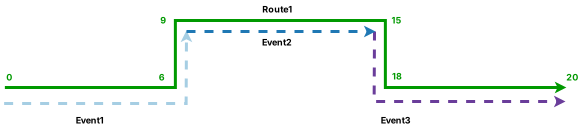
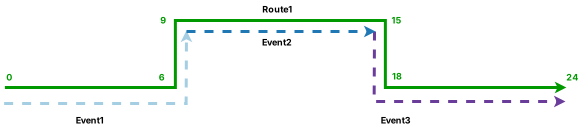
Event 1 is retired on the date of realignment because part of it is in the edit section. A new event is created on the postrealignment route with the realignment date as the starting date. Because part of the event is in the realignment area, this portion of Event 1 is lengthened proportionally to cover the increased length of the route due to realignment. The start and end measure values are updated to 0 to 9.
Event 2 is retired on the date of realignment because it is completely in the edit section. A new event is created on the postrealignment route with the realignment date as the starting date. Because the event is located within the realignment area, the entire event is lengthened proportionally to cover the increased length of the route due to realignment. The start and end measure values are updated to 9 to 15.
Event 3 is retired on the date of realignment because part of it is in the edit section. A new event is created on the postrealignment route with the realignment date as the starting date. Because part of the event is in the realignment area, this portion of Event 3 is lengthened proportionally to cover the increased length of the route due to realignment. The start and end measure values are updated to 15 to 20.
Event 3 is retired on the date of realignment because part of it is in the edit section. A new event is created on the postrealignment route with the realignment date as the starting date. Because part of the event is in the realignment area, this portion of Event 3 is lengthened proportionally to cover the increased length of the route due to realignment. The start and end measure values are updated to 15 to 24.
The following diagram shows the route and events after realignment:
The following table provides details about the events after realignment:
| Event | Route Name | From Date | To Date | From Measure | To Measure | Location Error |
|---|---|---|---|---|---|---|
| Event1 | Route1 | 1/1/2000 | 1/1/2005 | 0 | 8 | No Error |
| Event1 | Route1 | 1/1/2005 | <Null> | 0 | 9 | No Error |
| Event2 | Route1 | 1/1/2000 | 1/1/2005 | 8 | 12 | No Error |
| Event2 | Route1 | 1/1/2005 | <Null> | 9 | 15 | No Error |
| Event3 | Route1 | 1/1/2000 | 1/1/2005 | 12 | 20 | No Error |
| Event3 | Route1 | 1/1/2005 | <Null> | 15 | 20 | No Error |
| Event | Route ID | From Date | To Date | From Measure | To Measure | Location Error |
|---|---|---|---|---|---|---|
| Event1 | Route1 | 1/1/2000 | 1/1/2005 | 0 | 8 | No Error |
| Event1 | Route1 | 1/1/2005 | <Null> | 0 | 9 | No Error |
| Event2 | Route1 | 1/1/2000 | 1/1/2005 | 8 | 12 | No Error |
| Event2 | Route1 | 1/1/2005 | <Null> | 9 | 15 | No Error |
| Event3 | Route1 | 1/1/2000 | 1/1/2005 | 12 | 20 | No Error |
| Event3 | Route1 | 1/1/2005 | <Null> | 15 | 24 | No Error |
Snap event behavior
Although the geographic location of the event is maintained by snapping to the new route location of realignment, the measures can change. The event can also split if it crosses the realign region where concurrent routes exist.
In this example, Route 2 is concurrent with Route 1. Route 2 is in the reverse direction and has the start and end measure values of 0 to 20.
Note:
For more examples of concurrent route scenarios, refer to the Detailed route realignment event behaviors with concurrent routes section.
The following table shows the edit activities involved in the route edit and their corresponding event behaviors:
| Edit activity | Event behavior |
|---|---|
| Realign | Snap |
| Calibrate | Stay Put |
The route realignment described above has the following effects:
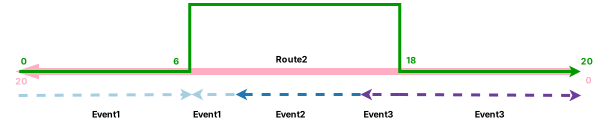
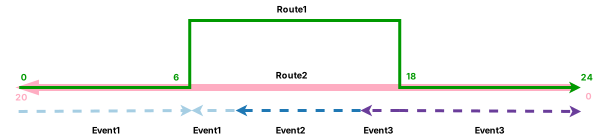
Event 1 is retired on the date of realignment because part of it is in the edit section. It then splits into two event records on the postrealignment routes with the realignment date as the starting date. This is because a concurrent route exists in the realignment section, and the portion of Event 1 in the realignment section snaps to Route 2, the concurrent route, after realignment. It is also reversed to accommodate the direction of Route 2. As a result, Event 1 splits into two pieces to maintain its geographic location. The first event record has the start and end measure values of 0 to 6 on Route 1. The second event record snaps to Route 2 and has the start and end measure values of 12 to 14 on Route 2.
Event 2 is retired on the date of reassignment because it is completely within the edit section. As a concurrent route exists in the realignment section, Event 2 snaps to Route 2, the concurrent route, after realignment. It is also reversed to accommodate the direction of Route 2. The new event record has the realignment date as the starting date. The new start and end measure values of Event 2 become 8 to 12 on Route 2 to maintain the geographic location of Event 2.
Event 3 is retired on the date of realignment because part of it is in the edit section. It then splits into two event records on the postrealignment routes with the realignment date as the starting date. This is because a concurrent route exists in the realignment section, and the portion of Event 3 in the realignment section snaps to Route 2, the concurrent route, after realignment. It is also reversed to accommodate the direction of Route 2. As a result, Event 3 splits into two pieces to maintain its geographic location. The first event record has the start and end measure values of 18 to 20 on Route 1. The second event record snaps to Route 2 and has the start and end measure values of 6 to 8 on Route 2.
Event 3 is retired on the date of realignment because part of it is in the edit section. It then splits into two event records on the postrealignment routes with the realignment date as the starting date. This is because a concurrent route exists in the realignment section, and the portion of Event 3 in the realignment section snaps to Route 2, the concurrent route, after realignment. It is also reversed to accommodate the direction of Route 2. As a result, Event 3 splits into two pieces to maintain its geographic location. The first event record has the start and end measure values of 18 to 24 on Route 1. The second event record snaps to Route 2 and has the start and end measure values of 6 to 8 on Route 2.
The following diagram shows the route and events after realignment:
The following table provides details about the events after realignment:
| Event | Route Name | From Date | To Date | From Measure | To Measure | Location Error |
|---|---|---|---|---|---|---|
| Event1 | Route1 | 1/1/2000 | 1/1/2005 | 0 | 8 | No Error |
| Event1 | Route1 | 1/1/2005 | <Null> | 0 | 6 | No Error |
| Event1 | Route2 | 1/1/2005 | <Null> | 12 | 14 | No Error |
| Event2 | Route1 | 1/1/2000 | 1/1/2005 | 8 | 12 | No Error |
| Event2 | Route2 | 1/1/2005 | <Null> | 8 | 12 | No Error |
| Event3 | Route1 | 1/1/2000 | 1/1/2005 | 12 | 20 | No Error |
| Event3 | Route1 | 1/1/2005 | <Null> | 18 | 20 | No Error |
| Event3 | Route2 | 1/1/2005 | <Null> | 6 | 8 | No Error |
| Event | Route ID | From Date | To Date | From Measure | To Measure | Location Error |
|---|---|---|---|---|---|---|
| Event1 | Route1 | 1/1/2000 | 1/1/2005 | 0 | 8 | No Error |
| Event1 | Route1 | 1/1/2005 | <Null> | 0 | 6 | No Error |
| Event1 | Route2 | 1/1/2005 | <Null> | 12 | 14 | No Error |
| Event2 | Route1 | 1/1/2000 | 1/1/2005 | 8 | 12 | No Error |
| Event2 | Route2 | 1/1/2005 | <Null> | 8 | 12 | No Error |
| Event3 | Route1 | 1/1/2000 | 1/1/2005 | 12 | 20 | No Error |
| Event3 | Route1 | 1/1/2005 | <Null> | 18 | 24 | No Error |
| Event3 | Route2 | 1/1/2005 | <Null> | 6 | 8 | No Error |
Route realignment with abandonment scenarios in a line network with spanning events
If the selected network is a line network, you can reassign the route section in the realignment area to abandoned route, which is a new route on a new line. Any event in the realign section follows the reassign event behavior. If you want the events to transfer to the abandoned route, configure the Snap behavior for the reassign route editing type.
In this example, four routes are on Line A and the routes are active from 1/1/2000. The realignment is set to occur on 1/1/2005 from the middle of Route 2 to the middle of Route 4 and is given the measures of 20 to 45, so a new route is created in the realignment section. The new route is named Route 3A. The Recalibrate route downstream check box is not checked and Reassign to abandoned route is checked in this edit.
Note:
The reassign event behavior is applied before the realign event behavior, so it is important to verify the event feature layer's reassign event behavior configuration before checking the Reassign to abandoned route check box.
The calibrate event behavior is applied before the realign event behavior, so it is important to verify the event feature layer's calibrate event behavior configuration before checking the Recalibrate route downstream check box. Because the Recalibrate route downstream check box is not checked for the scenarios below, calibrate event behavior is not applied.
For other event behaviors for reassignment and calibration, refer to the Event behavior for route reassignment and Event behavior for route calibration topics.
Routes before realignment
The following diagram shows the routes before realignment:
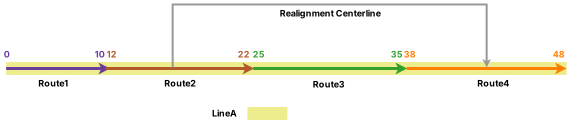
The following table provides details about the routes before realignment:
| Route Name | Line Name | Line Order | From Date | To Date | From Measure | To Measure |
|---|---|---|---|---|---|---|
| Route1 | LineA | 100 | 1/1/2000 | <Null> | 0 | 10 |
| Route2 | LineA | 200 | 1/1/2000 | <Null> | 12 | 22 |
| Route3 | LineA | 300 | 1/1/2000 | <Null> | 25 | 35 |
| Route4 | LineA | 400 | 1/1/2000 | <Null> | 38 | 48 |
Routes after realignment
Because Reassign to abandoned route is checked, the routes and the portions of routes that are within the realign region have become new, abandoned routes on a line named Line B. Route 2_Ab has a start measure of 17 and an end measure of 22. Route 3_Ab has a start measure of 25 and an end measure of 35. Route 4_Ab has a start measure of 38 and an end measure of 43. These measures are from the original measures on the realigned routes.
The following diagram shows the routes after realignment:
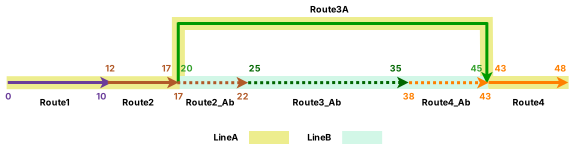
The following table provides details about the routes after realignment:
| Route Name | Line Name | Line Order | From Date | To Date | From Measure | To Measure |
|---|---|---|---|---|---|---|
| Route1 | LineA | 100 | 1/1/2000 | <Null> | 0 | 10 |
| Route2 | LineA | 200 | 1/1/2000 | 1/1/2005 | 12 | 22 |
| Route2 | LineA | 200 | 1/1/2005 | <Null> | 12 | 17 |
| Route3 | LineA | 300 | 1/1/2000 | 1/1/2005 | 25 | 35 |
| Route3A | LineA | 300 | 1/1/2005 | <Null> | 20 | 45 |
| Route4 | LineA | 400 | 1/1/2000 | 1/1/2005 | 38 | 48 |
| Route4 | LineA | 400 | 1/1/2005 | <Null> | 43 | 48 |
| Route2_Ab | LineB | 100 | 1/1/2005 | <Null> | 17 | 22 |
| Route3_Ab | LineB | 200 | 1/1/2005 | <Null> | 25 | 35 |
| Route4_Ab | LineB | 300 | 1/1/2005 | <Null> | 38 | 43 |
Events before route realignment
Two events are on Line A and both of them have a start date of 1/1/2000. The following diagram shows the routes and events before realignment:
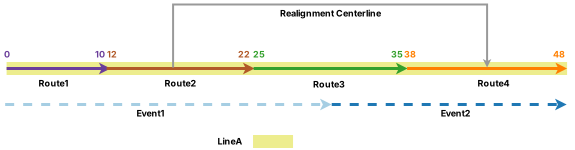
The following table provides details about the events before realignment:
| Event ID | From Date | To Date | From Route Name | To Route Name | From Measure | To Measure |
|---|---|---|---|---|---|---|
| Event1 | 1/1/2000 | <Null> | Route1 | Route3 | 0 | 30 |
| Event2 | 1/1/2000 | <Null> | Route3 | Route4 | 30 | 48 |
The following sections describe how event behavior rules are enforced after running the Apply Event Behaviors tool under this route realignment scenario.
Stay Put event behavior
Although the geographic location of the event is maintained, the measures can change. The event can also split if it crosses the realign region. When Snap is set as the reassign event behavior, the events and portion of events that are within the realign region will snap to the abandoned route to maintain their geographic locations.
The following table shows the edit activities involved in the route edit and their corresponding event behaviors:
| Edit activity | Event behavior |
|---|---|
| Realign | Stay Put |
| Reassign | Snap |
The route realignment described above has the following effects:
Event 1 is retired on the date of realignment because part of it is in the edit section. It then splits into two event records on the postrealignment route with the realignment date as the starting date. As the reassign event behavior is applied before the realign event behavior, the portion of Event 1 that is in the realignment section splits from the original Event 1 and snaps to the abandoned routes. The other portion of Event 1 that stays on Line A is shortened to the length of the left portion of Line A before the realign Stay Put event behavior is applied. When the realign Stay Put event behavior is applied, this event does not need to change its measures to maintain its geographic location. As a result, Event 1 splits into two events. One event stays on Line A with a start measure of 0 on Route 1 and an end measure of 17 on Route 2. The other event snaps to the abandoned routes with a start measure of 17 on Route 2_Ab and an end measure of 30 on Route 3_Ab.
Event 2 is retired on the date of realignment because part of it is in the edit section. It then splits into two event records on the postrealignment route with the realignment date as the starting date. As the reassign event behavior is applied before the realign event behavior, the portion of Event 2 that is in the realignment section splits from the original Event 2 and snaps to the abandoned routes. The other portion of Event 2 that stays on Line A is shortened to the length of the right portion of Line A before the realign Stay Put event behavior is applied. When the realign Stay Put event behavior is applied, this event does not need to change its measures to maintain its geographic location. As a result, Event 2 splits into two events. One event stays on Line A with a start measure of 43 on Route 4 and an end measure of 48 on Route 4. The other event snaps to the abandoned routes with a start measure of 30 on Route 3_Ab and an end measure of 43 on Route 4_Ab.
The following diagram shows the routes and events after realignment:
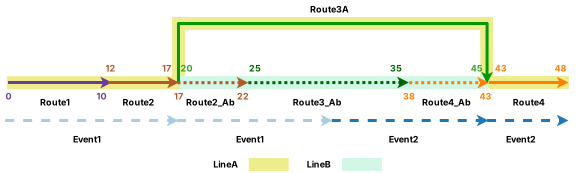
Note:
The retired event is not drawn in the diagram above.
The following table provides details about the events after realignment:
| Event ID | From Date | To Date | From Route Name | To Route Name | From Measure | To Measure | Location Error |
|---|---|---|---|---|---|---|---|
| Event1 | 1/1/2000 | 1/1/2005 | Route1 | Route3 | 0 | 30 | No Error |
| Event1 | 1/1/2005 | <Null> | Route1 | Route2 | 0 | 17 | No Error |
| Event1 | 1/1/2005 | <Null> | Route2_Ab | Route3_Ab | 17 | 30 | No Error |
| Event2 | 1/1/2000 | 1/1/2005 | Route3 | Route4 | 30 | 48 | No Error |
| Event2 | 1/1/2005 | <Null> | Route3_Ab | Route4_Ab | 30 | 43 | No Error |
| Event2 | 1/1/2005 | <Null> | Route4 | Route4 | 43 | 48 | No Error |
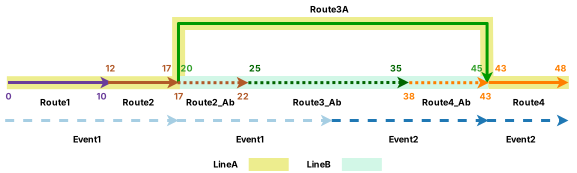
Move event behavior
Although the measures of the event are maintained, the geographic location can change. When the reassign event behavior is set to Snap, the events and portions of events that are within the realign region will snap to the abandoned route to maintain their geographic locations, causing the original events to split.
The following table shows the edit activities involved in the route edit and their corresponding event behaviors:
| Edit activity | Event behavior |
|---|---|
| Realign | Move |
| Reassign | Snap |
The route realignment described above has the following effects:
Event 1 is retired on the date of realignment because part of it is in the edit section. It then splits into two event records on the postrealignment route with the realignment date as the starting date. As the reassign event behavior is applied before the realign event behavior, the portion of Event 1 that is in the realignment section splits from the original Event 1 and snaps to the abandoned routes. The other portion of Event 1 that stays on Line A is shortened to the length of the left portion of Line A before the realign Move event behavior is applied. When the realign Move event behavior is applied, this event does not need to move, as it is not in the edit section. As a result, Event 1 splits into two events. One event stays on Line A with a start measure of 0 on Route 1 and an end measure of 17 on Route 2. The other event snaps to the abandoned routes with a start measure of 17 on Route 2_Ab and an end measure of 30 on Route 3_Ab.
Event 2 is retired on the date of realignment because part of it is in the edit section. It then splits into two event records on the postrealignment route with the realignment date as the starting date. As the reassign event behavior is applied before the realign event behavior, the portion of Event 2 that is in the realignment section splits from the original Event 2 and snaps to the abandoned routes. The other portion of Event 2 that stays on Line A is shortened to the length of the right portion of Line A before the realign Move event behavior is applied. When the realign Move event behavior is applied, this event does not need to move, as it is not in the edit section. As a result, Event 2 splits into two events. One event stays on Line A with a start measure of 43 on Route 4 and an end measure of 48 on Route 4. The other event snaps to the abandoned routes with a start measure of 30 on Route 3_Ab and an end measure of 43 on Route 4_Ab.
The following diagram shows the routes and events after realignment:
The following table provides details about the events after realignment:
| Event ID | From Date | To Date | From Route Name | To Route Name | From Measure | To Measure | Location Error |
|---|---|---|---|---|---|---|---|
| Event1 | 1/1/2000 | 1/1/2005 | Route1 | Route3 | 0 | 30 | No Error |
| Event1 | 1/1/2005 | <Null> | Route1 | Route2 | 0 | 17 | No Error |
| Event1 | 1/1/2005 | <Null> | Route2_Ab | Route3_Ab | 17 | 30 | No Error |
| Event2 | 1/1/2000 | 1/1/2005 | Route3 | Route4 | 30 | 48 | No Error |
| Event2 | 1/1/2005 | <Null> | Route3_Ab | Route4_Ab | 30 | 43 | No Error |
| Event2 | 1/1/2005 | <Null> | Route4 | Route4 | 43 | 48 | No Error |
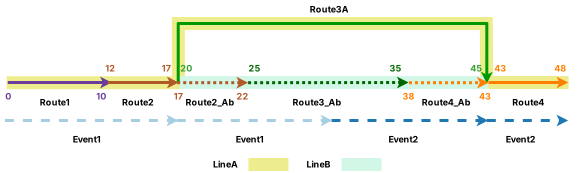
Retire event behavior
Events intersecting the realignment region are retired. When the reassign event behavior is set to Snap, the events and portions of events that are within the realign region will snap to the abandoned route to maintain their geographic locations, causing the original events to split.
The following table shows the edit activities involved in the route edit and their corresponding event behaviors:
| Edit activity | Event behavior |
|---|---|
| Realign | Retire |
| Reassign | Snap |
The route realignment described above has the following effects:
Event 1 is retired on the date of realignment because part of it is in the edit section. It then splits into two event records on the postrealignment route with the realignment date as the starting date. As the reassign event behavior is applied before the realign event behavior, the portion of Event 1 that is in the realignment section splits from the original Event 1 and snaps to the abandoned routes. The other portion of Event 1 that stays on Line A is shortened to the length of the left portion of Line A before the realign Retire event behavior is applied. When the realign Retire event behavior is applied, this event does not need to retire, as it is not in the edit section. As a result, Event 1 splits into two events. One event stays on Line A with a start measure of 0 on Route 1 and an end measure of 17 on Route 2. The other event snaps to the abandoned routes with a start measure of 17 on Route 2_Ab and an end measure of 30 on Route 3_Ab.
Event 2 is retired on the date of realignment because part of it is in the edit section. It then splits into two event records on the postrealignment route with the realignment date as the starting date. As the reassign event behavior is applied before the realign event behavior, the portion of Event 2 that is in the realignment section splits from the original Event 2 and snaps to the abandoned routes. The other portion of Event 2 that stays on Line A is shortened to the length of the right portion of Line A before the realign Retire event behavior is applied. When the realign Retire event behavior is applied, this event does not need to retire, as it is not in the edit section. As a result, Event 2 splits into two events. One event stays on Line A with a start measure of 43 on Route 4 and an end measure of 48 on Route 4. The other event snaps to the abandoned routes with a start measure of 30 on Route 3_Ab and an end measure of 43 on Route 4_Ab.
The following diagram shows the routes and events after realignment:
The following table provides details about the events after realignment:
| Event ID | From Date | To Date | From Route Name | To Route Name | From Measure | To Measure | Location Error |
|---|---|---|---|---|---|---|---|
| Event1 | 1/1/2000 | 1/1/2005 | Route1 | Route3 | 0 | 30 | No Error |
| Event1 | 1/1/2005 | <Null> | Route1 | Route2 | 0 | 17 | No Error |
| Event1 | 1/1/2005 | <Null> | Route2_Ab | Route3_Ab | 17 | 30 | No Error |
| Event2 | 1/1/2000 | 1/1/2005 | Route3 | Route4 | 30 | 48 | No Error |
| Event2 | 1/1/2005 | <Null> | Route3_Ab | Route4_Ab | 30 | 43 | No Error |
| Event2 | 1/1/2005 | <Null> | Route4 | Route4 | 43 | 48 | No Error |
Cover event behavior
If the event is in the realignment area, its shape is changed to cover the realigned portion of the route. The measures of the event are also updated to reflect the new shape.
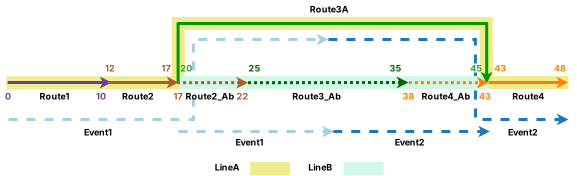
For events with realign cover behavior, reassign event behavior does not cause the events to split. The events and portions of events that are within the realign region and are snapped to the abandoned route, and the original events remain intact and proportionally cover the postrealignment route.
Note:
Use the Cover realign event behavior if the events need to stay on realigned route portions. Cover is the only event behavior that prevents events from splitting by reassigning event behaviors.
The following table shows the edit activities involved in the route edit and their corresponding event behaviors:
| Edit activity | Event behavior |
|---|---|
| Realign | Cover |
| Reassign | Snap |
The route realignment described above has the following effects:
Event 1 is retired on the date of realignment because part of it is in the edit section. It then forms two event records on the postrealignment route with the realignment date as the starting date. As the reassign event behavior is applied before the realign event behavior, the portion of Event 1 that is in the realignment section snaps to the abandoned routes. The other portion of Event 1 that stays on Line A is lengthened proportionally to cover the first half of Route 3A due to realignment. As a result, Event 1 becomes two events. One event stays on Line A with a start measure of 0 on Route 1 and an end measure of 32.5 on Route 3A. The other event snaps to the abandoned routes with a start measure of 17 on Route 2_Ab and an end measure of 30 on Route 3_Ab.
Event 2 is retired on the date of realignment because part of it is in the edit section. It then forms two event records on the postrealignment route with the realignment date as the starting date. As the reassign event behavior is applied before the realign event behavior, the portion of Event 2 that is in the realignment section snaps to the abandoned routes. The other portion of Event 2 that stays on Line A is lengthened proportionally to cover the second half of Route 3A due to realignment. As a result, Event 2 becomes two events. One event stays on Line A with a start measure of 32.5 on Route 3A and an end measure of 48 on Route 4. The other event snaps to the abandoned routes with a start measure of 30 on Route 3_Ab and an end measure of 43 on Route 4_Ab.
The following diagram shows the routes and events after realignment:
The following table provides details about the events after realignment:
| Event ID | From Date | To Date | From Route Name | To Route Name | From Measure | To Measure | Location Error |
|---|---|---|---|---|---|---|---|
| Event1 | 1/1/2000 | 1/1/2005 | Route1 | Route3 | 0 | 30 | No Error |
| Event1 | 1/1/2005 | <Null> | Route1 | Route3A | 0 | 32.5 | No Error |
| Event1 | 1/1/2005 | <Null> | Route2_Ab | Route3_Ab | 17 | 30 | No Error |
| Event2 | 1/1/2000 | 1/1/2005 | Route3 | Route4 | 30 | 48 | No Error |
| Event2 | 1/1/2005 | <Null> | Route3A | Route4 | 32.5 | 48 | No Error |
| Event2 | 1/1/2005 | <Null> | Route3_Ab | Route4_Ab | 30 | 43 | No Error |
Snap event behavior
Although the geographic location of the event is maintained by snapping to the new route location of realignment, the measures can change. The event can also split if it crosses the realign region where concurrent routes exist.
When the reassign event behavior is set to Snap, the events and portions of events that are within the realign region will snap to the abandoned route to maintain their geographic locations, causing the original events to split.
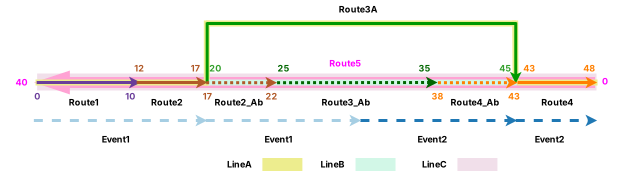
In this example, Route 5 is concurrent with the routes on Line A. Route 5 is on Line C and is in the reverse direction. It has the start measure value of 0 and end measure value of 40.
Note:
When abandoned routes and concurrent routes are both present in the realignment, events with realign and reassign snap event behavior will snap to abandoned routes regardless of how the dominant rules are configured.
The following table shows the edit activities involved in the route edit and their corresponding event behaviors:
| Edit activity | Event behavior |
|---|---|
| Realign | Snap |
| Reassign | Snap |
The route realignment described above has the following effects:
Event 1 is retired on the date of realignment because part of it is in the edit section. It then splits into two event records on the postrealignment route with the realignment date as the starting date. As the reassign event behavior is applied before the realign event behavior, the portion of Event 1 that is in the realignment section splits from the original Event 1 and snaps to the abandoned routes. The other portion of Event 1 that stays on Line A is shortened to the length of the left branch of Line A before the realign Snap event behavior is applied. When the realign Snap event behavior is applied, this event does not need to change its measures to maintain geographic location because it is not in the edit section. As a result, Event 1 splits into two events. One event stays on Line A with a start measure of 0 on Route 1 and an end measure of 17 on Route 2. The other event snaps to the abandoned routes with a start measure of 17 on Route 2_Ab and an end measure of 30 on Route 3_Ab.
Event 2 is retired on the date of realignment because part of it is in the edit section. It then splits into two event records on the postrealignment route with the realignment date as the starting date. As the reassign event behavior is applied before the realign event behavior, the portion of Event 2 that is in the realignment section splits from the original Event 2 and snaps to the abandoned routes. The other portion of Event 2 that stays on Line A is shortened to the length of the right branch of Line A before the realign Snap event behavior is applied. When the realign Snap event behavior is applied, this event does not need to change its measures to maintain geographic location because it is not in the edit section. As a result, Event 2 splits into two events. One event stays on Line A with a start measure of 43 on Route 4 and an end measure of 48 on Route 4. The other event snaps to the abandoned routes with a start measure of 30 on Route 3_Ab and an end measure of 43 on Route 4_Ab.
The following diagram shows the routes and events after realignment:
The following table provides details about the events after realignment:
| Event ID | From Date | To Date | From Route Name | To Route Name | From Measure | To Measure | Location Error |
|---|---|---|---|---|---|---|---|
| Event1 | 1/1/2000 | 1/1/2005 | Route1 | Route3 | 0 | 30 | No Error |
| Event1 | 1/1/2005 | <Null> | Route1 | Route2 | 0 | 17 | No Error |
| Event1 | 1/1/2005 | <Null> | Route2_Ab | Route3_Ab | 17 | 30 | No Error |
| Event2 | 1/1/2000 | 1/1/2005 | Route3 | Route4 | 30 | 48 | No Error |
| Event2 | 1/1/2005 | <Null> | Route3_Ab | Route4_Ab | 30 | 43 | No Error |
| Event2 | 1/1/2005 | <Null> | Route4 | Route4 | 43 | 48 | No Error |
Route realignment in a line network
If the selected network is a line network, you can provide new measures to the route segment in the realignment area. The new measures and the Recalibrate route downstream option determine whether new routes will be created on the line of the realigned route.
In the following example, Route 1 belongs to Line 1 and is active from 1/1/2000. The realignment is set to occur on 1/1/2005, where the middle of Route 1 is rerouted to a new location. The following subsections illustrate different scenarios of realignment measures and recalibration. The diagrams and tables demonstrate the route and event information before the realignment.
Route before realignment
The following diagram shows the route before realignment:

The following table provide details about the route before realignment:
| Route Name | Line Name | Line Order | From Date | To Date | From Measure | To Measure |
|---|---|---|---|---|---|---|
| Route1 | Line1 | 100 | 1/1/2000 | <Null> | 0 | 20 |
Events before realignment
Three events are on Route 1 and all of them have a start date of 1/1/2000. The following diagram shows the route and events before realignment:
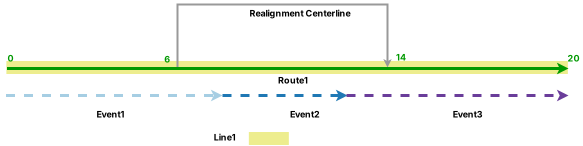
The following table provides details about the events before realignment:
| Event | Route Name | From Date | To Date | From Measure | To Measure |
|---|---|---|---|---|---|
| Event1 | Route1 | 1/1/2000 | <Null> | 0 | 8 |
| Event2 | Route1 | 1/1/2000 | <Null> | 8 | 12 |
| Event3 | Route1 | 1/1/2000 | <Null> | 12 | 20 |
The following sections describe how measures and downstream recalibration play a role in realignment when the Stay Put event behavior is configured.
Note:
In all of the following examples, both the realign event behavior and the calibrate event behavior are set to Stay Put.
The calibrate event behavior is applied before the realign event behavior, so it is important to verify the event feature layer's calibrate event behavior configuration before checking the Recalibrate route downstream check box.
To review other event behaviors for calibration, refer to the Event behavior for route calibration topic.
When events are configured with realign Stay Put behavior, the geographic location of the event is maintained, but the measures can change. The event can also split if it crosses the realign region. Portions of events in the realign region are retired.
Realignment with no new route creation and with downstream recalibration
In this scenario, the Recalibrate route downstream check box is checked. The realignment starts with measure 6 and ends with measure 18 on Route 1, as an additional length of 4 is added due to shape change. The realigned portion of Route 1 does not use new measures, so it can remain monotonically calibrated after realignment, and no new route is created.
The following table shows the edit activities involved in the route edit and their corresponding event behaviors:
| Edit activity | Event behavior |
|---|---|
| Realign | Stay Put |
| Calibrate | Stay Put |
The following diagram shows the route after realignment:
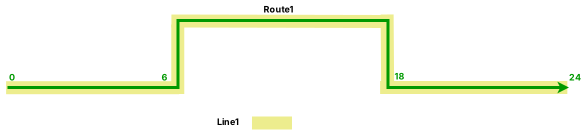
The following table provides details about the route after realignment:
| Route Name | Line Name | Line Order | From Date | To Date | From Measure | To Measure |
|---|---|---|---|---|---|---|
| Route1 | Line1 | 100 | 1/1/2000 | 1/1/2005 | 0 | 20 |
| Route1 | Line1 | 100 | 1/1/2005 | <Null> | 0 | 24 |
The route realignment described above has the following effects:
Event 1 is retired on the date of realignment since part of it is in the edit section. A new event is created on the postrealignment route with the realignment date as the starting date. The start measure changes to 0 and the end measure changes to 6 to accommodate the new measures of Route 1.
Event 2 is retired on the date of realignment since it is completely within the edit section.
Event 3 is retired on the date of realignment since part of it is in the edit section. A new event is created on the postrealignment route with the realignment date as the starting date. The start measure value changes to 18 and the end measure value changes to 24 to accommodate the new measures of Route 1.
The following diagram shows the routes and events after realignment:
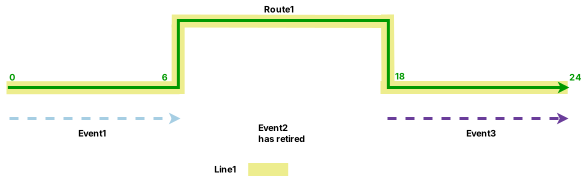
Note:
The retired event is not drawn in the diagram above.
The following table provides details about the events after realignment:
| Event | Route Name | From Date | To Date | From Measure | To Measure | Location Error |
|---|---|---|---|---|---|---|
| Event1 | Route1 | 1/1/2000 | 1/1/2005 | 0 | 8 | No Error |
| Event1 | Route1 | 1/1/2005 | <Null> | 0 | 6 | No Error |
| Event2 | Route1 | 1/1/2000 | 1/1/2005 | 8 | 12 | No Error |
| Event3 | Route1 | 1/1/2000 | 1/1/2005 | 12 | 20 | No Error |
| Event3 | Route1 | 1/1/2005 | <Null> | 18 | 24 | No Error |
Realignment with new route creation and with downstream recalibration
In this scenario, the Recalibrate route downstream check box is checked. The realignment starts with measure 6 and ends with measure 18 on Route 1 as an additional length of 4 is added due to shape change. However, the realigned portion of Route 1 has new measures from 0 to 12. In this case, Route 1 cannot remain monotonically calibrated after realignment, so a new route is created. The new route is named RouteNew.
Since the Recalibrate route downstream check box is checked, RouteNew is recalibrated downstream, and it replaces the original downstream portion of Route 1. The new measures of RouteNew are determined by the length of the realignment.
The following table shows the edit activities involved in the route edit and their corresponding event behaviors:
| Edit activity | Event behavior |
|---|---|
| Realign | Stay Put |
| Calibrate | Stay Put |
The following diagram shows the routes after realignment:
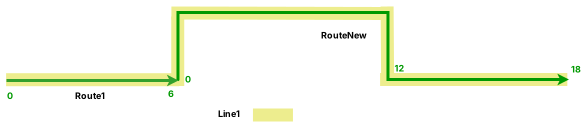
The following tables provide details about the routes after realignment:
| Route Name | Line Name | Line Order | From Date | To Date | From Measure | To Measure |
|---|---|---|---|---|---|---|
| Route1 | Line1 | 100 | 1/1/2000 | 1/1/2005 | 0 | 20 |
| Route1 | Line1 | 100 | 1/1/2005 | <Null> | 0 | 6 |
| RouteNew | Line1 | 200 | 1/1/2005 | <Null> | 0 | 18 |
The route realignment described above has the following effects:
Event 1 is retired on the date of realignment since part of it is in the edit section. A new event is created on the postrealignment Route 1 with the realignment date as the starting date. The start measure value changes to 0 and the end measure value changes to 6 to accommodate the new measures of Route 1.
Event 2 is retired on the date of realignment since it is completely within the edit section.
Event 3 is retired on the date of realignment since part of it is in the edit section. Since RouteNew has replaced Route 1 at the location of Event 3, Event 3 cannot be created when the calibrate Stay Put behavior is applied.
The following diagram shows the routes and events after realignment:
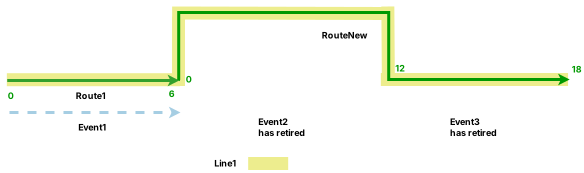
The following table provides details about the events after realignment:
| Event | Route Name | From Date | To Date | From Measure | To Measure | Location Error |
|---|---|---|---|---|---|---|
| Event1 | Route1 | 1/1/2000 | 1/1/2005 | 0 | 8 | No Error |
| Event1 | Route1 | 1/1/2005 | <Null> | 0 | 6 | No Error |
| Event2 | Route1 | 1/1/2000 | 1/1/2005 | 8 | 12 | No Error |
| Event3 | Route1 | 1/1/2000 | 1/1/2005 | 12 | 20 | No Error |
Note:
For events to stay on the routes downstream of the realignment, the routes must not be retired.
Realignment with new route creation and without downstream recalibration
In this scenario, the Recalibrate route downstream check box is not checked. The realignment starts with measure 6 and ends with measure 12 on Route 1. However, the realignment is done using the reverse direction of the chosen centerlines. In this case, Route 1 cannot remain monotonically calibrated after realignment, as the realigned portion is reversed, so a new route is created. The new route is named RouteNew. RouteNew has a start measure of 12, because the realignment starts with measure 12 on Route 1, and an end measure of 24, because the length of the realignment is 12.
Since the Recalibrate route downstream check box is not checked, the right portion of Route 1 has become a new route, Route 1b. Route 1b has a start measure of 12, because the downstream starts with the original measure 12 on Route 1, and an end measure of 18, because the length of the right arm is 6.
The following table shows the edit activity involved in the route edit and its corresponding event behavior:
| Edit activity | Event behavior |
|---|---|
| Realign | Stay Put |
The following diagram shows the routes after realignment:
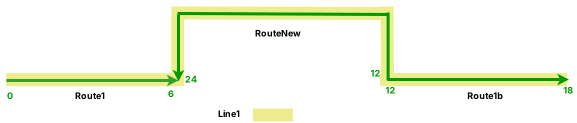
The following table provides details about the routes after realignment:
| Route Name | Line Name | Line Order | From Date | To Date | From Measure | To Measure |
|---|---|---|---|---|---|---|
| Route1 | Line1 | 100 | 1/1/2000 | 1/1/2005 | 0 | 20 |
| Route1 | Line1 | 100 | 1/1/2005 | <Null> | 0 | 6 |
| RouteNew | Line1 | 200 | 1/1/2005 | <Null> | 12 | 24 |
| Route1 | Line1 | 300 | 1/1/2005 | <Null> | 12 | 18 |
The route realignment described above has the following effects:
Event 1 is retired on the date of realignment since part of it is in the edit section. A new event is created on the postrealignment Route 1 with the realignment date as the starting date. The start measure value changes to 0 and the end measure value changes to 6 to accommodate the new measures of Route 1.
Event 2 is retired on the date of realignment since it is completely within the edit section.
Event 3 is retired on the date of realignment since part of it is in the edit section. Since Route 1b has replaced Route 1 at the location of Event 3, Event 3 cannot be created when the calibrate Stay Put behavior is applied.
The following diagram shows the routes and events after realignment:
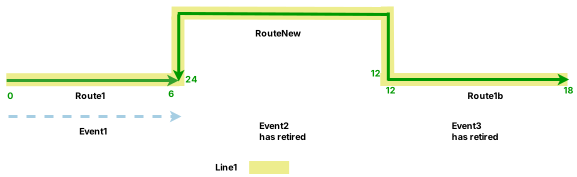
The following table provides details about the events after realignment:
| Event | Route Name | From Date | To Date | From Measure | To Measure | Location Error |
|---|---|---|---|---|---|---|
| Event1 | Route1 | 1/1/2000 | 1/1/2005 | 0 | 8 | No Error |
| Event1 | Route1 | 1/1/2005 | <Null> | 0 | 6 | No Error |
| Event2 | Route1 | 1/1/2000 | 1/1/2005 | 8 | 12 | No Error |
| Event3 | Route1 | 1/1/2000 | 1/1/2005 | 12 | 20 | No Error |
Route realignment in a line network with spanning events
The following sections describe how event behavior rules are enforced that span routes when a route on a line in a line network is realigned.
In this example, four routes are on Line A and the routes are active from 1/1/2000. The realignment is set to occur on 1/1/2005 from the middle of Route 2 to the middle of Route 4. The following subsections illustrate scenarios with different Recalibrate route downstream and Reassign to abandoned route options. In this section, the graphics and tables demonstrate the route and event information before the realignment.
Routes before realignment
The following diagram shows the routes before realignment:
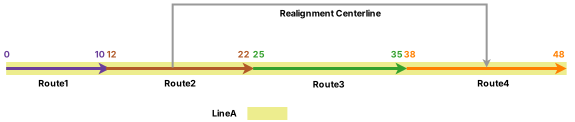
The following table provides details about the routes before realignment:
| Route Name | Line Name | Line Order | From Date | To Date | From Measure | To Measure |
|---|---|---|---|---|---|---|
| Route1 | LineA | 100 | 1/1/2000 | <Null> | 0 | 10 |
| Route2 | LineA | 200 | 1/1/2000 | <Null> | 12 | 22 |
| Route3 | LineA | 300 | 1/1/2000 | <Null> | 25 | 35 |
| Route4 | LineA | 400 | 1/1/2000 | <Null> | 38 | 48 |
Events before route realignment
Two events are on Line A and both of them have a start date of 1/1/2000. The following diagram shows the routes and events before realignment:
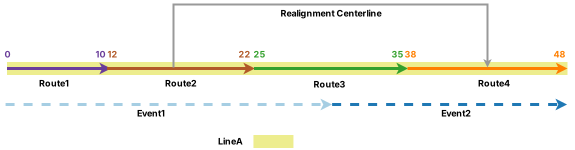
The following table provides details about the events before realignment:
| Event ID | From Date | To Date | From Route Name | To Route Name | From Measure | To Measure |
|---|---|---|---|---|---|---|
| Event1 | 1/1/2000 | <Null> | Route1 | Route3 | 0 | 30 |
| Event2 | 1/1/2000 | <Null> | Route3 | Route4 | 30 | 48 |
The following sections describe how event behavior rules are enforced after running the Apply Event Behaviors tool under scenarios with different Recalibrate route downstream and Reassign to abandoned route options.
Realign with abandonment scenario in a line network with spanning events with Stay Put event behavior
If the selected network is a line network, you can reassign the route portion in the realignment area to the abandoned route, which is a new route on a new line. Any event in the realign section follows the reassign event behavior. If you want the events to transfer to the abandoned route, configure the Snap behavior for the reassign route editing type.
In this example, the events are configured with the realign Stay Put event behavior, reassign Snap event behavior, and calibrate Stay Put event behavior. Both Recalibrate route downstream and Reassign to abandoned route are checked in this edit.
Note:
The reassign event behavior is applied before the realign event behavior, so it is important to verify the event feature layer's reassign event behavior configuration before checking the Reassign to abandoned route check box.
The calibrate event behavior is applied before the realign event behavior, so it is important to verify the event feature layer's calibrate event behavior configuration before checking the Recalibrate route downstream check box.
To explore other event behaviors for reassignment and calibration, refer to the Event behavior for route reassignment and Event behavior for route calibration topics.
Routes after realignment
Since Reassign to abandoned route is checked, the routes and the portions of routes that are within the realign region have become new, abandoned routes on a line named Line B. Route 2_Ab has a start measure of 17 and an end measure of 22. Route 3_Ab has a start measure of 25 and an end measure of 35. Route 4_Ab has a start measure of 38 and an end measure of 43. These measures are from the original measures on the realigned routes.
Route 2 becomes the only route in the realignment area, as the realignment starts on Route 2. Since Recalibrate route downstream is checked, Route 2 is recalibrated downstream, and it retires the original Route 4. The new measures of Route 2 are determined by the length of realignment.
The following table shows the edit activities involved in the route edit and their corresponding event behaviors:
| Edit activity | Event behavior |
|---|---|
| Realign | Stay Put |
| Reassign | Snap |
| Calibrate | Stay Put |
The following diagram shows the routes after realignment:
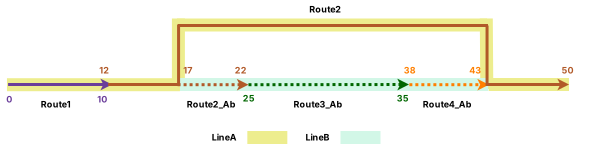
The following table provides details about the routes after realignment:
| Route Name | Line Name | Line Order | From Date | To Date | From Measure | To Measure |
|---|---|---|---|---|---|---|
| Route1 | LineA | 100 | 1/1/2000 | <Null> | 0 | 10 |
| Route2 | LineA | 200 | 1/1/2000 | 1/1/2005 | 12 | 22 |
| Route2 | LineA | 200 | 1/1/2005 | <Null> | 12 | 50 |
| Route3 | LineA | 300 | 1/1/2000 | 1/1/2005 | 25 | 35 |
| Route4 | LineA | 400 | 1/1/2000 | 1/1/2005 | 38 | 48 |
| Route2_Ab | LineB | 100 | 1/1/2005 | <Null> | 17 | 22 |
| Route3_Ab | LineB | 200 | 1/1/2005 | <Null> | 25 | 35 |
| Route4_Ab | LineB | 300 | 1/1/2005 | <Null> | 38 | 43 |
Stay Put event behavior
Although the geographic location of the event is maintained, the measures can change. The event can also split if it crosses the realign region. When Snap is set as the reassign event behavior, the events and portions of events that are within the realign region will snap to the abandoned route to maintain their geographic locations.
The route realignment described above has the following effects:
Event 1 is retired on the date of realignment since part of it is in the edit section. It then splits into two event records on the postrealignment route with the realignment date as the starting date. As the reassign event behavior is applied before the realign event behavior, the portion of Event 1 that is in the realignment section splits from the original Event 1 and snaps to the abandoned routes. The other portion of Event 1 that stays on Line A is shortened to the length of the left portion of Line A before the realign Stay Put event behavior is applied. When the realign Stay Put event behavior is applied, this event does not need to change its measures to maintain its geographic location. As a result, Event 1 splits into two events. One event stays on Line A with a start measure of 0 on Route 1 and an end measure of 17 on Route 2. The other event snaps to the abandoned routes with a start measure of 17 on Route 2_Ab and an end measure of 30 on Route 3_Ab.
Event 2 is retired on the date of realignment because part of it is in the edit section. As the reassign event behavior is applied first, the portion of Event 2 that is in the realignment section splits from the original Event 2 and snaps to the abandoned routes. The other portion of Event 2 that was downstream of realignment cannot be created when the calibrate Stay Put behavior is applied, because Route 2 has replaced Route 4 at this location. As a result, there is only one new event record for Event 2 that starts from measure 30 on Route 3_Ab and ends at measure 43 on Route 4_Ab.
The following diagram shows the routes and events after realignment:
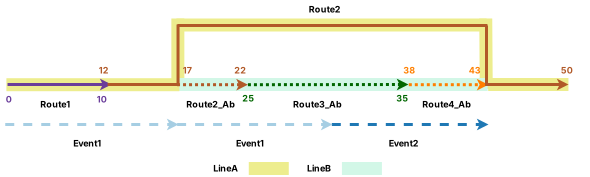
Note:
The retired event is not drawn in the diagram above.
The following table provides details about the events after realignment:
| Event ID | From Date | To Date | From Route Name | To Route Name | From Measure | To Measure | Location Error |
|---|---|---|---|---|---|---|---|
| Event1 | 1/1/2000 | 1/1/2005 | Route1 | Route3 | 0 | 30 | No Error |
| Event1 | 1/1/2005 | <Null> | Route1 | Route2 | 0 | 17 | No Error |
| Event1 | 1/1/2005 | <Null> | Route2_Ab | Route3_Ab | 17 | 30 | No Error |
| Event2 | 1/1/2000 | 1/1/2005 | Route3 | Route4 | 30 | 48 | No Error |
| Event2 | 1/1/2005 | <Null> | Route3_Ab | Route4_Ab | 30 | 43 | No Error |
Realignment without abandonment scenario in a line network with spanning events
The following sections describe the realign Cover and Snap event behaviors for the route realignment activity above. The Recalibrate route downstream check box is checked but Reassign to abandoned route is not checked. As a result, routes in the realignment area will retire without being reassigned to a line of abandonment.
The events are configured with the calibrate Stay Put event behavior.
Note:
The calibrate event behavior is applied before the realign event behavior, so it is important to verify the event feature layer's calibrate event behavior configuration before checking the Recalibrate route downstream check box.
To see other event behaviors for calibration, refer to the Event behavior for route calibration topic.
Routes after realignment
Route 2 becomes the only route in the realignment area, as the realignment starts on Route 2. Since Recalibrate route downstream is checked, Route 2 is recalibrated downstream, and it retires the original Route 4. The new measures of Route 2 are determined by the length of realignment. No abandoned route is created as Reassign to abandoned route is not checked.
The following diagram shows the routes after realignment:
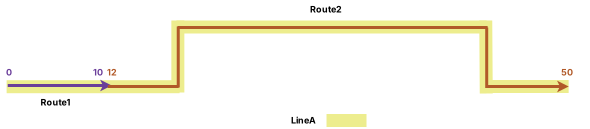
The following table provides details about the routes after realignment:
| Route Name | Line Name | Line Order | From Date | To Date | From Measure | To Measure |
|---|---|---|---|---|---|---|
| Route1 | LineA | 100 | 1/1/2000 | <Null> | 0 | 10 |
| Route2 | LineA | 200 | 1/1/2000 | 1/1/2005 | 12 | 22 |
| Route2 | LineA | 200 | 1/1/2005 | <Null> | 12 | 50 |
| Route3 | LineA | 300 | 1/1/2000 | 1/1/2005 | 25 | 35 |
| Route4 | LineA | 400 | 1/1/2000 | 1/1/2005 | 38 | 48 |
The following sections describe how the realign Cover and Snap event behavior rules are enforced after running the Apply Event Behaviors tool under this route realignment scenario.
Cover event behavior
If the event is in the realignment area, its shape is changed proportionally to cover the realigned portion of the route. The measures of the event are also updated to reflect the new shape. For events in the downstream portion of realignment, calibrate event behavior is applied.
Note:
Use the Cover realign event behavior if the events need to stay on realigned route portions. Cover is the only event behavior that prevents events from splitting by reassigning event behaviors.
The following table shows the edit activities involved in the route edit and their corresponding event behaviors:
| Edit activity | Event behavior |
|---|---|
| Realign | Cover |
| Calibrate | Stay Put |
The route realignment described above has the following effects:
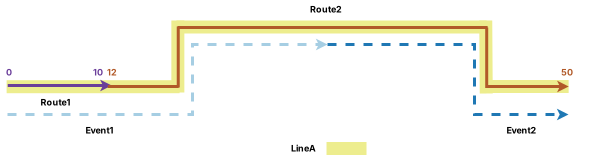
Event 1 is retired on the date of realignment since part of it is in the edit section. A new event is created on the postrealignment route with the realignment date as the starting date. Because part of the event is in the realignment area, this portion of Event 1 is lengthened proportionally to cover the increased length of the route due to realignment. The new Event 1 has a start measure of 0 on Route 1 and an end measure of 31 on Route 2.
Event 2 is retired on the date of realignment since part of it is in the edit section. A new event is created on the postrealignment route with the realignment date as the starting date. Because part of the event is in the realignment area, this portion of Event 2 is lengthened proportionally to cover the increased length of the route due to realignment. The new Event 2 has a start measure of 31 on Route 2 and an end measure of 50 on Route 2.
The following diagram shows the routes and events after realignment:
The following table provides details about the events after realignment:
| Event ID | From Date | To Date | From Route Name | To Route Name | From Measure | To Measure | Location Error |
|---|---|---|---|---|---|---|---|
| Event1 | 1/1/2000 | 1/1/2005 | Route1 | Route3 | 0 | 30 | No Error |
| Event1 | 1/1/2005 | <Null> | Route1 | Route2 | 0 | 31 | No Error |
| Event2 | 1/1/2000 | 1/1/2005 | Route3 | Route4 | 30 | 48 | No Error |
| Event2 | 1/1/2005 | <Null> | Route2 | Route2 | 31 | 50 | No Error |
Snap event behavior
Although the geographic location of the event is maintained by snapping to the new route location of realignment, the measures can change. The event can also split if it crosses the realign region where concurrent routes exist.
For events in the downstream portion of realignment, the calibrate event behavior is applied.
In this example, Route 5 is concurrent with the routes on Line A. Route 5 is on Line B and is in the reverse direction. It has the start measure value of 0 and end measure value of 40.
Note:
For more examples of concurrent routes, refer to the Detailed route realignment event behaviors with concurrent routes section.
The following table shows the edit activities involved in the route edit and their corresponding event behaviors:
| Edit activity | Event behavior |
|---|---|
| Realign | Snap |
| Calibrate | Stay put |
The route realignment described above has the following effects:
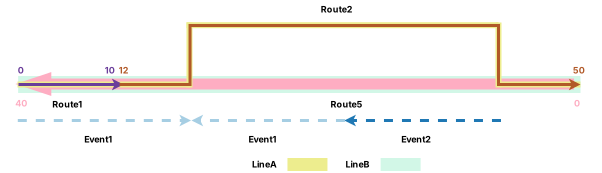
Event 1 is retired on the date of realignment since part of it is in the edit section. It then splits into two event records on the postrealignment routes with the realignment date as the starting date. This is because a concurrent route exists in the realignment section, and the portion of Event 1 in the realignment section snaps to Route 5, the concurrent route, after realignment. It is also reversed to accommodate the direction of Route 5. As a result, Event 1 splits into two pieces to maintain its geographic location. The first event record has the start measure value of 0 on Route 1 and end measure value of 17 on Route 2. The second event record snaps to Route 5 and has the start measure value of 15 on Route 5 and end measure value of 25 on Route 5.
Event 2 is retired on the date of realignment since part of it is in the edit section. As the reassign event behavior is applied first, the portion of Event 2 that is in the realignment section splits from the original Event 2 and snaps to the concurrent route, Route 5. It is also reversed to accommodate the direction of Route 5. The other portion of Event 2 that was at the downstream of realignment cannot be created when calibrate Stay Put behavior is applied, because Route 2 has replaced Route 4 at this location. As a result, there is only one new event record for Event 2 that starts from measure 5 on Route 5 and ends at measure 15 on Route 5.
The following diagram shows the routes and events after realignment:
The following table provides details about the events after realignment:
| Event ID | From Date | To Date | From Route Name | To Route Name | From Measure | To Measure | Location Error |
|---|---|---|---|---|---|---|---|
| Event1 | 1/1/2000 | 1/1/2005 | Route1 | Route3 | 0 | 30 | No Error |
| Event1 | 1/1/2005 | <Null> | Route1 | Route2 | 0 | 17 | No Error |
| Event1 | 1/1/2005 | <Null> | Route5 | Route5 | 15 | 25 | No Error |
| Event2 | 1/1/2000 | 1/1/2005 | Route3 | Route4 | 30 | 48 | No Error |
| Event2 | 1/1/2005 | <Null> | Route5 | Route5 | 5 | 15 | No Error |
Detailed route realignment event behaviors with concurrent routes
The following sections describe how realign Cover and Snap event behavior rules are enforced when routes that have a concurrent section with dominant routes are realigned.
Nonline network scenario
In this example, three routes are active from 1/1/2000: Route 1, Route 2, and Route 3. Route 3 is concurrent with the middle part of Route 2, and it is in the reverse direction. Route 3 is the subordinate route. The realignment is set to occur on 1/1/2005 where the middle of Route 2 is realigned in a section that overlaps the dominant concurrent Route 1. The realigned portion of Route 2 is assigned new measures of 7 to 23. The Recalibrate route downstream check box is not checked.
In this example, three routes are active from 1/1/2000: Route 1, Route 2, and Route 3. Route 3 is concurrent with the middle part of Route 2, and it is in the reverse direction. Route 3 is the subordinate route. The realignment is set to occur on 1/1/2005 where the middle of Route 2 is realigned in a section that overlaps the dominant concurrent Route 1. The Recalibrate route downstream check box is checked.
The following diagrams and tables demonstrate the route information before and after the realignment.
Routes before realignment
The following diagram shows the routes before realignment:
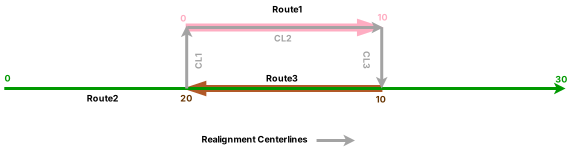
The following table provides details about the routes before realignment:
| Route Name | From Date | To Date | From Measure | To Measure |
|---|---|---|---|---|
| Route1 | 1/1/2000 | <Null> | 0 | 10 |
| Route2 | 1/1/2000 | <Null> | 0 | 30 |
| Route3 | 1/1/2000 | <Null> | 10 | 20 |
| Route ID | From Date | To Date | From Measure | To Measure |
|---|---|---|---|---|
| Route1 | 1/1/2000 | <Null> | 0 | 10 |
| Route2 | 1/1/2000 | <Null> | 0 | 30 |
| Route3 | 1/1/2000 | <Null> | 10 | 20 |
Routes after realignment
The following diagram shows the routes after realignment:


The following table provides details about the routes after realignment:
| Route Name | From Date | To Date | From Measure | To Measure |
|---|---|---|---|---|
| Route1 | 1/1/2000 | <Null> | 0 | 10 |
| Route2 | 1/1/2000 | 1/1/2005 | 0 | 30 |
| Route2 | 1/1/2005 | <Null> | 0 | 30 |
| Route3 | 1/1/2000 | <Null> | 10 | 20 |
| Route ID | From Date | To Date | From Measure | To Measure |
|---|---|---|---|---|
| Route1 | 1/1/2000 | <Null> | 0 | 10 |
| Route2 | 1/1/2000 | 1/1/2005 | 0 | 30 |
| Route2 | 1/1/2005 | <Null> | 0 | 40 |
| Route3 | 1/1/2000 | <Null> | 10 | 20 |
Events before route realignment
Event 1 is on Route 2 and it has a start date of 1/1/2000. The following diagram shows the routes and event before realignment:
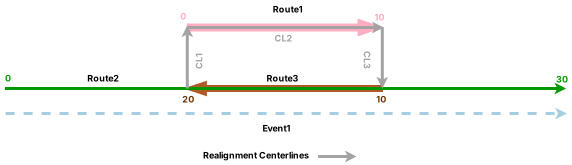
The following table provides details about the event before realignment:
| Event | Route Name | From Date | To Date | From Measure | To Measure |
|---|---|---|---|---|---|
| Event1 | Route2 | 1/1/2000 | <Null> | 0 | 30 |
| Event | Route ID | From Date | To Date | From Measure | To Measure |
|---|---|---|---|---|---|
| Event1 | Route2 | 1/1/2000 | <Null> | 0 | 30 |
Cover event behavior
If the event is in the realignment area, its shape is changed to cover the realigned portion of the route. The measures of the event are also updated to reflect the new shape.
If the event is created on the dominant route and route concurrencies are formed by realignment, the event continues to cover the entire dominant route. If the event is created on the subordinate route and route concurrencies are formed by realignment, the event does not cover the segment on the subordinate route where the dominant route is present.
The following table shows the edit activities involved in the route edit and their corresponding event behaviors:
| Edit activity | Event behavior |
|---|---|
| Realign | Cover |
| Calibrate | Stay Put |
Note:
Although the Recalibrate route downstream check box is not checked, the route is recalibrated from the beginning of realignment to the nearest calibration point downstream. Calibrate event behavior is applied to events in the affected route section.
Note:
For any route edit in which the Recalibrate route downstream check box is checked, any portion of the route downstream of the edited section is recalibrated. Calibrate event behavior is applied in these recalibrated sections.
The route realignment described above has the following effect:
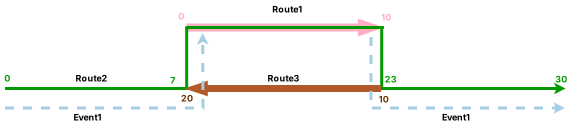
Event 1 is retired on the date of realignment because part of it is in the edit section. It then forms two event records on the postrealignment route with the realignment date as the starting date. This is because Event 1 is associated with the subordinate route, Route 2, and after realignment, it does not cover the segment on Route 2 where the dominant Route 1 is present. The upstream event record has the start measure value of 0 and end measure value of 12 to cover the portion of Route 2 until the concurrency with Route 1, and the downstream event record has the start measure value of 18 and end measure value of 30 to cover Route 2 after the concurrency with Route 1.
Event 1 is retired on the date of realignment because part of it is in the edit section. It then forms two event records on the postrealignment route with the realignment date as the starting date. This is because Event 1 is associated with the subordinate route, Route 2, and after realignment, it does not cover the segment on Route 2 where the dominant Route 1 is present. The upstream event record has the start measure value of 0 and end measure value of 15 to cover the portion of Route 2 until the concurrency with Route 1, and the downstream event record has the start measure value of 25 and end measure value of 40 to cover Route 2 after the concurrency with Route 1.
The following diagram shows the routes and event after realignment:

Note:
The retired event is not drawn in the diagram above.
The following table provides details about the event after realignment:
| Event | Route Name | From Date | To Date | From Measure | To Measure | Location Error |
|---|---|---|---|---|---|---|
| Event1 | Route2 | 1/1/2000 | 1/1/2005 | 0 | 30 | No Error |
| Event1 | Route2 | 1/1/2005 | <Null> | 0 | 12 | No Error |
| Event1 | Route2 | 1/1/2005 | <Null> | 18 | 30 | No Error |
| Event | Route ID | From Date | To Date | From Measure | To Measure | Location Error |
|---|---|---|---|---|---|---|
| Event1 | Route2 | 1/1/2000 | 1/1/2005 | 0 | 30 | No Error |
| Event1 | Route2 | 1/1/2005 | <Null> | 0 | 15 | No Error |
| Event1 | Route2 | 1/1/2005 | <Null> | 25 | 40 | No Error |
Snap event behavior
Although the geographic location of the event is maintained by snapping to the new route location of realignment, the measures can change. The event can also split if it crosses the realign region where concurrent routes exist.
The following table shows the edit activities involved in the route edit and their corresponding event behaviors:
| Edit activity | Event behavior |
|---|---|
| Realign | Snap |
| Calibrate | Stay Put |
The route realignment described above has the following effects:
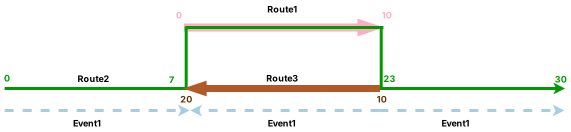
Event 1 is retired on the date of realignment because part of it is in the edit section. It then forms three event records on the postrealignment route with the realignment date as the starting date. This is because there is a concurrent route that exists in the realignment section, and the portion of Event 1 in the realignment section snaps to Route 3, the concurrent route, after realignment. It is also reversed to accommodate the direction of Route 3. As a result, Event 1 splits into three pieces to maintain its geographic location.
The first event record has the start measure value of 0 and end measure value of 7 on Route 2, the second event record snaps to Route 3 and has the start measure value of 10 and end measure value of 20 on Route 3, and the downstream event record has the start measure value of 23 and end measure value of 30 on Route 2.
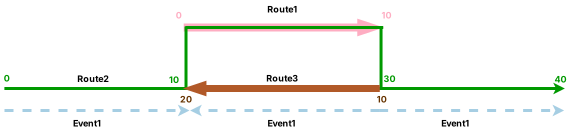
The first event record has the start measure value of 0 and end measure value of 10 on Route 2, the second event record snaps to Route 3 and has the start measure value of 10 and end measure value of 20 on Route 3, and the downstream event record has the start measure value of 30 and end measure value of 40 on Route 2.
The following diagram shows the routes and event after realignment:
The following table provides details about the event after realignment:
| Event | Route Name | From Date | To Date | From Measure | To Measure | Location Error |
|---|---|---|---|---|---|---|
| Event1 | Route2 | 1/1/2000 | 1/1/2005 | 0 | 30 | No Error |
| Event1 | Route2 | 1/1/2005 | <Null> | 0 | 7 | No Error |
| Event1 | Route2 | 1/1/2005 | <Null> | 23 | 30 | No Error |
| Event1 | Route3 | 1/1/2005 | <Null> | 10 | 20 | No Error |
| Event | Route ID | From Date | To Date | From Measure | To Measure | Location Error |
|---|---|---|---|---|---|---|
| Event1 | Route2 | 1/1/2000 | 1/1/2005 | 0 | 30 | No Error |
| Event1 | Route2 | 1/1/2005 | <Null> | 0 | 10 | No Error |
| Event1 | Route2 | 1/1/2005 | <Null> | 30 | 40 | No Error |
| Event1 | Route3 | 1/1/2005 | <Null> | 10 | 20 | No Error |
Line network scenario
In this example, two routes on Line A are active from 1/1/2000: Route 1 and Route 2, and Route 3 on Line B is in the reverse direction. The realignment is set to occur on 1/1/2005 where half of Route 1 and half of Route 2 are realigned.
The realigned portion is assigned the new measures of 0 to 20, so a new route is created: RouteNew. RouteNew has dominancy over Route 3. The Recalibrate route downstream check box is not checked and the Reassign to abandoned route check box is checked in this edit.
Route 1 becomes the only route on Line A in the realignment area, as the realignment starts on Route 1. Because Recalibrate route downstream is checked, Route 1 is recalibrated downstream, and it retires the original Route 2. The new measures of Route 1 are determined by the length of realignment. No abandoned route is created as Reassign to abandoned route is not checked.
Route 1 has a higher rank than Route 3 after realignment.
Note:
You can reverse the direction for centerlines in a route editing activity using Flip the direction of the centerlines  .
The following diagrams and tables demonstrate the route information before and after the realignment.
Routes before realignment
The following diagram shows the routes before realignment:
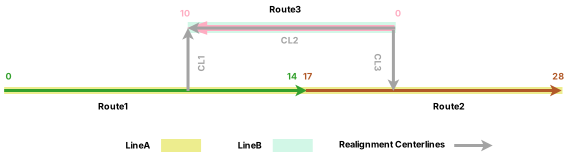
The following table provides details about the routes before realignment:
| Route Name | Line Name | Line Order | From Date | To Date | From Measure | To Measure |
|---|---|---|---|---|---|---|
| Route1 | LineA | 100 | 1/1/2000 | <Null> | 0 | 14 |
| Route2 | LineA | 200 | 1/1/2000 | <Null> | 17 | 28 |
| Route3 | LineB | 100 | 1/1/2000 | <Null> | 0 | 10 |
Routes after realignment
Because Reassign to abandoned route is checked, the routes and the portions of routes that are within the realign region have become new, abandoned routes on a line named Line C. Route 1_Ab has a start measure of 10 and an end measure of 14. Route 2_Ab has a start measure of 17 and an end measure of 20. These measures are from the original measures on the realigned routes.
The following diagram shows the routes after realignment:
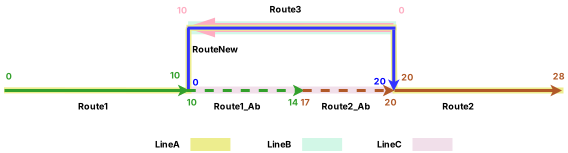
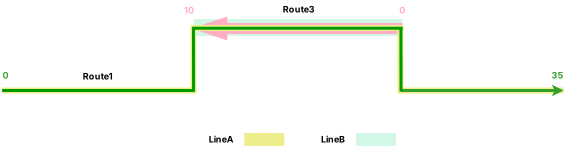
The following table provides details about the routes after realignment:
| Route Name | Line Name | Line Order | From Date | To Date | From Measure | To Measure |
|---|---|---|---|---|---|---|
| Route1 | LineA | 100 | 1/1/2000 | 1/1/2005 | 0 | 14 |
| Route1 | LineA | 100 | 1/1/2005 | <Null> | 0 | 10 |
| RouteNew | LineA | 200 | 1/1/2005 | <Null> | 0 | 20 |
| Route2 | LineA | 200 | 1/1/2000 | 1/1/2005 | 17 | 28 |
| Route2 | LineA | 300 | 1/1/2005 | <Null> | 20 | 28 |
| Route3 | LineB | 100 | 1/1/2000 | <Null> | 0 | 10 |
| Route1_Ab | LineC | 100 | 1/1/2005 | <Null> | 10 | 14 |
| Route2_Ab | LineC | 200 | 1/1/2005 | <Null> | 17 | 20 |
| Route Name | Line Name | Line Order | From Date | To Date | From Measure | To Measure |
|---|---|---|---|---|---|---|
| Route1 | LineA | 100 | 1/1/2000 | 1/1/2005 | 0 | 14 |
| Route1 | LineA | 100 | 1/1/2005 | <Null> | 0 | 35 |
| Route2 | LineA | 200 | 1/1/2000 | 1/1/2005 | 17 | 28 |
| Route3 | LineB | 100 | 1/1/2000 | <Null> | 0 | 10 |
Events before route realignment
Event 1 is on Line A and it has a start date of 1/1/2000. The following diagram shows the routes and event before realignment:
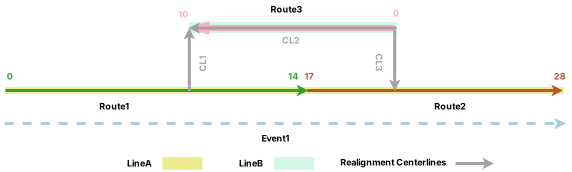
The following table provides details about the event before realignment:
| Event ID | From Date | To Date | From Route Name | To Route Name | From Measure | To Measure | Location Error |
|---|---|---|---|---|---|---|---|
| Event1 | 1/1/2000 | <Null> | Route1 | Route2 | 0 | 28 | No Error |
Cover event behavior
If the event is in the realignment area, its shape is changed proportionally to cover the realigned portion of the route. The measures of the event are also updated to reflect the new shape.
If the event is created on the dominant route and route concurrencies are formed by realignment, the event continues to cover the entire dominant route. If the event is created on the subordinate route and route concurrencies are formed by realignment, the event does not cover the segment on the subordinate route where the dominant route is present.
Note:
For any route in which the Recalibrate route downstream check box is checked, any portion of the route downstream of the edited section is recalibrated. Calibrate event behavior is applied in these recalibrated sections.
The following table shows the edit activities involved in the route edit and their corresponding event behaviors:
| Edit activity | Event behavior |
|---|---|
| Realign | Cover |
| Calibrate | Stay Put |
The Realign route edit activity with the Cover event behavior has the following effect:
Event 1 is retired on the date of realignment because part of it is in the edit section. A new event is created on the postrealignment route with the realignment date as the starting date. Because the new route, RouteNew, is dominant over Route 3, Event 1 continues to cover the routes in Line A. Its start measure value is still 0 on Route 1 and end measure value is still 28 on Route 2, though its shape is updated.
Event 1 is retired on the date of realignment because part of it is in the edit section. A new event is created on the postrealignment route with the realignment date as the starting date. Because Route 1 is dominant over Route 3, Event 1 continues to cover the entire Route 1. Its start measure value changes to 0 and end measure value changes to 35 on Route 1.
The following diagram shows the routes and event after realignment:
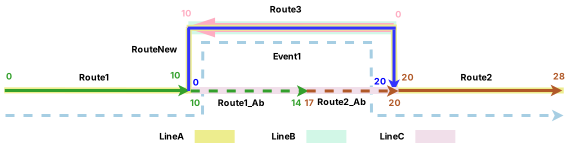
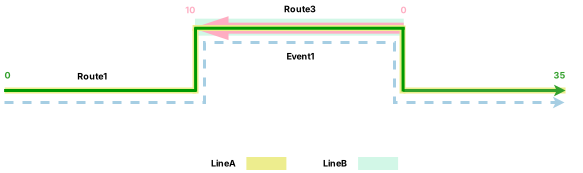
The following table provides details about the event after realignment:
| Event ID | From Date | To Date | From Route Name | To Route Name | From Measure | To Measure | Location Error |
|---|---|---|---|---|---|---|---|
| Event1 | 1/1/2000 | 1/1/2005 | Route1 | Route2 | 0 | 28 | No Error |
| Event1 | 1/1/2005 | <Null> | Route1 | Route2 | 0 | 28 | No Error |
| Event ID | From Date | To Date | From Route Name | To Route Name | From Measure | To Measure | Location Error |
|---|---|---|---|---|---|---|---|
| Event1 | 1/1/2000 | 1/1/2005 | Route1 | Route2 | 0 | 28 | No Error |
| Event1 | 1/1/2005 | <Null> | Route1 | Route1 | 0 | 35 | No Error |