Split (Analysis Tools)
Summary
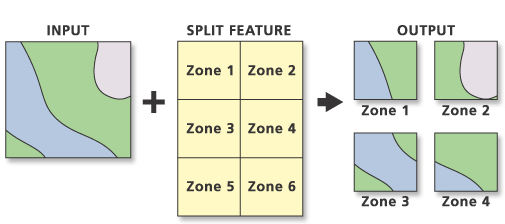
Splits an input with overlaying features to create a subset of output feature classes.
Illustration
Usage
The unique values of the Split Field parameter form the names of the output feature classes. These are saved in the target workspace.
The Split Features dataset must be polygons.
The Split Field data type must be character. Its unique values form the names of output feature classes.
The split field's unique values must start with a valid character. If the target workspace is a geodatabase, the field's values must begin with a letter. Field values that begin with a number, such as 350 degrees, cause an error. However, shapefile names can begin with a number, and a folder target workspace allows field values that begin with a number.
The target workspace must already exist.
The total number of output feature classes equals the number of unique Split Field values and the extent of overlay of the Input Features values with the Split Features values.
The feature attribute table of each output feature class contains the same fields as the Input Features attribute table.
Annotation features are split and saved in the output features based on the Split Features polygon in which the lower left starting point of the annotation string falls.
Attribute values from the input feature classes will be copied to the output feature class. However, if the input is a layer or layers created by the Make Feature Layer tool and a field's Use Ratio Policy is checked, then a ratio of the input attribute value is calculated for the output attribute value. When Use Ratio Policy is enabled, whenever a feature in an overlay operation is split, the attributes of the resulting features are a ratio of the attribute value of the input feature. The output value is based on the ratio in which the input feature geometry was divided. For example, if the input geometry was divided equally, each new feature's attribute value is assigned one-half of the value of the input feature's attribute value. Use Ratio Policy only applies to numeric field types.
Caution:
Geoprocessing tools do not honor geodatabase feature class or table field split policies.
For better performance and scalability, this tool uses a tiling process to handle very large datasets. For details, see Tiled processing of large datasets.
Parameters
| Label | Explanation | Data type |
|---|---|---|
|
Input Features |
The features to be split. |
Feature Layer |
|
Split Features |
Polygon features containing a tabular field whose unique values are used to split the input features and provide the output feature classes' names. |
Feature Layer |
|
Split Field |
The character field used to split the input features. This field's values identify the split features used to create each output feature class. The split field's unique values provide the names of the output feature classes. |
Field |
|
Target Workspace |
The existing workspace where the output feature classes are stored. |
Workspace ; Feature Dataset |
|
XY Tolerance (Optional) |
The minimum distance separating all feature coordinates (nodes and vertices) as well as the distance a coordinate can move in x or y (or both). Set the value higher for data that has less coordinate accuracy and lower for datasets with extremely high accuracy. Caution:Changing this parameter's value may cause failure or unexpected results. It is recommended that you do not modify this parameter. It has been removed from view on the tool dialog box. By default, the input feature class's spatial reference x,y tolerance property is used. |
Linear Unit |
Derived output
| Label | Explanation | Data type |
|---|---|---|
|
Updated Target Workspace |
The workspace containing the features classes created by splitting the input. |
Workspace; Feature Dataset |
Environments
Default Output Z Value, M Resolution, M Tolerance, Output CONFIG Keyword, Output M Domain, Output XY Domain, Output Z Domain, Output Coordinate System, Extent, Output has M values, Output has Z values, XY Resolution, XY Tolerance, Z Resolution, Z Tolerance, Parallel Processing Factor, Transfer Geodatabase Field Properties
Special cases
- Parallel Processing Factor
-
This tool honors the Parallel Processing Factor environment. If the environment is not set (the default) or is set to 0, parallel processing will be disabled; parallel processing will not be used and processing will be done sequentially. Setting the environment to 100 will enable parallel processing; parallel processing will be used and processing will be done in parallel. Up to 10 cores will be used when parallel processing is enabled.
Parallel processing is currently supported for polygon-on-polygon, line-on-polygon, and point-on-polygon overlay operations.
Licensing information
- Basic: No
- Standard: No
- Advanced: Yes