Add Geometry To Indoor Positioning Dataset (Indoor Positioning Tools)
Summary
Generates traversability information necessary to enable geometry-aided indoor positioning.
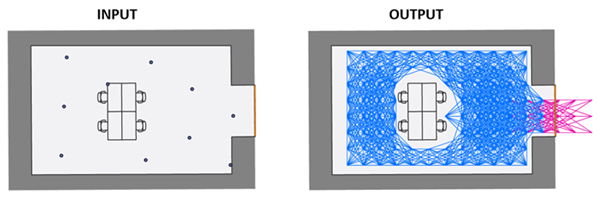
The generated information is stored as an attachment to the specified input indoor positioning system (IPS) positioning dataset. The tool generates a polyline feature layer from the input data that can be used to visually inspect the connected traversable paths for each valid level.
Illustration
Usage
The tool creates a graph over a regular point grid covering valid level features where edges represent possible indoor movements. Edges are added between adjacent grid nodes when movement is not obstructed by obstacle features such as walls or barriers in the layer specified for the Obstacle Features parameter. The graph is created only within the area defined by the intersection of the IPS positioning points from the specified IPS Positioning Datasets feature class and IPS area features. The graph can be extended to connect to outdoor spaces using features in the layer specified for the Entrance / Exit Features parameter.
The Target IPS Positioning Datasets parameter value must be a polygon feature class that conforms to the IPS Positioning Datasets feature class in the ArcGIS IPS Information Model, and must have attachments enabled. It can be created using the Create IPS Data Model tool.
The Target IPS Positioning Dataset Name parameter value can be selected from the available dataset names in the IPS positioning dataset specified for the Target IPS Positioning Datasets parameter.
The Level Features parameter value must be a polygon layer that represents the footprint of each level contained in the facility. The selected layer must meet the following conditions:
The layer must contain
LEVEL_ID,VERTICAL_ORDER, andFACILITY_IDfields.The layer must be the same layer used to generate the IPS positioning dataset selected for the Target IPS Positioning Datasets parameter.
The IPS Area Features parameter value must be a polygon layer that represents the indoor areas where geometry-aided indoor positioning will be enabled. IPS area features in the selected layer are only valid if they meet the following conditions:
The layer must contain a
LEVEL_IDfield.The layer must share a
LEVEL_IDfield value with one of the features from the layer selected for the Level Features parameter.The
LEVEL_IDfield value must not be Null.The geometry of the IPS area feature must be contained within the associated level.
Tip:
You can create a layer for IPS area features in various ways. One recommended method is to select features labeled as corridors and hallways from the Units feature class in the ArcGIS Indoors Information Model. You can also manually create IPS area features, which allows flexibility in customizing the data according to your organization's needs.
The Obstacle Features parameter value must be a polyline layer that represents physical barriers that block user movement. The selected layer must meet the following conditions:
The layer must contain a
LEVEL_IDfield.The
LEVEL_IDfield value must not be Null.If the layer conforms to the Details layer in the Indoors model, ensure that the selected obstacle features only represent impassable objects or barriers.
If the IPS positioning points cover traversable objects or barriers, such as doors or staircases, ensure that these features are not included in the selected obstacle features.
Note:
If no features are selected in the layer provided for the Obstacle Features parameter, the tool processes all features in the layer as obstacle features.
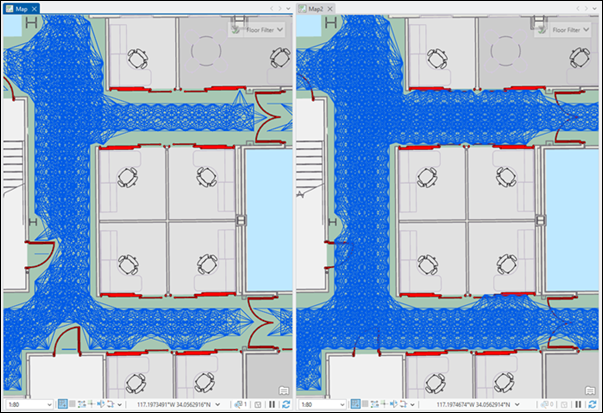
Features within the IPS area (green) that represent traversable objects, such as doors or staircases, should not be included in the selected obstacle features. For example, in the first image, the connectivity graph is disconnected near the door features (red) because they were selected as obstacle features. In the second image, the connectivity graph continues smoothly along the corridor because the doors were excluded from the selected obstacle features. The second image is correct because it allows the blue dot to move more easily through the walkable space within the IPS area. The Exit / Entrance Features parameter value must be a layer that represents entry and exit transition areas that connect indoor and outdoor spaces. The selected layer must meet the following conditions:
The layer must contain
FACILITY_ID,VERTICAL_ORDER_FROM, andVERTICAL_ORDER_TOfields.Only line features containing two vertices will be processed by the tool.
Only line features that generate at least one indoor-outdoor edge that connects to the indoor-indoor edges will be processed by the tool.
Note:
You can use the Transitions layer from the Indoors model as input for this parameter. If you're using the Transitions layer, you must configure entrance and exit features before running the tool. Only configured entrance and exit features will be processed.
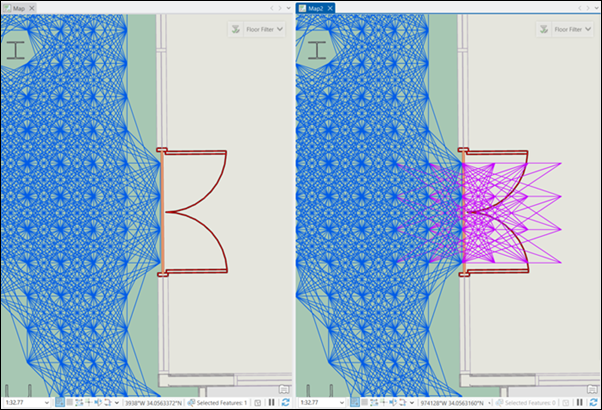
If entrance and exit features are provided, the tool generates indoor-to-outdoor transition edges (pink) to enable a smooth transition from the indoor space to the outdoor space.
Parameters
| Label | Explanation | Data type |
|---|---|---|
|
Target IPS Positioning Datasets |
The input feature class or layer containing IPS positioning datasets. |
Feature Layer |
|
Target IPS Positioning Dataset Name |
The target IPS positioning dataset that will be enriched with geometric data to support geometry-aided indoor positioning. |
String |
|
Level Features |
The feature class or layer containing polygon features representing building floors. |
Feature Layer |
|
IPS Area Features |
The feature class or layer containing polygon features representing areas where geometry-aided indoor positioning will be enabled. |
Feature Layer |
|
Obstacle Features |
The feature class or layer containing polyline features representing nontraversable physical barriers, such as walls, furniture, windows, and columns. The obstacle layer must contain a In the Indoors model, this can be a subset of the Details feature layer. |
Feature Layer |
|
Entrance / Exit Features (Optional) |
The feature class or layer containing polyline features representing entryways between indoor spaces and outdoor spaces. The entryways feature layer must contain the |
Feature Layer |
Derived output
| Label | Explanation | Data type |
|---|---|---|
|
Updated IPS Positioning Datasets |
The updated IPS Positioning Datasets feature class that contains the updated attachment. |
Feature Layer |
|
IPS Derived Walkable Features |
The polyline features representing walkable paths derived from the input data. This output represents the paths determined to be traversable based on the input data. |
Feature Layer |
Environments
This tool does not use any geoprocessing environments.
Licensing information
- Basic: No
- Standard: Requires ArcGIS IPS
- Advanced: Requires ArcGIS IPS