Iterate Layers (Model Tools)
Summary
Iterates layers in a map.
Usage
This tool is only available from ModelBuilder for use in models. The tool is not available from the Geoprocessing pane or from Python.
When the Layer Type parameter is set to Table View, only stand-alone tables are iterated. To work with feature or raster tables, set the Layer Type parameter to Feature Layer or Raster Layer, respectively.
For each iteration, the tool returns the following outputs:
Output Layer—The layer from the map based on the parameter filters that have been set. This layer will include any selections or joins already set on the layer.
Name—The name of the layer. The name can be used in inline variable substitution.
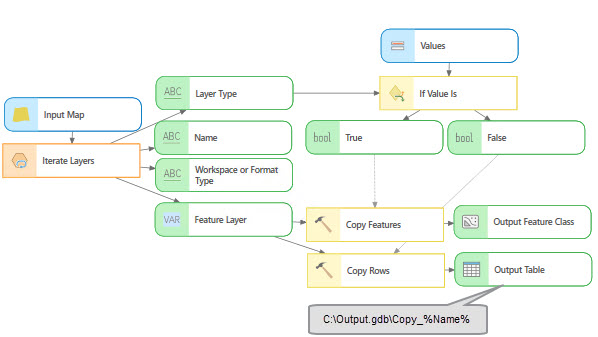
Output Layer Type—The type of layer. This value matches the layer types set with the Layer Type parameter. The output values are constants and are not localized. If two or more layer types are used, the type can be used to branch a model as shown in the following image:
Workspace or Format Type—The workspace type of the layer. This value is only returned for feature layers, raster layers, and table views. The output values are constants and are not localized. For raster layers that are stored in the folder-based workspace, the file format is returned—for example,
TIFF—and this value can be used to branch a model or as a diagnostic to evaluate the layer type that was iterated as shown in the following image: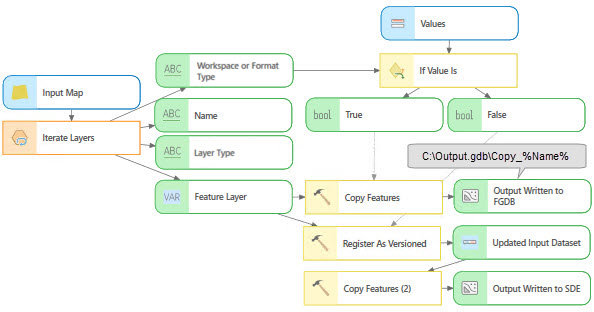
The tool returns layers that match the type set with the Layer Type parameter and the filters set with the Visibility and State parameters. For example, if the Layer Type parameter is set to Feature Layer and Raster Layer, the Visibilty parameter is set to Not Visible, and the State parameter is set to Valid, the tool will return feature and raster layers that are both not visible and valid.
If the Layer Type parameter is not set or no layers match the parameter criteria, the value of Output Layer is set to OUTPUT_LAYER, the value of the Name and the Output Layer Type outputs are set to FEATURE_LAYER, and the Workspace or Format Type output is set to WORKSPACE.
The Layer Type parameter can be set to multiple types, for example Feature Layer, Raster Layer, and Table View. However, the tool can be connected to downstream tools—such as Copy Features, Copy Raster, or Copy Rows—that may be incompatible with some of the layer types. To support multiple layer types in this scenario, the Layer Type parameter must be set to a single specific layer type. Then connect the output to the corresponding tool that works with that specific data type. Once all the downstream connections are made, you can set the Layer Type parameter to all three layer types. This workflow is necessary because the starting default for the tool is set to a feature layer type that is not compatible with the tools that take a raster as input. Once all layer types are added to the model, validation leaves the tools in their valid state.
Parameters
| Label | Explanation | Data type |
|---|---|---|
|
Input Map |
The input map with the layers that will be iterated. |
Map |
|
Wildcard (Optional) |
A combination of |
String |
|
Layer Type (Optional) |
Specifies the layer type that will be used to filter the layers to be iterated. If no layer type is specified, all supported layer types will be iterated. More than one layer type can be used to filter the layers.
|
String |
|
Workspace Type |
Specifies the workspace type that will be used to filter the layers to be iterated. If no workspace type is specified, all layers of the supported workspace types will be iterated. This parameter is only enabled when the Layer Type parameter is set to Feature Layer, Raster Layer, or Table View.
|
String |
|
Feature Type (Optional) |
Specifies the feature type that will be used to filter the layers to be iterated. If no feature type is specified, all supported feature types will be iterated.
|
String |
|
Raster Type (Optional) |
The raster format type that will be used to filter the raster layers when the Workspace Type parameter is set to Raster. If no raster type is specified, all layers of the supported raster types will be iterated. |
String |
|
Visibility (Optional) |
Specifies whether layer visibility will be used to filter the layers.
|
String |
|
State (Optional) |
Specifies the layer state that will be used to filter the layers. Layers with broken source path layers will be returned if the parameter is set to invalid.
|
String |
|
Recursive (Optional) |
Specifies whether nested group layers will be iterated.
|
Boolean |
Derived output
| Label | Explanation | Data type |
|---|---|---|
|
Output Layer |
The layer from the map based on the parameter filters that have been set. This layer will include any selections or joins already set on the layer. |
Any Value |
|
Name |
The name of the layer. |
String |
|
Output Layer Type |
The type of the layer. |
String |
|
Workspace or Format Type |
The workspace type of the layer. |
String |
Environments
This tool does not use any geoprocessing environments.
Licensing information
- Basic: Yes
- Standard: Yes
- Advanced: Yes