import arcpy
from arcpy import env
from arcpy.ia import *
env.workspace = "C:/iapyexamples/data"
outNegate = Negate("degs")
outNegate.save("C:/iapyexamples/output/outneg")
Negate の例 2 (スタンドアロン スクリプト)
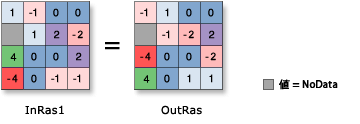
次の例では、入力ラスターの値の符号を変更して、Grid ラスターを出力しています。
# Name: Negate_Ex_02.py
# Description: Changes the sign (multiplies by -1) of the cell values
#              of the input raster on a pixel-by-pixel basis
# Requirements: Image Analyst extension

# Import system modules
import arcpy
from arcpy import env
from arcpy.ia import *

# Set environment settings
env.workspace = "C:/iapyexamples/data"

# Set local variables
inRaster = "degs"

# Run Negate
outNegate = Negate(inRaster)

# Save the output
outNegate.save("C:/iapyexamples/output/outnegate")