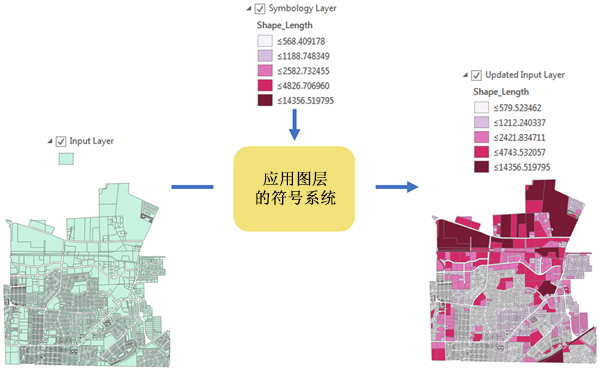
arcpy.management.ApplySymbologyFromLayer(in_layer, in_symbology_layer, {symbology_fields}, {update_symbology})
|
名称
|
说明
|
数据类型
|
|
in_layer
|
将应用符号系统的图层。
|
Feature Layer; Raster Layer; Layer
|
|
in_symbology_layer
|
包含将应用于输入图层的符号系统的图层。 支持 .lyrx 和 .lyr 文件。
|
Layer
|
|
symbology_fields
[[field_type, source_field, target_field],...]
(可选)
|
与符号系统图层中使用的符号系统字段相匹配的输入图层中的字段。
值表列:
Type—Specifies whether the field is the symbology value field, normalization field, or other type.
VALUE_FIELD—The field will be used as the primary field to symbolize values.
NORMALIZATION_FIELD—The field will be used to normalize quantitative values.
EXCLUSION_CLAUSE_FIELD—The field will be used for the symbology exclusion clause.
CHART_RENDERER_PIE_SIZE_FIELD—The field will be used to set the size of pie chart symbols.
ROTATION_XEXPRESSION_FIELD—The field will be used to set the rotation of symbols on the x-axis.
ROTATION_YEXPRESSION_FIELD—The field will be used to set the rotation of symbols on the y-axis.
ROTATION_ZEXPRESSION_FIELD—The field will be used to set the rotation of symbols on the z-axis.
TRANSPARENCY_EXPRESSION_FIELD—The field will be used to set the transparency of symbols
TRANSPARENCY_NORMALIZATION_FIELD—The field will be used to normalize transparency values.
SIZE_EXPRESSION_FIELD—The field will be used to set the size or width of symbols.
COLOR_EXPRESSION_FIELD—The field will be used to set the color of symbols.
PRIMITIVE_OVERRIDE_EXPRESSION_FIELD—The field will be used to set various properties on individual symbol layers.
Source Field—The symbology field used in the symbology layer. Use "#" if you do not know the source field and want the system default to be used.
Target Field—The field from the input layer to use when applying the symbology.
|
Value Table
|
|
update_symbology
(可选)
|
指定是否将更新符号系统范围。
|
String
|
派生输出
|
名称
|
说明
|
数据类型
|
|
out_layer
|
已更新的输入图层。
|
Layer
|
代码示例
ApplySymbologyFromLayer 示例 1(Python 窗口)
以下 Python 窗口脚本演示了如何在即时模式下使用 ApplySymbologyFromLayer 函数。
import arcpy
arcpy.env.workspace = "C:/data.gdb"
arcpy.management.ApplySymbologyFromLayer("sf_points", "sf_points_water.lyrx")
ApplySymbologyFromLayer 示例 2(独立脚本)
如下介绍了如何在独立脚本中使用 ApplySymbologyFromLayer 函数。
# Import system modules
import arcpy

# Set the current workspace
arcpy.env.workspace = "C:/data.gdb"

# Set layer to apply symbology to
inputLayer = "sf_points"

# Set layer that output symbology will be based on
symbologyLayer = "water_symbols_pnt.lyrx"

# Apply the symbology from the symbology layer to the input layer
arcpy.management.ApplySymbologyFromLayer(inputLayer, symbologyLayer)
ApplySymbologyFromLayer 示例 3(独立脚本)
如下介绍了如何在独立脚本中使用 ApplySymbologyFromLayer 函数。
# Import system modules
import arcpy

# Set the current workspace
arcpy.env.workspace = "C:/data.gdb"

# Set layer to apply symbology to
inputLayer = "InlandEmpireBlocks"

# Set layer that output symbology will be based on
symbologyLayer = "USCensusBlocks.lyrx"

# The symbology layer is symbolized by population normalized by area.
# Symbolize the input by Pop2014 field normalized to Square Miles
symbologyFields = [["VALUE_FIELD", "#", "Pop2014"],
                   ["NORMALIZATION_FIELD", "#", "SQ_MILES"]]

# Apply the symbology from the symbology layer to the input layer
arcpy.management.ApplySymbologyFromLayer(inputLayer, symbologyLayer,
                                         symbologyFields)
ApplySymbologyFromLayer 示例 3(脚本工具)
在脚本工具中,将符号系统应用于多个派生输出要素图层。 该示例工具具有以下参数:
输入图层
数据类型:要素图层(多值)
类型:必填
方向:输入
符号系统
派生输出
数据类型:要素图层(多值)
类型:派生
方向:输出
# Import system modules
import os
import arcpy

# Get Parameters
layers = arcpy.GetParameter(0)  # Accepts Feature Layers (multivalue)
sym = arcpy.GetParameter(1)  # Accepts a Feature Layer

# Apply symbology to each input layer, store the result objects in a list
results = []
for layer in layers:

    # Derive the name of the output featureclass
    layername = arcpy.Describe(layer).baseName
    outfeature = os.path.join(arcpy.env.scratchGDB, layername + "_out")

    # Copy feature to get output. This step can be replaced by other
    # steps that produce or manipulate a feature class.
    arcpy.management.CopyFeatures(layer, outfeature)

    # Apply symbology to the final output
    res = arcpy.management.ApplySymbologyFromLayer(outfeature, sym)

    # Append multivalue feature
    results.append(res)

# Set the symbology of the derived output parameter using the
# list of result objects
arcpy.SetParameter(2, results)