Discover the shortest path
The shortest path between two starting points can be identified with the Trace tool using the Shortest path trace type. The shortest path is calculated using a numeric network attribute such as shape length. Cost- or distance-based paths can be achieved with a shortest path trace.
Important:
The shortest path trace type is deprecated with ArcGIS Pro 3.7 and ArcGIS Enterprise 12.1.
While the shortest path trace will continue to function and be an option until the next major release, it is recommended to use the path trace to return the shortest path. The path trace provides the same functionality to return a shortest path result while offering additional capabilities to find paths in your network.
Note that the path trace is not currently supported across all platforms. Some clients, APIs, and SDKs will adopt support for the path trace in future releases.
To learn more, see Utility network trace types.
Requirements
To perform a shortest path trace, the following requirements must be met:
Two starting points must be placed on network features.
The network topology must be enabled.
When working with an enterprise geodatabase, the Input Utility Network parameter value must be from a utility network service.
Trace the shortest path
Ensure the utility network is available in an active map view and click the Utility Network tab.
The Utility Network tab is activated.
Ensure that two starting points exist. In the Tools group, click the Trace command to open the Trace pane. Set two Starting Points to use in the trace.
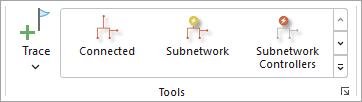
On the Utility Network tab, in the Tools group, click Shortest Path in the tools gallery.
Tip:
Use the down arrow to browse within the tools gallery for Shortest Path.
The Trace tool opens for the utility network in the active map using the specific Trace Type.
For the Shortest Path Network Attribute Name parameter, specify the network attribute that will be used to calculate the shortest path or cost of travel between the two starting points. Use a numeric network attribute such as
Shape length.Apply additional configuration parameters as needed. Reference the Trace tool for a full list of tool parameters. Also see Configure a trace.
Click Run.
Features participating in the shortest path between the two starting points are returned.