Discover valid paths
Valid paths that exist between one or more start and stop locations can be identified with the Trace tool using the Path trace type in both traditional and telecom domain networks. The Num Paths and Max Hops parameters are provided to constrain the valid paths that are returned.
A path trace begins at a start location, designated using starting points to identify the origin of the path to be analyzed. Stop locations specify the end of the path and can be designated using stopping points. For traditional domain networks, stopping points are required, while they are optional for telecom domain networks.
When a path trace is configured using the Shortest Path Network Attribute Name parameter and the default Num Paths parameter value of 1, the shortest path can be returned.
Important:
The shortest path trace type is deprecated with ArcGIS Pro 3.7 and ArcGIS Enterprise 12.1.
While the shortest path trace will continue to function and be an option until the next major release, it is recommended to use the path trace to return the shortest path. The path trace provides the same functionality to return a shortest path result while offering additional capabilities to find paths in your network.
The path trace is not currently supported across all platforms. Some clients, APIs, and SDKs will adopt support for the path trace in future releases.
When working with a telecom domain network the Infer Connectivity parameter can be used to find paths and model circuits in scenarios where explicit connectivity between a provided start and stop location does not exist.
Requirements
To perform a path trace, the following requirements must be met:
The network topology must be enabled.
One or more starting points must exist.
For traditional domain networks, one or more stopping points must exist.
All starting and stopping points specified must be included in the result.
When stopping points are not specified in a telecom domain network, the following can be used to define stop locations for a path:
The trace encounters a barrier.
The trace reaches the maximum number of hops specified by the Max Hops parameter.
The trace reaches a junction at the endpoint of the path with a valence of 1.
When you specify stopping points in a telecom domain network, barriers, Max Hops, and endpoint valence are not used as stop locations for the path.
When working with an enterprise geodatabase, the following are requirements:
The Input Utility Network parameter value must be from a utility network service.
This trace type requires ArcGIS Enterprise 12.1 or later.
Trace valid paths
To trace valid paths, complete the following steps:
Ensure that the utility network is available in an active map view, and click the Utility Network tab.
The Utility Network tab is activated.
Ensure that at least one starting point exists. To create a starting point to use in the trace, do the following:
In the Tools group, click the Trace command to open the Trace pane.
Click the Start tab, and create a starting point.
Optionally, specify a stopping point to define the stop location. To create a stopping point to use in the trace, do the following:
In the Tools group, click the Trace command to open the Trace pane.
Click the Stop tab, and create a stopping point.
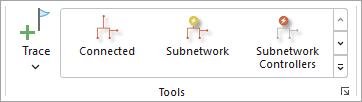
On the Utility Network tab, in the Tools group, click the Trace down arrow to browse the trace gallery, and click Path.
Tip:
Use the down arrow to browse within the tools gallery for Path.
The Trace tool opens for the utility network in the active map using the Trace Type value of Path.
For the Num Paths parameter, specify the maximum number of paths to return between the start and stop locations.
Paths with the fewest number of hops are returned first. The default is 1.
As an example, using the default value of 2 will constrain the paths returned to the two paths between each start and stop location with the fewest number of hops even if other valid paths exist.
For the Max Hops parameter, specify the maximum number of hops between edges that are allowed in a valid path.
The default is 100.
As an example, when using the default value of 100, no paths will be returned that traverse more than 100 network junctions between the start and stop locations.
Optionally, check the Infer Connectivity parameter to enable connectivity inference when finding a path.
Connectivity inference is supported with telecom domain networks only. When enabled, the path trace will traverse containment associations to identify features assigned the Junction Unit Container and Unit Identifiable network categories and find a path between the specified start and stop location.
Apply additional configuration parameters as needed.
Reference the Trace tool for a full list of tool parameters, and see Configure a trace for additional information.
Click Run.
Valid paths between the start and stop locations that meet the specified criteria are returned.
Return the shortest path
The path trace can be used to return the shortest path between a specified start and stop location.
Ensure that the utility network is available in an active map view, and click the Utility Network tab.
The Utility Network tab is activated.
Ensure that one starting point exists to define the start of the path. To create a starting point to use in the trace, do the following:
In the Tools group, click the Trace command to open the Trace pane.
Click the Start tab, and create a starting point.
Specify a stopping point to define the end of the path. To create a stopping point to use in the trace, do the following:
In the Tools group, click the Trace command to open the Trace pane.
Click the Stop tab, and create a stopping point.
On the Utility Network tab, in the Tools group, click the Trace down arrow to browse the trace gallery, and click Path.
The Trace tool opens for the utility network in the active map using the Trace Type value of Path.
For the Num Paths parameter, enter a value of 1 to return the shortest path between the provided trace locations.
Note:
Returned paths are not ordered. When the Num Paths parameter value is greater than 1, the first path is the shortest; however, additional paths are not returned using shortest path ordering.
For the Max Hops parameter, specify the maximum number of hops between edges that are allowed in the path.
For the Shortest Path Network Attribute Name parameter, specify the network attribute that will be used to calculate the shortest path or cost of travel between the the starting and stopping point, using a numeric network attribute such as
Shape length.Note:
When a network attribute is not specified for the Shortest Path Network Attribute Name parameter, a fixed weight of 1 is applied to each edge traversed by the trace.
Apply additional configuration parameters as needed. Reference the Trace tool for a full list of tool parameters. Also see Configure a trace.
Click Run.
Features participating in the shortest path between the starting point and stopping point are returned.