Pairwise Dissolve (Analysis Tools)
Summary
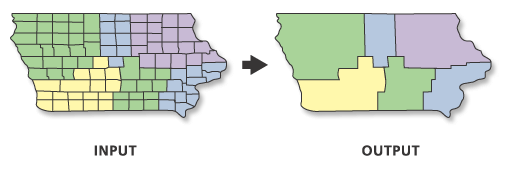
Aggregates features based on specified attributes using a parallel processing approach.
An alternate tool is available for dissolve operations. See the Dissolve tool documentation for details.
Illustration
Usage
The attributes of the features that become aggregated by the dissolve process can be summarized or described using a variety of statistics. The statistic used to summarize attributes is added to the output feature class as a single field with an underscore and the input field name as the naming standard of the statistic type. For example, if the
SUMstatistic is used on a field namedPOP, the output will include a field namedSUM_POP.Very large features can be created in the output feature class. This is important when there is a small number of unique values for the Dissolve Fields parameter value or when dissolving all features into a single feature. Very large features may cause processing or display problems or may have poor performance when drawn on a map or when edited. Problems may also occur if the dissolve output created a feature at the maximum size on one machine, and this output is moved to a machine with less available memory. To avoid these potential problems, uncheck the Create multipart features parameter to divide potentially larger multipart features into many smaller features. For extremely large features, you can use the Dice tool to divide the large features to solve processing, display, or performance problems.
Null values are excluded from all statistical calculations. For example, the
AVERAGEof 10, 5, andNULLis 7.5 ((10+5)/2). TheCOUNTstatistic returns the number of values included in the statistical calculation, which in this case is 2.If the Input Features parameter value's geometry type is either point or multipoint and the Create multipart features parameter is checked, the output will be a multipoint feature class. Otherwise, if the Create multipart features parameter is unchecked, the output will be a point feature class.
When the Output Lineage Table parameter is specified, the tool will create an lineage table that records the input features that participate in the creation of each output feature. The table will contain the following fields:
OUTPUT_FID—The FID of features in the Output Feature Class parameter value.INPUT_FID—The FID of the feature of the Input Features parameter value that participated in the creation of the output feature with theOUTPUT_FID. If more than one feature was involved in the creation of theOUTPUT_FIDfeature, there will be multiple records with thatOUTPUT_FIDto record the FID of each input feature that participated in the creation of the output feature.
An output lineage table will only be created when the Create multipart features parameter is unchecked. The Output Lineage Table will have the same name as the Output Feature Class with _Tbl appended to the name.
When a lineage table is created a slightly different algorithm is applied to the data so slight differences in part order could occur.
The calculation of the lineage could take a considerable amount of time depending on the size and complexity of the input data being dissolved.
By default, curve features from the input will be densified in the output. To support curves in the output, use the Maintain Curve Segments environment.
This tool honors the Parallel Processing Factor environment. If the environment is not set (the default) or is set to 100, full parallel processing will be enabled and the tool will attempt to distribute the work to all the logical cores on the machine. Setting the environment to 0 will disable parallel processing. Specifying a factor between 1 and 99 will cause the tool to identify the percentage of logical cores to use by applying the formula (Parallel Processing Factor / 100 * Logical Cores) rounded up to the nearest integer. If the result of this formula is 0 or 1, parallel processing will not be enabled.
Parameters
| Label | Explanation | Data type |
|---|---|---|
|
Input Features |
The features to be aggregated. |
Feature Layer |
|
Output Feature Class |
The feature class to be created that will contain the aggregated features. |
Feature Class |
|
Dissolve Fields (Optional) |
The field or fields on which features will be aggregated. |
Field |
|
Statistics Fields (Optional) |
Specifies the field or fields containing the attribute values that will be used to calculate the specified statistic. Multiple statistic and field combinations can be specified. Null values are excluded from all calculations. By default, the tool will not calculate any statistics. Numeric attribute fields can be summarized using any statistic. Text attribute fields can be summarized using minimum, maximum, count, first, last, unique, concatenate, and mode statistics. Value table columns:
|
Value Table |
|
Create multipart features (Optional) |
Specifies whether multipart features will be included in the output.
|
Boolean |
|
Concatenation Separator (Optional) |
A character or characters that will be used to concatenate values when the Concatenation option is used for the Statistics Fields parameter. By default, the tool will concatenate values without a separator. |
String |
|
Output Lineage Table (Optional) |
A lineage table that records the input features that participate in the creation of each single part output feature. An output lineage table will only be created when the Create multipart features parameter is unchecked and a valid output table path is provided. |
Table |
Environments
Current Workspace, Scratch Workspace, Output Coordinate System, Geographic Transformations, Extent, XY Resolution, XY Tolerance, Output has M values, M Resolution, M Tolerance, Output has Z values, Default Output Z Value, Z Resolution, Z Tolerance, Maintain fully qualified field names, Output CONFIG Keyword, Auto Commit, Output XY Domain, Output M Domain, Output Z Domain, Parallel Processing Factor, Maintain Curve Segments, Curve Processing Method, Transfer Geodatabase Field Properties
Licensing information
- Basic: Yes
- Standard: Yes
- Advanced: Yes