Pairwise Polygon Neighbors (Analysis Tools)
Summary
Creates a table with statistics based on polygon contiguity (overlaps, coincident edges, or nodes).
Learn more about how the Polygon Neighbors and Pairwise Polygon Neighbors tools work
Illustration
Usage
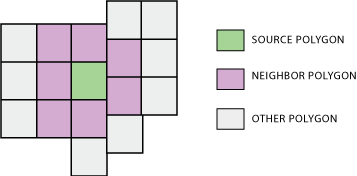
The tool analyzes polygon contiguity, summarizing the following between source polygons and neighbor polygons:
The area of overlaps (overlapping neighbors—optional)
The length of coincident edges (edge neighbors)
The number of times boundaries cross or touch at a point (node neighbors)
The summary information is written to an output table. A source polygon may have one or more neighbor polygons; a neighbor polygon is spatially related with the source polygon in at least one of the ways described above.
Only first-order contiguity is analyzed and reported by the tool. Relationships beyond that are not examined, that is, neighbors of neighbors (second-order contiguity) are not examined.
The Report By Fields parameter is used to identify unique polygons or polygon groups and report their neighboring information by the polygons or polygon groups. To find the neighbors of each individual polygon in the input, specify one or more input fields that result in a unique value or set of values (in the case of multiple fields) for every polygon.
If the specified fields identify unique polygon groups, the neighboring information is summarized and reported by the groups.
See How Polygon Neighbors and Pairwise Polygon Neighbors works for details on the use of this parameter.
You can use the Include area overlaps parameter to analyze overlapping area relationships. When Include area overlaps is checked, the output table will contain an
AREAfield that stores the area of overlap for the overlapping neighbor being analyzed. If no overlap is found, theAREAfield value is 0.Tip:
Calculating overlapping area relationships is a high-resource operation, and performance may be slower than determining coincident edge and node neighbor relationships. If you know that the data has no overlapping features or you are not interested in analyzing overlapping neighbors, ensure that the Include area overlaps parameter is not checked.
Caution:
The Include area overlaps parameter must be checked to obtain records for neighbors that are completely contained by a source polygon. If the Include area overlaps parameter is not checked, the output table will not contain records for neighbors that are completely contained in a source polygon.
There is no entry in the output table for features that are not neighbors.
The Include both sides of neighbor relationship parameter is used to control the relationships included in the output. To report all contiguity relationships, including reciprocal relationships, check Include both sides of neighbor relationship. For example, if OID1 is a neighbor of OID2, an entry is written to the output table for OID1 having a neighbor OID2 and for OID2 having a neighbor OID1. If you only want the first side of the relationship, uncheck Include both sides of neighbor relationship. Using the example above but with Include both sides of neighbor relationship unchecked, only the entry for OID1 having a neighbor OID2 will be included in the output table.
The Output Linear Units parameter specifies the units that will be used for shared boundary lengths between neighbors. The default is to use the same units as defined by the input feature coordinate system.
The Output Area Units parameter is only used when the Include area overlaps parameter is checked. When Include area overlaps is checked, the units used to calculate the area overlap of neighbors are specified in the Output Area Units parameter. The default is to use the same units as defined by the input feature's coordinate system.
The Output Table parameter value can be a file geodatabase table or a
.dbftable.For each field specified in the Report By Fields parameter, the output table will contain two fields using the following naming convention:
src_<field>andnbr_<field>. The fields represent the source and neighbor field values from the input.The output table will also contain the following fields:
AREA—This field stores the total overlapping area between a source polygon and a neighbor polygon (overlapping neighbors). This field is included in the output table only when the Include area overlaps parameter is checked.LENGTH—This field stores the total length of coincident edges between a source polygon and a neighbor polygon.NODE_COUNT—This field stores the number of times a source polygon and a neighbor polygon cross or touch at a point.
If there is a selection set on the input features, only selected features will be analyzed.
Parameters
| Label | Explanation | Data type |
|---|---|---|
|
Input Features |
The input polygon features. |
Feature Layer |
|
Output Table |
The output table. |
Table |
|
Report By Fields (Optional) |
The input attribute field or fields that will be used to identify unique polygons or polygon groups and represent them in the output. |
Field |
|
Include area overlaps (Optional) |
Specifies whether overlapping area relationships will be analyzed and included in the output.
|
Boolean |
|
Include both sides of neighbor relationship (Optional) |
Specifies whether both sides of neighbor relationships will be included in the output.
|
Boolean |
|
XY Tolerance (Optional) |
The minimum distance between coordinates before they will be considered equal. By default, this is the x,y tolerance of the input features. Caution:Changing this parameter's value may cause failure or unexpected results. It is recommended that you do not modify this parameter. It has been removed from view on the tool dialog box. By default, the input feature class's spatial reference x,y tolerance property is used. |
Linear Unit |
|
Output Linear Units (Optional) |
Specifies the units that will be used to report the total length of the coincident edge between neighboring polygons. The default is the input feature units.
|
String |
|
Output Area Units (Optional) |
Specifies the units that will be used to report the area overlap of neighboring polygons. The default is the input feature units. This parameter is only active when the Include area overlaps parameter is checked.
|
String |
|
Use maximum precision (Optional) |
Specifies the level of precision that will be used. Check this parameter when you want the tool to apply a level of accuracy that is greater than the default for the input spatial reference when determining point output.
|
Boolean |
Environments
Auto Commit, Maintain fully qualified field names, Default Output Z Value, M Resolution, M Tolerance, Output CONFIG Keyword, Output M Domain, Output XY Domain, Output Z Domain, Output Coordinate System, Geographic Transformations, Extent, Output has M values, Output has Z values, XY Resolution, XY Tolerance, Z Resolution, Z Tolerance, Parallel Processing Factor, Maintain Curve Segments, Curve Processing Method, Transfer Geodatabase Field Properties
Licensing information
- Basic: Yes
- Standard: Yes
- Advanced: Yes