Remove Overlapping Centerlines (Location Referencing Tools)
Summary
Removes overlapping centerline sections to ensure that there is one common centerline when centerline geometry overlaps.
The ArcGIS Location Referencing minimum schema models route concurrencies by having routes share the same centerline associations in the centerline sequence table. Running this tool may result in centerline changes, such as centerline splitting or deletion of duplicated centerline features. It may also update centerline sequence table records so that routes share centerlines.
Overlapping centerlines may result when any of the following occur:
A network with concurrent routes is loaded
An additional network is loaded
Ad-hoc user centerline editing
Note:
While the Remove Overlapping Centerlines tool can be run any time after an LRS Network is created and data is loaded, consider running it only after you've finished creating all LRS Networks and have loaded all data in the LRS. If additional columns are modeled on the centerlines, some centerline attributes may be lost when the tool is run.
Illustration
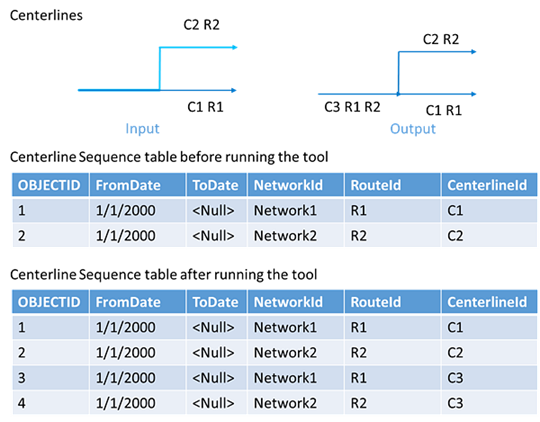
Usage
An LRS dataset is required to run this tool.
The number of centerline features in the input centerline feature layer may be different after running the tool, depending on the number of overlapping centerlines and the routes associated with them.
This tool uses the topological operations Intersect and Simplify together, which can cause small polyline segments of a length around and above the feature class tolerance to be lost. Associated route shapes may change slightly beyond tolerance as a result of using this tool. Consider starting an edit session in ArcGIS Pro for test runs of the tool using the Enable Undo button in the Geoprocessing pane.
Learn more about how cluster tolerance is used in ArcGIS topological operations
This tool ignores z-values on the centerlines during calculations. For example, if two centerlines do not overlap in 3D space but do overlap in 2D space, they will be considered overlapping.
This tool supports conflict prevention and will attempt to acquire and transfer locks.
Learn more about conflict prevention in ArcGIS Pipeline Referencing or conflict prevention in ArcGIS Roads and Highways.
Parameters
| Label | Explanation | Data type |
|---|---|---|
|
Input Centerline Features |
An input layer or feature class representing an LRS centerline. |
Feature Layer |
Derived output
| Label | Explanation | Data type |
|---|---|---|
|
Updated Centerline features |
The updated centerline feature layer. |
Feature Layer |
|
Output Details File |
A text file that details the overlapping centerlines removed from the feature layer. |
Text File |
Environments
Current Workspace, Parallel Processing Factor
Special cases
- Parallel Processing Factor
-
The default value for this environment, if left blank, is 0%. Any absolute value for the environment is always clamped between 0 and the number of logical cores in that machine.
Licensing information
- Basic: Requires ArcGIS Location Referencing (ArcGIS Pipeline Referencing or ArcGIS Roads and Highways)
- Standard: Requires ArcGIS Location Referencing (ArcGIS Pipeline Referencing or ArcGIS Roads and Highways)
- Advanced: Requires ArcGIS Location Referencing (ArcGIS Pipeline Referencing or ArcGIS Roads and Highways)