Manage conflicts using conflict containers
When reconciling a version with the default version in a telecom domain network, logical conflicts can occur involving content within grouped objects that have been modified in conflicting ways between versions. Existing conflict detection mechanisms do not identify these logical conflicts in the containment hierarchy. Conflict containers can be configured to detect and report these logical conflicts during reconcile operations by assigning the Conflict Container network category to features or objects that represent the top (root) of a containment hierarchy.
Learn more about managing branch version conflicts
Conflict detection in branch versions
In branch versioning, a conflict is detected on reconcile when the same feature or object is updated or deleted in both a named version and the default version. These conflicts are detected at the row level. In the telecom domain network, grouping allows multiple records to represent a single physical fiber or port. When you insert or update grouped objects— for example, fiber strands inside a fiber cable, or ports inside a chassis, the records can logically represent the same fiber or port, even though they appear as different rows across versions. Standard row-level conflict detection cannot identify this logical conflict.
Logical conflicts such as this can occur in telecom domain networks because grouped objects are represented using nonspatial objects and unit identifiers (units, unit IDs). Edits that restructure how these groups are organized insert rows rather than updating existing ones. If the default version and a named version each modify a grouped object in different ways for the same container, neither set of inserts is detected as a conflict using existing conflict detection mechanisms; however, a logical conflict is introduced between the two representations of the feature.
Logical conflicts are not identified or reported through existing conflict detection. Features are assigned the Conflict Container network category to detect and report these types of issues during reconcile.
The conflict detection process associated with grouped objects and conflict container features operates independently of existing conflict detection. Assigning the category to an asset type does not change how update-update, update-delete, or delete-update conflicts are identified or presented for resolution; instead, it provides an additional mechanism to report logical conflicts for features within a feature's containment hierarchy.
Conflict container features
The Conflict Container network category is a system-provided network category available in telecom domain networks. It is assigned at the asset type level to features or objects that represent the top (or root) of a containment hierarchy using the Set Network Category tool.
Features assigned the conflict container network category are known as conflict container features. You define the container features that will act as conflict containers in the schema by determining which features will be treated as a set during reconcile if conflicts are detected.
During a reconcile operation, the conflict container features are used to report logical conflicts in the containment hierarchy to the user as a conflict set. You can create multiple conflict containers to limit the conflicts that are rolled up to each conflict container for evaluation, depending on the scope of large containment hierarchies.
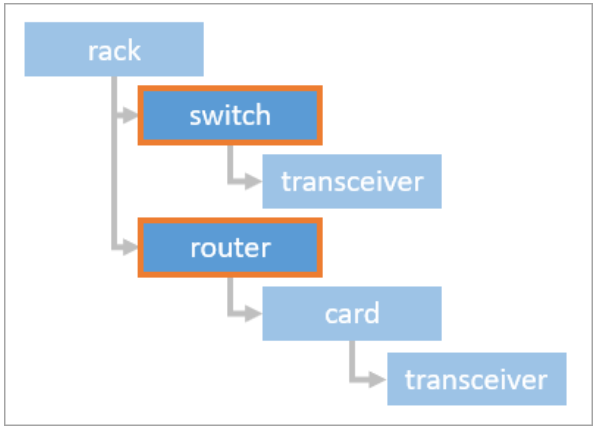
For example, as outlined in the diagram below, assigning the Conflict Container category to a feature higher in the hierarchy — such as a rack — causes logical conflicts from all content in the hierarchy to roll up and be reported through the rack feature. Assigning the category to features lower in the hierarchy — such as a switch and a router within the rack — produces separate conflict sets for each, which may be easier to review.
Learn more about how to set or modify a network category assignment
Examples
The following diagram illustrates a containment hierarchy for a rack with two branches — a switch branch and a router branch — in which both the switch and router are assigned the Conflict Container network category. If conflicts occur for the switch and its transceiver content during reconcile, they are returned as a conflict set on the switch. Conflicts within the router hierarchy are returned as a separate conflict set on the router, independently of the switch conflict set.
The following example illustrates a fiber cable that contains grouped fiber strand objects. Fiber group A (strands 1–48) is divided using different approaches in the default version and a named version.
In the default version, fiber group A is divided into two subgroups: Fiber A (strands 1–24) and Fiber A1 (strands 25–48).
In the named version, fiber group A is divided into three subgroups: Fiber A (strands 1–24), Fiber A2 (strands 25–36), and Fiber A3 (strands 37–48).
Fiber B (strands 49–96) is unchanged in both versions.
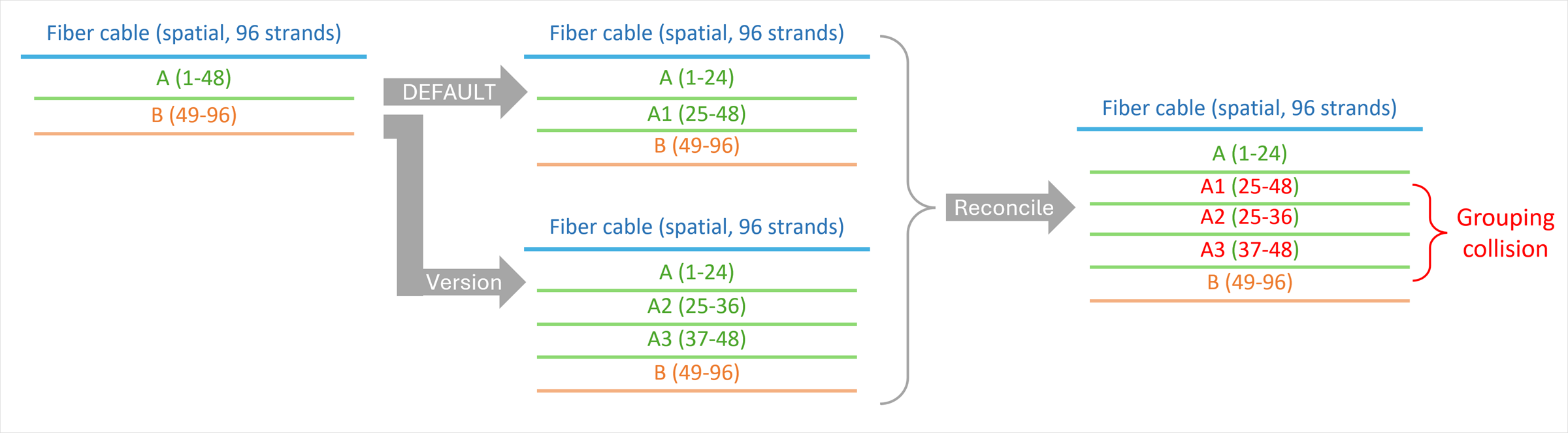
The divided fibers are created as inserts in new rows in each version. Because no existing row is updated in either version, existing conflict detection does not identify this as a conflict. However, because the fiber cable asset type is assigned the Conflict Container network category, these edits conflict logically at the container level on reconcile and are returned as a conflict set on the fiber cable feature for review.
Review and resolve container conflict sets
When a reconcile operation detects logical conflicts on conflict container features, those conflicts are reported in the Conflicts view alongside any other conflicts discovered during the reconcile. Each conflict container feature with a logical conflict appears in the conflicts list for the feature type as a Container Conflict, with the conflict set represented for the pre-reconcile version.
Use the Conflicts view to review the conflict set representation in the current named version. You can access a diagram displaying the containment hierarchy for the conflict container feature by selecting the conflict container feature under Container Conflict, then clicking the View conflict diagram  icon below the information grid.
Note:
The information grid does not currently support the display of the conflict set in the Target Version.
The Conflict Diagram can be used to provide visual context for the conflict set. Selecting a feature in the information grid selects the corresponding element in the diagram, while selecting the diagram element selects the associated feature in the grid.
Note:
You can use display field expressions on the layer to identify features in the information grid and Conflict Diagram.
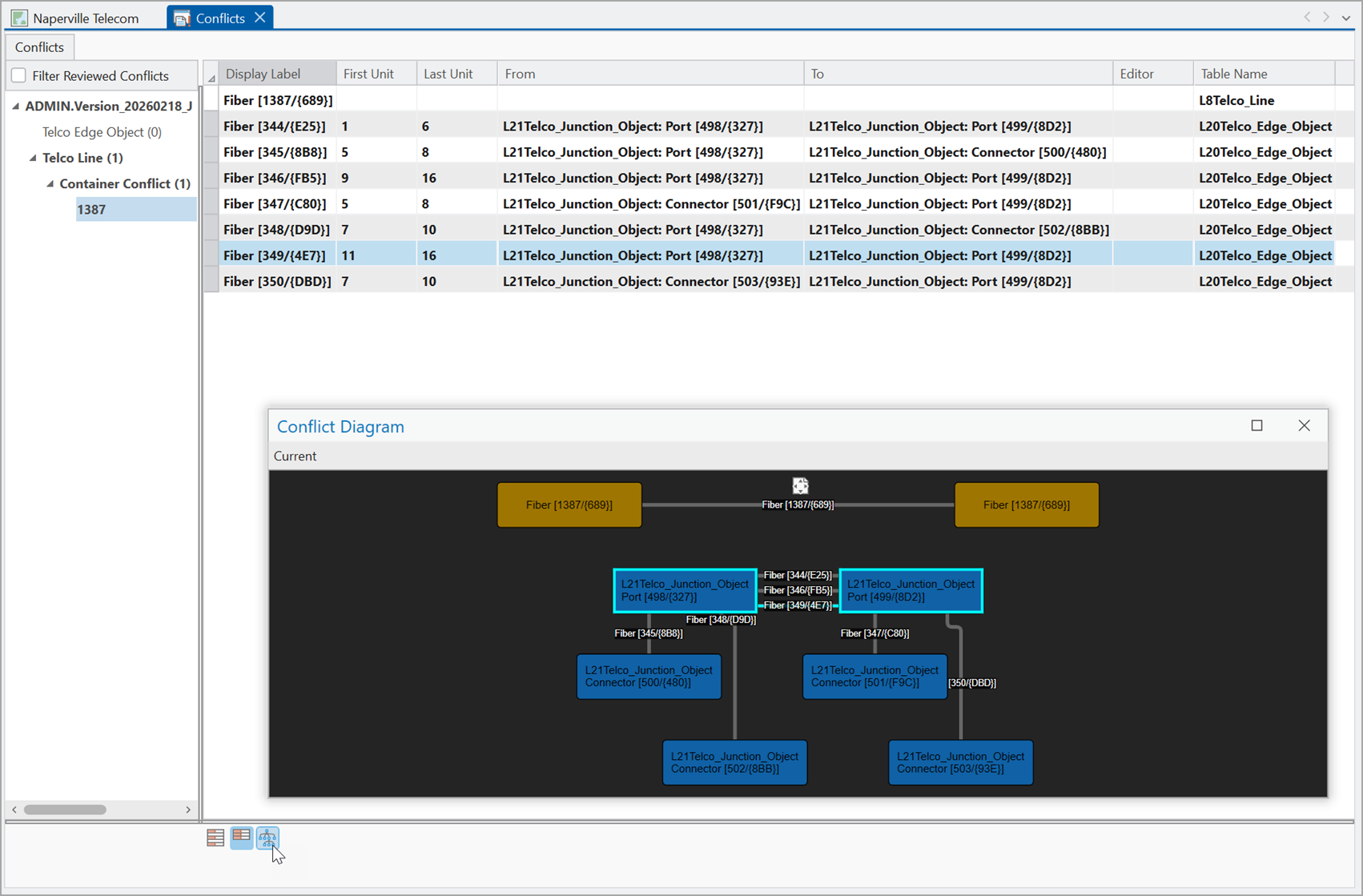
When you resolve conflicts, you are deciding which representation of the row you want to keep. To resolve conflicts, from the Conflicts view, right-click a layer or feature associated with the Container Conflict in the Conflicts list and select the replacement option.
- Replace With Current Version
Note:
Conflicts are automatically resolved in favor of the (current) edit version. The Replace With Target Version and Replace With Common Ancestor will be supported in a future release.