Symmetrical Difference (Analysis Tools)
Summary
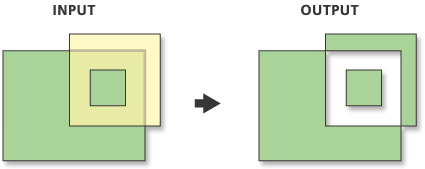
Computes a geometric intersection of the input and update features, returning the input features and update features that do not overlap. Features or portions of features in the input and update features that do not overlap will be written to the output feature class.
Illustration
Usage
The input and update feature class or feature layer must be of the same geometry type.
Attribute values from the input feature classes will be copied to the output feature class. However, if the input is a layer or layers created by the Make Feature Layer tool and a field's Use Ratio Policy is checked, then a ratio of the input attribute value is calculated for the output attribute value. When Use Ratio Policy is enabled, whenever a feature in an overlay operation is split, the attributes of the resulting features are a ratio of the attribute value of the input feature. The output value is based on the ratio in which the input feature geometry was divided. For example, if the input geometry was divided equally, each new feature's attribute value is assigned one-half of the value of the input feature's attribute value. Use Ratio Policy only applies to numeric field types.
Caution:
Geoprocessing tools do not honor geodatabase feature class or table field split policies.
For better performance and scalability, this tool uses a tiling process to handle very large datasets. For details, see Tiled processing of large datasets.
This tool may generate multipart features in the output even if all inputs are single part. If you don't want multipart features, use the Multipart To Singlepart tool on the output feature class.
Parameters
| Label | Explanation | Data type |
|---|---|---|
|
Input Features |
The input feature class or layer. |
Feature Layer |
|
Update Features |
The update feature class or layer. The geometry type must be the same as that of the input feature class or layer. |
Feature Layer |
|
Output Feature Class |
The feature class to which the results will be written. |
Feature Class |
|
Attributes to Join (Optional) |
Specifies the attributes that will be transferred to the output feature class. The
|
String |
|
XY Tolerance (Optional) |
The minimum distance separating all feature coordinates (nodes and vertices) as well as the distance a coordinate can move in x or y (or both). Caution:Changing this parameter's value may cause failure or unexpected results. It is recommended that you do not modify this parameter. It has been removed from view on the tool dialog box. By default, the input feature class's spatial reference x,y tolerance property is used. |
Linear Unit |
Environments
Auto Commit, Maintain fully qualified field names, Default Output Z Value, M Resolution, M Tolerance, Output CONFIG Keyword, Output M Domain, Output XY Domain, Output Z Domain, Output Coordinate System, Geographic Transformations, Extent, Output has M values, Output has Z values, Parallel Processing Factor, XY Resolution, XY Tolerance, Z Resolution, Z Tolerance, Transfer Geodatabase Field Properties
Special cases
- Parallel Processing Factor
-
This tool honors the Parallel Processing Factor environment. If the environment is not set (the default) or is set to 0, parallel processing will be disabled; parallel processing will not be used and processing will be done sequentially. Setting the environment to 100 will enable parallel processing; parallel processing will be used and processing will be done in parallel. Up to 10 cores will be used when parallel processing is enabled.
Licensing information
- Basic: No
- Standard: No
- Advanced: Yes