Create Space Time Cube From Multidimensional Raster Layer (Space Time Pattern Mining Tools)
Summary
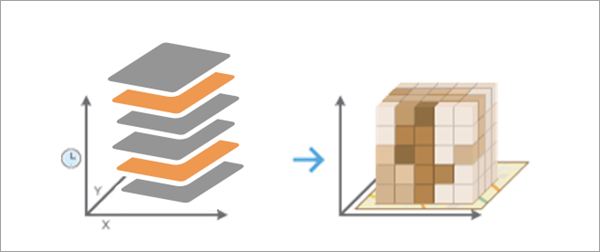
Creates a space-time cube from a multidimensional raster layer and structures the data into space-time bins for efficient space-time analysis and visualization.
Learn more about adding and visualizing multidimensional raster layers in maps in ArcGIS Pro
Illustration
Usage
The Output Space Time Cube parameter value can be analyzed for patterns in space and time using tools in the Space Time Pattern Mining toolbox, including Emerging Hot Spot Analysis, Local Outlier Analysis, and Time Series Clustering.
The Output Space Time Cube value will be created using the spatial and temporal resolution of the Input Multidimensional Raster Layer parameter value. Each space-time bin in the output cube will refer to a single raster cell for a single time interval from the input. Bins sharing the same location will have the same
Location IDattribute, and bins sharing the same time interval will have the sameTime Step IDattribute.This tool is similar to the Create Space Time Cube From Defined Locations and Create Space Time Cube By Aggregating Points tools, except no spatial or temporal aggregation is used in this tool for the conversion. The locations of the space-time cube are the same as the individual raster cells, and the time intervals of the cube are the same as the time intervals of the raster.
Each location will be analyzed for trends in time using the Mann-Kendall statistic. This information, along with other properties of the space-time cube, is written as geoprocessing messages at the bottom of the Geoprocessing pane during tool processing. You can also access the messages using geoprocessing history by hovering over the progress bar and clicking the pop-out button
 or expanding the messages section in the Geoprocessing pane.
You can visualize the space-time cube using the Make Space Time Cube Layer tool and the other tools in the Space Time Cube Visualization toolset.
This tool requires that the Input Multidimensional Raster Layer value be projected to accurately measure distances. If it is in a geographic coordinate system with latitude and longitude coordinates and no Output Coordinate System environment setting is specified, the raster layer will be projected to the WGS 1984 World Equidistant Cylindrical projection (WKID 4087).
The Input Multidimensional Raster Layer value must have at least 10 time intervals to be used in this tool.
Space-time cubes can store a maximum of 2 billion bins. If the number of raster cells multiplied by the number of time intervals exceeds 2 billion, the tool will return an error.
Any raster cell that has NoData values for every time interval will be excluded from the output, and no space-time bin will be assigned.
If the multidimensional raster is stored in Cloud Raster Format (
*.crffile), you can browse to or specify the file path of the raster dataset for the Input Multidimensional Raster Layer parameter without creating a multidimensional raster layer. If the raster is multivariate, all variables will be used by the tool.When filling empty bins with spatial neighbors, the tool estimates based on the closest 8 nearest neighbors. A minimum of 4 of those spatial neighbors must have values to fill the empty bin using this option.
When filling empty bins with space-time neighbors, the tool estimates based on the closest 8 nearest neighbors. Additionally, temporal neighbors are used for each of those bins found to be spatial neighbors by going backward and forward one time step. A minimum of 13 space time neighbors are required to fill the empty bin using this option.
When filling empty bins with temporal trend, the first two time periods and last two time periods at a given location must have values in their bins to interpolate values at other time periods for that location.
The temporal trend fill type uses the Interpolated Univariate Spline method in the SciPy Interpolation package.
If the StdTime values of the input multidimensional raster layer contain milliseconds, the time stamp of each space-time bin will include seconds only, and the milliseconds will be ignored.
Parameters
| Label | Explanation | Data type |
|---|---|---|
|
Input Multidimensional Raster Layer |
The input multidimensional raster layer that will be converted to a space-time cube. |
Raster Layer |
|
Output Space Time Cube |
The output netCDF data cube that will be created. |
File |
|
Fill Empty Bins Method |
Specifies how missing values in the output space-time cube will be filled. Each space-time bin in the output must have a value, so you must specify how to fill in values for raster cells with NoData values.
|
String |
Environments
Extent, Output Coordinate System, Parallel Processing Factor
Licensing information
- Basic: Yes
- Standard: Yes
- Advanced: Yes
Related topics
- An overview of the Space Time Cube Creation toolset
- How Create Space Time Cube works
- Emerging Hot Spot Analysis
- Local Outlier Analysis
- Time Series Clustering
- Visualize the space-time cube
- What is a z-score? What is a p-value?
- An overview of the Space Time Pattern Mining toolbox
- Find a geoprocessing tool