ArcGIS Pro 3.7 API Reference Guide
ArcGIS.Core.CIM Namespace / CIMGeometricEffect Class
Members Example

In This Topic
    CIMGeometricEffect Class
    In This Topic
    Represents a geometric effect, this is base class for all geometric effects.
    Syntax
    Example
    Dash line with two markers - Method I
    /// <summary>
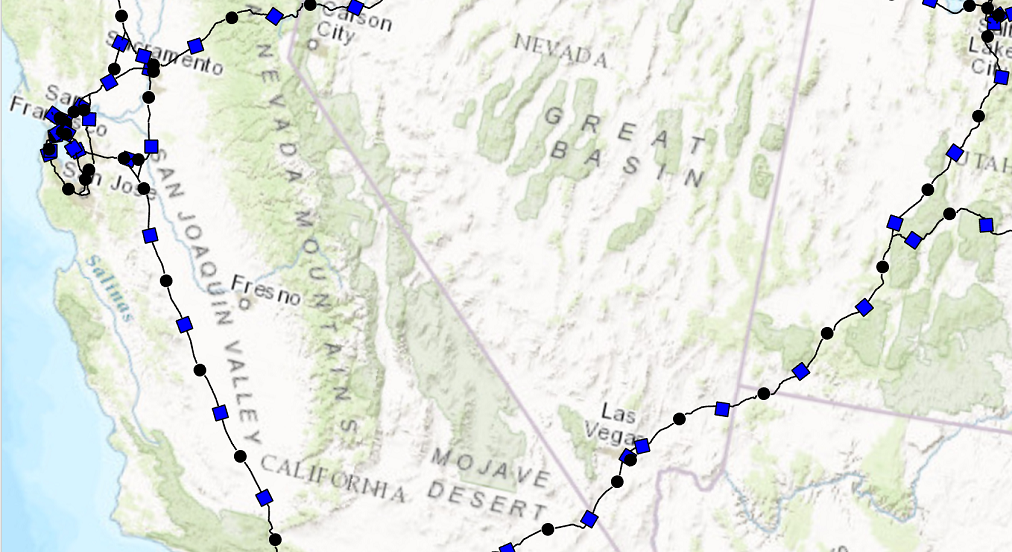
    /// Create a line symbol with a dash and two markers.<br/>          
    /// This line symbol comprises three symbol layers listed below: 
    /// 1. A solid stroke that has dashes.
    /// 1. A circle marker.
    /// 1. A square marker.
    /// ![LineSymbolTwoMarkers](https://ArcGIS.github.io/arcgis-pro-sdk/images/Symbology/line-dash-two-markers.png)
    /// </summary>
    {
      //Create a line symbol with a dash and two markers.
      //Note: Run withing QueuedTask
      CIMLineSymbol dash2MarkersLine = new CIMLineSymbol();
      var mySymbolLyrs = new CIMSymbolLayer[]
            {
                  new CIMSolidStroke()
                  {
                      Color = ColorFactory.Instance.BlackRGB,
                      Enable = true,
                      ColorLocked = true,
                      CapStyle = LineCapStyle.Round,
                      JoinStyle = LineJoinStyle.Round,
                      LineStyle3D = Simple3DLineStyle.Strip,
                      MiterLimit = 10,
                      Width = 1,
                      CloseCaps3D = false,
                      Effects = new CIMGeometricEffect[]
                      {
                          new CIMGeometricEffectDashes()
                          {
                              CustomEndingOffset = 0,
                              DashTemplate = new double[] {20, 10, 20, 10},
                              LineDashEnding = LineDashEnding.HalfPattern,
                              OffsetAlongLine = 0,
                              ControlPointEnding = LineDashEnding.NoConstraint
                          },
                          new CIMGeometricEffectOffset()
                          {
                              Method = GeometricEffectOffsetMethod.Bevelled,
                              Offset = 0,
                              Option = GeometricEffectOffsetOption.Fast
                          }
                      },
                  },
                  CreateCircleMarkerPerSpecs(),
                  CreateSquareMarkerPerSpecs()
        };
      dash2MarkersLine.SymbolLayers = mySymbolLyrs;
    
      static CIMMarker CreateCircleMarkerPerSpecs()
      {
        var circleMarker = SymbolFactory.Instance.ConstructMarker(ColorFactory.Instance.BlackRGB, 5, SimpleMarkerStyle.Circle) as CIMVectorMarker;
        //Modifying the marker to align with line
        //First define "markerplacement"
        CIMMarkerPlacementAlongLineSameSize markerPlacement = new CIMMarkerPlacementAlongLineSameSize()
        {
          AngleToLine = true,
          Offset = 0,
          Endings = PlacementEndings.Custom,
          OffsetAlongLine = 15,
          PlacementTemplate = new double[] { 60 }
        };
        //assign the markerplacement to the marker
        circleMarker.MarkerPlacement = markerPlacement;
        return circleMarker;
      }
      static CIMMarker CreateSquareMarkerPerSpecs()
      {
        var squareMarker = SymbolFactory.Instance.ConstructMarker(ColorFactory.Instance.BlueRGB, 5, SimpleMarkerStyle.Square) as CIMVectorMarker;
        CIMMarkerPlacementAlongLineSameSize markerPlacement2 = new CIMMarkerPlacementAlongLineSameSize()
        {
          AngleToLine = true,
          Endings = PlacementEndings.Custom,
          OffsetAlongLine = 45,
          PlacementTemplate = new double[] { 60 },
        };
        squareMarker.MarkerPlacement = markerPlacement2;
        return squareMarker;
      }
    }
    Dash line with two markers - Method II
    /// <summary>
    /// Create a line symbol with a dash and two markers. <br/>
    /// In this pattern of creating this symbol, a [CIMVectorMarker](https://pro.arcgis.com/en/pro-app/sdk/api-reference/#topic6176.html) object is created as a new [CIMSymbolLayer](https://pro.arcgis.com/en/pro-app/sdk/api-reference/#topic5503.html).
    /// The circle and square markers created by [ContructMarker](https://pro.arcgis.com/en/pro-app/sdk/api-reference/#topic12350.html) method is then assigned to the [MarkerGraphics](https://pro.arcgis.com/en/pro-app/sdk/api-reference/#topic6188.html) property of the CIMVectorMarker. 
    /// When using this method, the CIMVectorMarker's [Frame](https://pro.arcgis.com/en/pro-app/sdk/api-reference/#topic6187.html) property needs to be set to the [CIMMarker](https://pro.arcgis.com/en/pro-app/sdk/api-reference/#topic3264.html) object's Frame. 
    /// Similarly, the CIMVectorMarker's [Size](https://pro.arcgis.com/en/pro-app/sdk/api-reference/#topic3284.html) property needs to be set to the CIMMarker object's size.
    /// This line symbol comprises three symbol layers listed below: 
    /// 1. A solid stroke that has dashes.
    /// 1. A circle marker.
    /// 1. A square marker.
    /// ![LineSymbolTwoMarkers](https://ArcGIS.github.io/arcgis-pro-sdk/images/Symbology/line-dash-two-markers.png)
    /// </summary>
    {
      // Create a line symbol with a dash and two markers.
      //default line symbol that will get modified.
      //Note: Run withing QueuedTask
      CIMLineSymbol dash2MarkersLine = new CIMLineSymbol();
      //circle marker to be used in our line symbol as a layer
      var circleMarker = SymbolFactory.Instance.ConstructMarker(ColorFactory.Instance.BlackRGB, 5, SimpleMarkerStyle.Circle) as CIMVectorMarker;
      //circle marker to be used in our line symbol as a layer
      var squareMarker = SymbolFactory.Instance.ConstructMarker(ColorFactory.Instance.BlueRGB, 5, SimpleMarkerStyle.Square) as CIMVectorMarker;
      //Create the array of layers that make the new line symbol
      CIMSymbolLayer[] mySymbolLyrs =
          {
                  new CIMSolidStroke() //dash line
                  {
                      Color = ColorFactory.Instance.BlackRGB,
                      Enable = true,
                      ColorLocked = true,
                      CapStyle = LineCapStyle.Round,
                      JoinStyle = LineJoinStyle.Round,
                      LineStyle3D = Simple3DLineStyle.Strip,
                      MiterLimit = 10,
                      Width = 1,
                      CloseCaps3D = false,
                      Effects = new CIMGeometricEffect[]
                      {
                          new CIMGeometricEffectDashes()
                          {
                              CustomEndingOffset = 0,
                              DashTemplate = new double[] {20, 10, 20, 10},
                              LineDashEnding = LineDashEnding.HalfPattern,
                              OffsetAlongLine = 0,
                              ControlPointEnding = LineDashEnding.NoConstraint
                          },
                          new CIMGeometricEffectOffset()
                          {
                              Method = GeometricEffectOffsetMethod.Bevelled,
                              Offset = 0,
                              Option = GeometricEffectOffsetOption.Fast
                          }
                      }
                  },
                  new CIMVectorMarker() //circle marker
                  {
                      MarkerGraphics = circleMarker.MarkerGraphics,
                      Frame = circleMarker.Frame, //need to match the CIMVector marker's frame to the circleMarker's frame.
                      Size = circleMarker.Size,    //need to match the CIMVector marker's size to the circleMarker's size.                    
                     MarkerPlacement = new CIMMarkerPlacementAlongLineSameSize()
                     {
                         AngleToLine = true,
                         Offset = 0,
                         Endings = PlacementEndings.Custom,
                         OffsetAlongLine = 15,
                         PlacementTemplate = new double[] {60},
                     }
    
                  },
                  new CIMVectorMarker() //square marker
                  {
                     MarkerGraphics = squareMarker.MarkerGraphics,
                     Frame = squareMarker.Frame, //need to match the CIMVector marker's frame to the squareMarker frame.
                     Size = squareMarker.Size, //need to match the CIMVector marker's size to the squareMarker size.
                     MarkerPlacement = new CIMMarkerPlacementAlongLineSameSize()
                     {
                         AngleToLine = true,
                         Endings = PlacementEndings.Custom,
                         OffsetAlongLine = 45,
                         PlacementTemplate = new double[] {60},
                     }
                  }
        };
      dash2MarkersLine.SymbolLayers = mySymbolLyrs;
    }
    Inheritance Hierarchy

    System.Object
       ArcGIS.Core.CIM.CIMObject
          ArcGIS.Core.CIM.CIMGeometricEffect
             ArcGIS.Core.CIM.CIMGeometricEffectAddControlPoints
             ArcGIS.Core.CIM.CIMGeometricEffectArrow
             ArcGIS.Core.CIM.CIMGeometricEffectBuffer
             ArcGIS.Core.CIM.CIMGeometricEffectCircularSector
             ArcGIS.Core.CIM.CIMGeometricEffectControlMeasureLine
             ArcGIS.Core.CIM.CIMGeometricEffectCut
             ArcGIS.Core.CIM.CIMGeometricEffectDashes
             ArcGIS.Core.CIM.CIMGeometricEffectDonut
             ArcGIS.Core.CIM.CIMGeometricEffectEnclosingPolygon
             ArcGIS.Core.CIM.CIMGeometricEffectExtension
             ArcGIS.Core.CIM.CIMGeometricEffectJog
             ArcGIS.Core.CIM.CIMGeometricEffectLocalizerFeather
             ArcGIS.Core.CIM.CIMGeometricEffectMove
             ArcGIS.Core.CIM.CIMGeometricEffectOffset
             ArcGIS.Core.CIM.CIMGeometricEffectOffsetHatch
             ArcGIS.Core.CIM.CIMGeometricEffectOffsetTangent
             ArcGIS.Core.CIM.CIMGeometricEffectRadial
             ArcGIS.Core.CIM.CIMGeometricEffectRegularPolygon
             ArcGIS.Core.CIM.CIMGeometricEffectReverse
             ArcGIS.Core.CIM.CIMGeometricEffectRotate
             ArcGIS.Core.CIM.CIMGeometricEffectScale
             ArcGIS.Core.CIM.CIMGeometricEffectSuppress
             ArcGIS.Core.CIM.CIMGeometricEffectTaperedPolygon
             ArcGIS.Core.CIM.CIMGeometricEffectWave

    Requirements

    Target Platforms: Windows 11 Home, Pro, Enterprise (64 bit)

    ArcGIS Pro version: 3.0 or higher.
    See Also