Set Subnetwork Definition (Utility Network Tools)
Summary
Sets the domain network tier's properties for a subnetwork in a utility network.
The types of features that participate in a tier can be restricted by defining valid asset types from the device, line, junction, edge object, and junction object classes. Defining valid asset types helps enforce data correctness by limiting the types of features that can participate in a subnetwork for a specific tier.
Configuration parameters are used to set properties when a trace is run on the subnetwork.
Learn more about setting the subnetwork definition
Usage
This tool also allows you to set and alter the tier's subnetwork definition. To alter the values of the tier's subnetwork definition, modify the parameter values and run the tool again.
The network topology must be disabled.
The following requirements must be met when working with an enterprise geodatabase:
The connected ArcGIS Enterprise portal account must be the portal utility network owner.
The Input Utility Network parameter value must be from a database connection established as the database utility network owner.
This tool must be connected to the default version to run.
- All other sessions connected to the default version are blocked from running validate or enable operations during the enable operation.
When defining summaries as part of the Subnetwork Trace Configuration parameter category, the Function and Attribute values filter the list of available fields for the summary attribute. The following matrix of valid field types can be used to define the
Summary Attributefield based on the specified function and network attribute field type. For example, to create a summary to report the average from a network attribute type of long, you can create a field of type double on the SubnetLine feature class and specify it as theSummary Attributefield.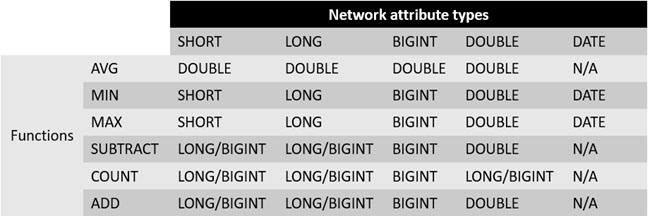
This is a matrix of valid field types for the summary attribute field based on the specified function.
Parameters
| Label | Explanation | Data type |
|---|---|---|
|
Input Utility Network |
The input utility network that contains the tier's subnetwork. |
Utility Network; Utility Network Layer |
|
Domain Network |
The domain network that contains the tier. |
String |
|
Tier Name |
The name of the tier that contains the subnetwork. |
String |
|
Support Disjoint Subnetwork |
Specifies whether the input tier will support disjoint subnetworks. Disjoint subnetworks are two or more subnetworks that belong to the same tier and have the same subnetwork name but are not traversable. This parameter is only available for tiers in domain networks with a partitioned tier definition. This parameter is set to
|
Boolean |
|
Valid Devices (Optional) |
The asset group/asset type pairs identified as valid devices for the subnetwork. |
String |
|
Valid Device Subnetwork Controllers (Optional) |
The asset group/asset type pairs identified as valid device subnetwork controllers in the subnetwork. |
String |
|
Valid Lines (Optional) |
The asset group/asset type pairs identified as valid lines for the subnetwork. |
String |
|
Aggregated Lines For SubnetLine Feature Class (Optional) |
The valid lines with geometry that will be aggregated to generate the SubnetLine features. This list is a subset of the values specified in the Valid Lines parameter. |
String |
|
Subnetwork Diagram Templates (Optional) |
The templates that will be used to generate subnetwork system diagrams for each subnetwork. |
String |
|
Summaries (Optional) |
Sets the
Value table columns:
|
Value Table |
|
Condition Barriers (Optional) |
Sets a traversability barrier condition on features based on a comparison to a network attribute or check for a category string. A condition barrier uses a network attribute or network category, an operator and a type, and an attribute value. For example, stop a trace when a feature has the Condition barrier components are as follows:
The condition barriers Operator value options are as follows:
The condition barriers Type value options are as follows:
Value table columns:
|
Value Table |
|
Function Barriers (Optional) |
Sets a traversability barrier on features based on a function. Function barriers can be used to do such things as restrict how far the trace travels from the starting point, or set a maximum value to stop a trace. For example, the length of each line traveled is added to the total distance traveled so far. When the total length traveled reaches the value specified, the trace stops. Function barrier components are as follows:
The function barrier Function value options are as follows:
For example, the starting point feature has a value of 20. The next feature has a value of 30. If you use the minimum function, the result is 20, maximum is 30, add is 50, average is 25, count is 2, and subtract is -10. The function barrier Operator value options are as follows:
Value table columns:
|
Value Table |
|
Include Barrier Features (Optional) |
Specifies whether the traversability barrier features will be included in the trace results. Traversability barriers are optional even if they have been preset in the subnetwork definition.
|
Boolean |
|
Apply Traversability To (Optional) |
Specifies the type of traversability that will be enforced. Traversability scope defines whether traversability will be enforced at junctions, edges, or both. For example, if a condition barrier is defined to stop the trace if Device Status is equal to Open and traversability scope is set to edges only, the trace will not stop—even if it encounters an open device—because Device Status is only applicable to junctions. In other words, this parameter indicates to the trace whether to ignore junctions, edges, or both.
|
String |
|
Propagators (Optional) |
Note:This parameter is only available in Python. Value table columns:
|
Value Table |
|
Update Structure Network Containers (Optional) |
Specifies whether the update subnetwork process will update the supported subnetwork name attribute for structure network containers. Note:This parameter requires a Utility Network Version value of 4 or later.
|
Boolean |
|
Update Domain Network Containers (Optional) |
Specifies whether the update subnetwork process will update the supported subnetwork name for domain network containers. Note:This parameter requires a Utility Network Version value of 4 or later.
|
Boolean |
|
Edit Mode For Default Version (Optional) |
Specifies the edit mode that will be used for subnetwork updates on the default version and with file and mobile geodatabases. Note:This parameter requires a Utility Network Version value of 4 or later.
|
String |
|
Edit Mode For Named Version (Optional) |
Specifies the edit mode that will be used for subnetwork updates on a named version. Note:This parameter requires a Utility Network Version value of 4 or later and is only applicable to enterprise geodatabases.
|
String |
|
Valid Junctions (Optional) |
The asset group/asset type pairs identified as valid junctions for the subnetwork. Note:This parameter requires a Utility Network Version value of 4 or later. |
String |
|
Valid Junction Objects (Optional) |
The asset group/asset type pairs identified as valid junction objects for the subnetwork. Note:This parameter requires a Utility Network Version value of 4 or later. |
String |
|
Valid Junction Object Subnetwork Controllers (Optional) |
The asset group/asset type pairs identified as valid junction object subnetwork controllers for the subnetwork. Note:This parameter requires a Utility Network Version value of 4 or later. |
String |
|
Valid Edge Objects (Optional) |
The asset group/asset type pairs identified as valid edge objects for the subnetwork. Note:This parameter requires a Utility Network Version value of 4 or later. |
String |
|
Manage IsDirty (Optional) |
Specifies whether the Note:This parameter requires a Utility Network Version value of 5 or later.
|
Boolean |
|
Include Containers (Optional) |
Specifies whether the container features and objects will be included in the trace results. This parameter requires a Utility Network Version value of 5 or later.
|
Boolean |
|
Include Content (Optional) |
Specifies whether the trace will include content of containers in the results. This parameter requires a Utility Network Version value of 5 or later.
|
Boolean |
|
Include Structures (Optional) |
Specifies whether structure features and objects will be included in the trace results. This parameter requires a Utility Network Version value of 5 or later.
|
Boolean |
|
Validate Locatability (Optional) |
Specifies whether an error will be returned during a trace or update subnetwork operation if nonspatial junction or edge objects are encountered without the necessary containment or attachment association in their association hierarchy. This parameter ensures that nonspatial objects returned by a trace or update subnetwork operation can be located through an association with features or other locatable objects. Note:This parameter requires a Utility Network Version value of 5 or later.
|
Boolean |
Derived output
| Label | Explanation | Data type |
|---|---|---|
|
Updated Utility Network |
The updated input utility network. |
Utility Network |
Environments
This tool does not use any geoprocessing environments.
Licensing information
- Basic: No
- Standard: Yes
- Advanced: Yes