Sensor support for synthetic aperture radar sensors
ArcGIS Pro supports synthetic aperture radar (SAR) sensors and raster datasets with the SAR Source Type. Supported sensor data is treated as a raster layer with radar properties and capabilities. The level of support depends on the sensor.
Display SAR data
When SAR data is loaded into ArcGIS Pro, the supported sensor data is rendered using the number of polarizations available. If the sensor data has a single polarization, the data is treated as a single-band raster layer. By default, it is displayed as a single-band raster using the Stretched symbology and Standard Deviation stretch type.
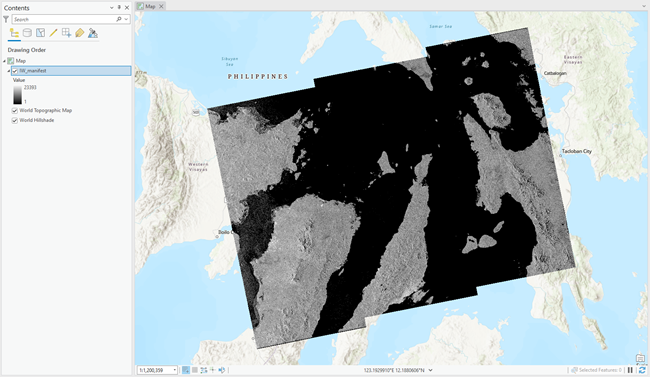
If the sensor data is dual polarized (either VV, VH or HH, HV), the data is treated as a two-band raster layer and is rendered using RGB symbology. By default, this is displayed as Red = band 1, Green = band 2, and Blue = band 2.
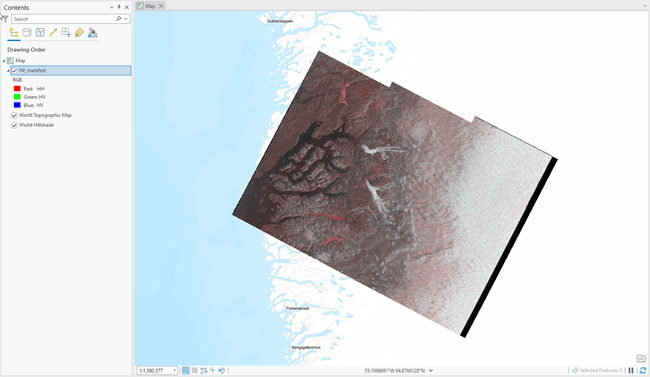
If the sensor data is quad polarized (includes VV, VH, HH, and HV), the data is treated as a four-band raster and is rendered using RGB symbology. By default, this is displayed as Red = band 1, Green = band 2, and Blue = band 3.
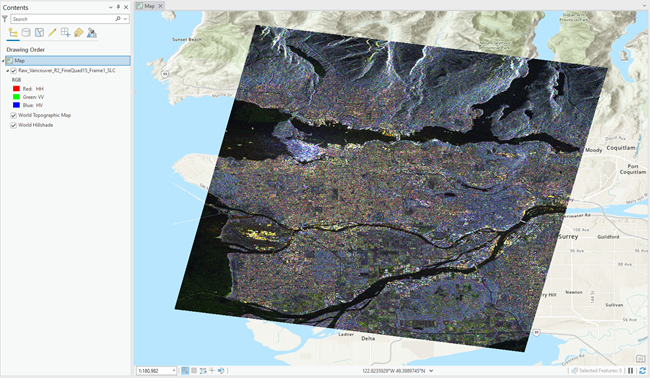
When only displaying a single polarization using the Stretched symbology, you can choose one of the following stretch types that is specifically for enhancing SAR visualization:
Square Root—A linear stretch is applied on the square root values of the pixels.
Logarithm—A linear stretch is applied on the 10log10 values of the pixels.
Note:
Once the dataset has been processed by a tool outside the Synthetic Aperture Radar toolset, it is no longer considered a radar layer since the radar metadata is no longer available.
SAR tool and function support
The tables below list the geoprocessing tools and raster functions that are available for the various SAR sensors. The ability to process the data using specific polarizations is only available through the geoprocessing tools. The first table shows the tools and functions for GRD data. The second table shows the tools and functions for complex data.
Note:
RADARSAT SGX data is similar in functionality to SGF, SCN, SCW, SCF, and SCS data.
SAR tools and functions for detected images
|
Geoprocessing tool |
Sentinel-1 GRD |
ICEYE GRD |
RCM GRD |
RADARSAT-2 SGX |
Capella GEC |
Capella GEO |
PAZ MGD |
NISAR GCOV Radar Backscatter |
|---|---|---|---|---|---|---|---|---|
|
|
|
|
|
|
|
|
||
|
|
||||||||
|
|
||||||||
|
|
|
|
|
|
|
|
|
|
|
|
|
|
|
|||||
|
|
|
|
|
|
|
|
||
|
|
|
|
|
|
|
|
||
|
|
|
|
|
|
|
|
||
|
|
|
|
|
|
|
|||
|
|
|
|
|
|
|
|
|
|
|
|
|
|
|
|
|
|||
|
|
|
|
|
|
||||
|
|
|
|
|
|
||||
|
|
|
|
|
|
|
|||
|
|
|
|
|
|
|
|||
|
|
|
|||||||
|
|
|
|
|
|
|
|||
|
Raster function |
Sentinel-1 GRD |
ICEYE GRD |
RCM GRD |
RADARSAT-2 SGX |
Capella GEC |
Capella GEO |
PAZ MGD |
NISAR GCOV Radar Backscatter |
|
|
||||||||
|
|
||||||||
|
|
|
|
||||||
|
|
|
|
|
|
|
|
||
|
|
|
|
|
|
|
|
||
|
|
||||||||
|
|
|
|
|
|
|
|
|
|
|
|
|
|
|
|
||||
|
|
|
|
|

SAR tools and functions for complex data
|
Geoprocessing tool |
Sentinel-1 SLC |
ICEYE SICD |
RCM SLC |
RADARSAT-2 SLC |
Capella SICD |
NISAR GCOV Cross Covariance |
|---|---|---|---|---|---|---|
|
|
|
|
|
|
||
|
|
||||||
|
|
||||||
|
|
|
|
|
|
|
|
|
|
|
|
||||
|
|
|
|
|
|
||
|
|
||||||
|
|
|
|
|
|
||
|
|
|
|
|
|
||
|
|
|
|
|
|
||
|
|
||||||
|
|
||||||
|
|
|
|
|
|
||
|
|
||||||
|
|
|
|
|
|
||
|
|
|
|
|
|
|
|
|
|
|
|
|
|
||
|
|
|
|
|
|||
|
|
|
|
||||
|
|
|
|
|
|
||
|
|
|
|
|
|
||
|
|
|
|||||
|
|
|
|
|
|
||
|
|
|
|
|
|
||
|
Raster function |
Sentinel-1 SLC |
ICEYE SICD |
RCM SLC |
RADARSAT-2 SLC |
Capella SICD |
NISAR GCOV Cross Covariance |
|
|
||||||
|
|
||||||
|
|
|
|||||
|
|
|
|
|
|
||
|
|
|
|
|
|
||
|
|
|
|
|
|
|
|
|
|
|
|
|
|
|
|
|
|
|
|
||||
|
|
|
|